 TutorialKart.com
Assign Sales organization, Distribution Channel, Plant in SAP SD
In this SAP SD tutorial, you will learn how to assign a sales organization, distribution channel and plant together in SAP. This assignment tells SAP which plant is allowed to work with a particular sales organization and distribution channel combination. In previous training we have learnt how to assign a sales group to a sales office in SAP.
The link between sales organization, distribution channel and plant is maintained in the Enterprise Structure assignment area of SAP Customizing. It is an important SD logistics assignment because the plant must be available to the relevant distribution chain before sales and delivery processing can use it correctly.
This activity is different from defining a sales area. A sales area is made from sales organization, distribution channel and division. The configuration in this tutorial connects a plant to the sales organization and distribution channel combination.
SAP SD objects required before sales organization distribution channel plant assignment
Before you assign sales organization, distribution channel and plant in SAP, check that the base enterprise structure objects already exist. If one of these objects is missing or not assigned in an earlier step, it may not appear in the assignment screen.
- The sales organization must be defined and assigned to the correct company code.
- The distribution channel must be defined and assigned to the sales organization.
- The plant must be defined and assigned to the company code.
- You should have a customizing request ready if your system requires transport recording.
SPRO and OVX6 path for assigning sales organization distribution channel plant
You can assign sales organization, distribution channel and plant by using the following SAP Customizing navigation method.
- Transaction code: – SPRO
- Menu path: – SPRO > SAP Customizing implementation Guide > Enterprise Structure > Assignment > Sales & Distribution > Assign sales organization – distribution channel – plant.
In many SAP GUI systems, the same configuration activity can also be opened with transaction OVX6 or OVX6N, depending on the release and authorization setup. If the direct transaction is not available, use the SPRO path. In SAP S/4HANA Cloud configuration, SAP lists the activity as Assign Sales Organization – Distribution Channel – Plant.
Field values used in sales organization distribution channel plant assignment
| Field on assignment screen | What to enter | Purpose in SAP SD |
|---|---|---|
| SOrg. | Sales organization key | Identifies the selling organizational unit. |
| DChl / Ref.dist.channel-Cust/Material | Distribution channel key shown in your system | Identifies how products or services are distributed for the sales organization. |
| Plnt | Plant key | Identifies the plant that can be used with the sales organization and distribution channel. |
The exact field label can vary slightly by SAP release and configuration screen. The business meaning is the same: maintain the sales organization, distribution channel and plant combination that should be allowed for SD processing.
Step-by-step SAP configuration to assign sales organization distribution channel plant
Step 1) Enter T-code SPRO in command field as shown below and enter.

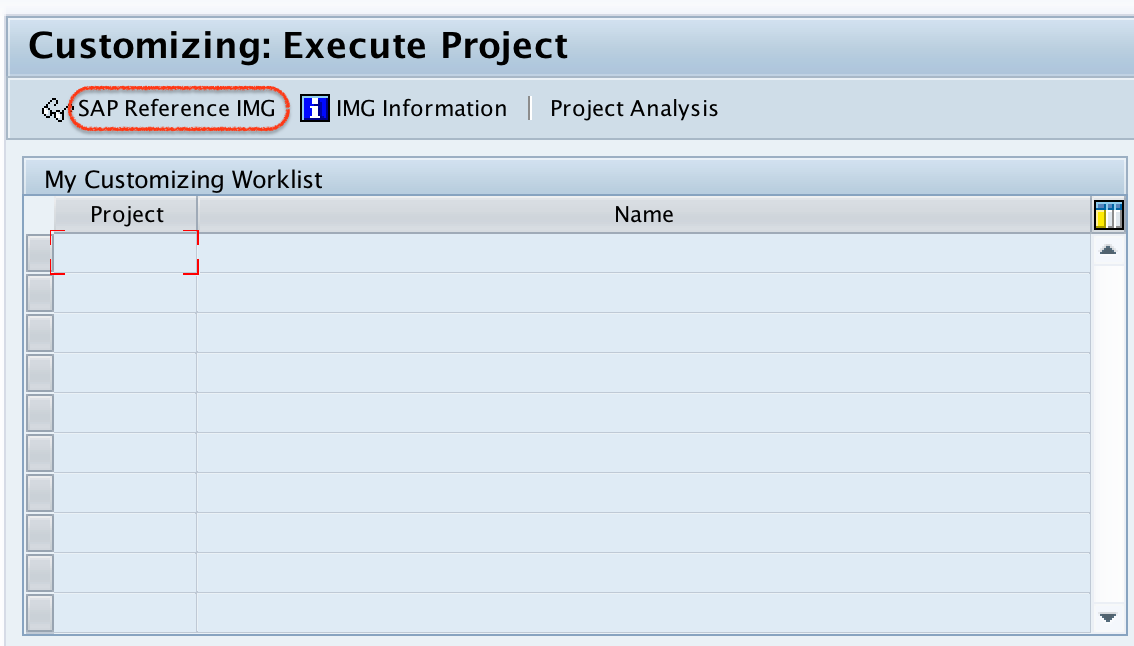
Step 2) In next screen execute project, click on SAP Reference IMG.
Step 3) On display IMG screen, navigate the menu path and choose assign sales organization – distribution channel – plant.
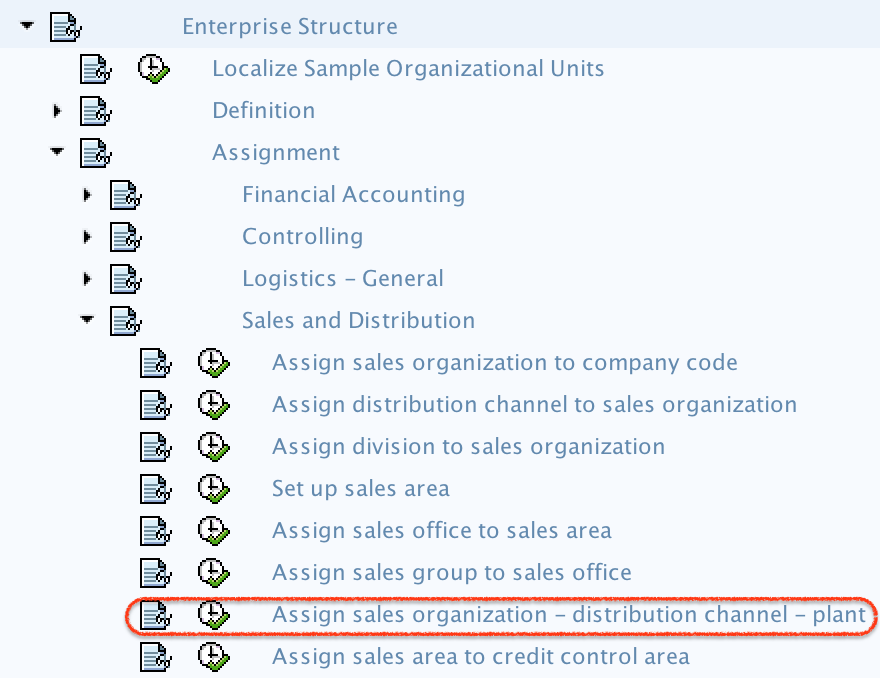
Step 4) On change view assignment sales organization/distribution channel – plant overview screen, click on new entries button for further assignment configuration screen.

Step 5) On new entries assignment screen, update the following details.
- SOrg: – Update the sales organization key for assignment.
- DChcust/Mt: – Update the distribution channel key for assignment
- Plnt: – Update the plant key for assignment.
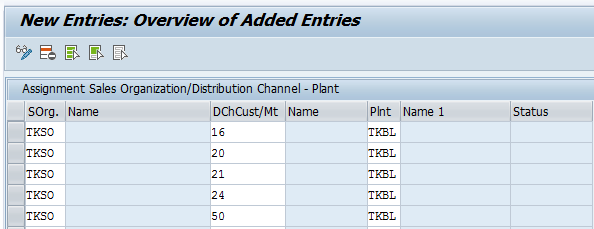
Step 6) After maintaining all the required details for assignment of sales organization – distribution channel – plant, click on save button.

Step 7) Now you are prompted for customizing request number, choose request and press enter to save the data.
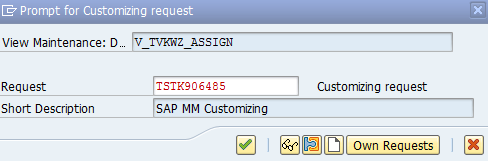
Successfully we have assigned sales organization, distribution channel and plant each other.
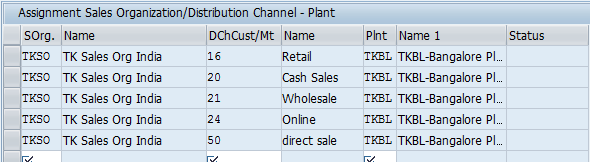
How to verify sales organization distribution channel plant assignment in SAP
After saving the entry, return to the overview screen and check that the combination appears with the correct sales organization, distribution channel and plant. For reporting or display checks, many SAP systems store this relationship in table TVKWZ, commonly described as allowed plants per sales organization. Do not maintain the table directly; use the customizing activity so that validations and transport recording are handled properly.
If the plant is still not available in a sales process after this assignment, check the surrounding configuration also. The issue may be in plant-company code assignment, distribution channel assignment to sales organization, material master sales views, customer master sales area data, shipping point determination, or authorization.
Can one plant be assigned to multiple sales organizations in SAP SD?
Yes, a plant can be assigned to more than one sales organization and distribution channel combination when the business design requires it. However, the plant still belongs to a company code in enterprise structure. If the sales organization and plant belong to different company codes, review the intercompany process and accounting impact before using the setup in sales documents.
SAP documentation for sales organization integration explains that a distribution chain can act for several plants and that plants can be assigned to different company codes. SAP also describes related organizational links between sales and other areas in S/4HANA Cloud organizational configuration.
Common mistakes in SAP sales organization distribution channel plant assignment
- Maintaining the plant for the wrong distribution channel and then testing with a different channel in sales documents.
- Assuming this step assigns the plant to company code. Plant-company code assignment is a separate enterprise structure activity.
- Creating the SD plant assignment before the distribution channel is assigned to the sales organization.
- Using the table display result as proof that the whole sales process is ready. The material, customer and shipping setup must also be checked.
- Saving the entry under the wrong customizing request or not including the configuration in the correct transport path.
SAP SD assignment QA checklist before moving transport
- Confirm the sales organization key is the one used in the target sales area.
- Confirm the distribution channel key matches the channel used in customer and material sales views.
- Confirm the plant is assigned to the intended company code and is valid for the logistics process.
- Confirm all required combinations are maintained, especially if one plant supports more than one sales organization or distribution channel.
- Test at least one sales document scenario using the configured sales organization, distribution channel and plant.
- Check that the customizing request contains the assignment entry before release.
FAQs on assigning sales organization distribution channel plant in SAP
What does assigning sales organization distribution channel plant do in SAP?
It defines which plant is allowed for a sales organization and distribution channel combination. This helps SAP SD use the correct plant relationship during sales and logistics processing.
What is the SAP table for sales organization distribution channel plant assignment?
For the plant assignment discussed in this tutorial, the commonly used table is TVKWZ. For only sales organization and distribution channel assignment, systems commonly use TVKOV, and for full sales area combinations with division, systems commonly use TVTA.
Can a plant be assigned to multiple sales organizations in SAP?
Yes. A plant can be assigned to multiple sales organization and distribution channel combinations if the business process requires it. Always check company code assignment and intercompany requirements before using this setup.
Is OX18 used for sales organization distribution channel plant assignment?
No. OX18 is used to assign a plant to a company code. The sales organization distribution channel plant assignment is maintained under Sales and Distribution enterprise structure assignment, commonly through SPRO and, in some systems, OVX6 or OVX6N.
Why is the distribution channel or plant not visible in this assignment screen?
Check whether the distribution channel and plant are already defined, whether the distribution channel is assigned to the sales organization, whether the plant is assigned to a company code, and whether your user has the required customizing authorization.
Official SAP references for sales organization plant assignment
For additional cross-checking, refer to SAP Help for Assigning Sales Organization Distribution Channel to Plant, SAP Help on Sales Organization integration, and SAP Learning material on defining and assigning plants.