 TutorialKart.com
Salesforce AppExchange is the official marketplace where Salesforce customers can find apps, components, industry solutions, consulting partners, and other extensions for their Salesforce org. It is hosted by Salesforce.com and is used by administrators, developers, consultants, and business teams to extend Salesforce without building every feature from the beginning.
What is Salesforce AppExchange?

Salesforce AppExchange is a marketplace for Salesforce apps where user’s can find, try out and install applications built using Force.com.
In practical terms, AppExchange works like a business app store for Salesforce. You can search for a requirement, compare listings, review screenshots and documentation, test a solution in a sandbox, and then install it into a Salesforce environment when it is suitable for your organization.
In AppExchange thousands of Salesforce apps are available which can be provided for free and some of theme are paid apps. The Apps present in Appexchange are termed as third party apps and Salesforce.com do not provide support for them. In addition, there are some sample apps provided by Salesforce Labs. Salesforce Labs does not support the apps it posts on the AppExchange, but offers many examples of Salesforce features that help administrators learn how to use those features.
Salesforce AppExchange users and common use cases
Salesforce AppExchange is useful for different roles in a Salesforce project. An administrator may install a dashboard package, a sales team may use a quoting or productivity app, a service team may add a telephony or case management extension, and a developer may install a Lightning component to speed up a custom build.
- Administrators use AppExchange to add reports, dashboards, automation templates, and managed packages.
- Developers use AppExchange to find components, integration tools, and sample packages that can support custom Salesforce development.
- Business users use AppExchange listings to identify ready-made tools for sales, service, marketing, finance, education, nonprofit, government, and other business needs.
- Partners and consultants publish solutions, implementation services, and industry accelerators for Salesforce customers.
How to access Salesforce AppExchange
Salesforce AppExchange can be used at https://appexchange.salesforce.com. In this marketplace, thousands of Applications grouped by category. It is easy to find the relevant app that can extend the features of our Salesforce organization.
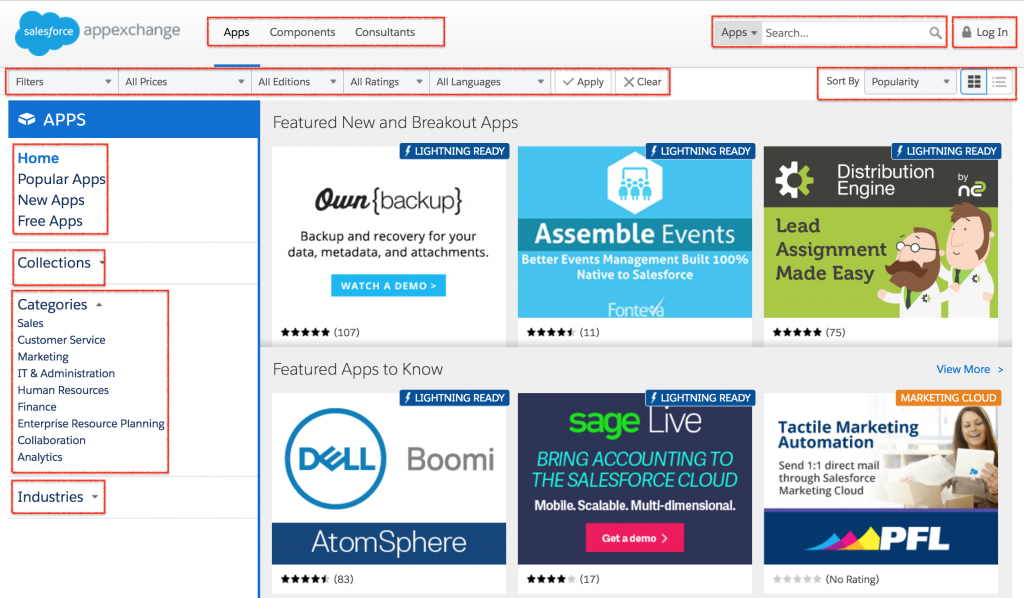
As shown above, we find many feature and option to search our favourite app in AppExchange. You will see many apps in Salesforce AppExchange, enter a keyword in the search textbox. By default, we use Search option for Apps but can also search for Components, Consultants, Developers and Jobs.
You can also browse the marketplace by product, industry, and business need. For example, AppExchange has sections for Salesforce products, industries, and business needs such as integration. This is useful when you do not know the exact app name but you know the problem you want to solve.
How to search for Salesforce apps in AppExchange
To find an app related to the “Dashboard” in AppExchange, type dashboard in the search textbox. You will get many dashboard apps built by Salesforce Labs, these Salesforce apps can be downloaded and installed for free, and from Salesforce partners.
While searching, read the listing carefully. A good review should include the app purpose, supported Salesforce editions, package type, pricing model, publisher details, documentation, screenshots, rating, latest update information, and installation instructions. Do not choose an app only because it appears first in search results.
Note : Before installing Apps in Salesforce instance, it is good practice to always try in a Sandbox before deploying an app on the production environment. For the app you installed from Salesforce AppExchange, you can choose to uninstall it without causing any problems for the rest of your Salesforce organization.
Salesforce Labs apps on AppExchange
Salesforce Labs listings are apps and sample solutions published by Salesforce employees or Salesforce teams. They are commonly used for learning, examples, and starting points. Always read the individual listing because support, documentation, and maintenance expectations can differ from one Salesforce Labs solution to another.
A few dashboard apps built by Salesforce Labs are as follows:
- Salesforce CRM Dashboard.
- Sales Activity Dashboard
- Chatter Usage Dashboards
- Salesforce1 Adoption Dashboard and Reports
As you know, a dashboard is supported by reports behind the scenes, so when you install any of these apps, it will include the reports needed as the data source. If the standard presentations of dashboards or data filters or groupings do not match your organization, you can easily modify and save them as new reports and dashboards.
Types of Salesforce AppExchange solutions
AppExchange is not limited to full applications. A listing can be a complete managed app, a smaller component, a data product, a flow-based solution, an industry template, or a consulting service. The exact listing type depends on what the publisher provides and how the solution is installed or used.
| AppExchange solution type | What it is used for |
|---|---|
| Apps | Ready-made Salesforce functionality, usually packaged for installation into an org. |
| Components | Reusable building blocks such as Lightning components that can be added to pages or apps. |
| Flow solutions | Automation templates or flow-based packages that support business processes. |
| Industry solutions | Solutions organized for industries such as nonprofit, government, financial services, education, healthcare, and manufacturing. |
| Consultants | Salesforce partners who provide implementation, integration, customization, and advisory services. |
For example, nonprofit teams can browse Salesforce AppExchange solutions for nonprofits, while public sector teams can browse solutions for government. This makes AppExchange useful not only for generic Salesforce apps, but also for industry-specific extensions.
Managed and unmanaged packages in Salesforce AppExchange
Many Salesforce AppExchange apps are installed as packages. The package type is important because it controls how much of the package can be viewed, customized, upgraded, or maintained by the publisher.
- Managed packages are controlled by the publisher. They are commonly used for commercial apps because the publisher can provide upgrades and keep protected parts of the implementation hidden.
- Unmanaged packages are usually used for samples, templates, or one-time transfers. Their components are visible and editable after installation, but they are not upgraded by the publisher in the same controlled way as managed packages.
Before installing a package, check whether it is managed or unmanaged, whether it can be uninstalled cleanly, and whether any custom objects, fields, permissions, or automation will affect your current Salesforce configuration.
How to install an app from Salesforce AppExchange safely
Installing an AppExchange app is a configuration change to your Salesforce org. Even if the app is free, treat the installation like a small implementation project.
- Open the Salesforce AppExchange listing and read the app overview, documentation, requirements, and publisher information.
- Check whether the app supports your Salesforce edition, required clouds, and required licenses.
- Review permissions, access requirements, package type, and data access details.
- Install the app in a sandbox first, especially if it creates objects, fields, flows, triggers, permission sets, or reports.
- Test the app with realistic records and user profiles.
- Document what was installed and prepare a rollback plan before production deployment.
- Install in production only after testing and approval from the Salesforce owner or admin team.
After installation, assign permissions only to the users who need the app. For reporting and dashboard packages, also verify folder access, report filters, dashboard running user settings, and field-level security.
How to publish an App in Salesforce AppExchange?
To publish an App in Salesforce AppExchange or to start building a listing, you must log in to partner community and follow the steps given below.
- If you want to list an app or component, you must connect your package organization to Salesforce AppExchange.
- Now create a provider profile.
- Review tips for creating a listing.
- Create a listing.
- Now submit the package for security review.
- After the app is approved , publish your app on Salesforce AppExchange.
A publisher should also prepare installation instructions, configuration steps, screenshots, documentation, support contact details, and a clear explanation of what data the solution accesses. For paid apps, pricing and contract details should be clear before customers install or purchase the solution.
Salesforce AppExchange review checklist before installation
- Does the listing solve a specific Salesforce requirement instead of adding unnecessary features?
- Is the app compatible with the Salesforce edition, products, and licenses used by your org?
- Is the package managed or unmanaged, and does that match your long-term maintenance plan?
- Has the app been tested in a sandbox with real user profiles and realistic data?
- Are permission sets, object access, field-level security, reports, dashboards, flows, and integrations documented?
- Is there a rollback or uninstall plan if the package does not work as expected?
- Does the publisher provide documentation, support information, and release notes?
Salesforce AppExchange general Questions.
- What is the purpose of the Salesforce AppExchange Marketplace? (Select all that apply):
- Administrators can download and customize pre-built reports and dashboards.
- Sales users can install add-ins to synchronize the Contacts and Calendar entries in their desktop email apps with Salesforce.
- Partners can share and link opportunities to collaborate on sales deals.
- Salesforce customers can share and install apps published by third-party developers and system integrators.
Answer : a) Administrators can download and customize pre-built reports and dashboards and d) Salesforce customers can share and install apps published by third-party developers and system integrators.
- What are the package types found in the Salesforce AppExchange Marketplace? (Select all that apply):
- Mass Delete.
- Managed.
- Sales.
- Unmanaged.
- Marketing.
Answer : b) Managed and d) Unmanaged. Managed Package Types are packages that may continue to be managed by the publishing developers and the package contents are not visible or editable. Unmanaged packages are not managed by the publishing developers and the package contents are visible and editable.
Salesforce AppExchange FAQs
What is Salesforce AppExchange?
Salesforce AppExchange is Salesforce’s marketplace for apps, components, industry solutions, consultants, and other extensions that can be used with Salesforce. It helps Salesforce customers find ready-made solutions instead of building every requirement manually.
How do I access Salesforce AppExchange?
You can access Salesforce AppExchange at appexchange.salesforce.com. You can search by keyword, browse by product, browse by industry, or explore solutions by business need.
Are Salesforce AppExchange apps free?
Some AppExchange apps are free, while others are paid or require a Salesforce partner contract. Always check the listing pricing, license requirements, trial information, and publisher terms before installing an app.
Should I install AppExchange apps directly in production?
No. The safer approach is to install and test the app in a Salesforce sandbox first. After testing permissions, data access, automation, reports, and user experience, you can plan the production installation.
What are the common Salesforce AppExchange solution types?
Common AppExchange solution types include apps, components, flow solutions, industry solutions, and consultants. Some listings are installed packages, while others are services or solution templates that help with implementation.