 TutorialKart.com
Salesforce Security – Field Level Security
Field Level Security in Salesforce, commonly called FLS, controls whether users can see or edit individual fields on an object. It is different from object permissions, record access, and Security settings. Object permissions decide whether a user can access an object, sharing rules decide which records the user can access, and field level security decides which fields on those records are visible or editable.
The fields that users see on detail and edit pages are a combination of page layouts , profiles, permission sets, and field level security settings. Even when a field is placed on a page layout, users cannot see it if field level security hides it for their assigned access. For administrators, this is one of the most important checks when a user says, “I can open the record, but I cannot see this field.”
Where Field Level Security Fits in Salesforce Data Security
Salesforce security is applied in layers. Field level security is the layer that protects individual fields such as salary, tax ID, discount percentage, internal approval notes, or registration numbers. It can make a field visible, read-only, editable, or hidden for different profiles and permission sets.
| Security layer | What it controls | Example |
|---|---|---|
| Object access | Whether users can open an object and create, read, edit, or delete its records | User can access the Invoice object |
| Record access | Which records of that object the user can access | User can see only invoices owned by the sales team |
| Field level security | Which fields are visible or editable on those records | User cannot see Invoice RegNo |
| Page layout | How fields are arranged on the record page and which fields are marked read-only or required in the layout | Invoice RegNo appears in the invoice details section |
Use field level security when the requirement is about protecting a field from certain users, not simply arranging the field on the screen. Page layouts help with user interface control, but they are not a replacement for FLS.
Salesforce Field Level Security Scenario for Invoice RegNo
Example :- Let us consider a scenario.
There are two users in my developer organization. User1 and User2.
| User1 | User2 |
| User1 – Prasanth | User2 – Adarsh |
| Profile – System Administrator | Profile – Custom – Sales Profile. |
| Object – Invoices | Object – Invoices |
| Page Layout – Invoice Layout | page Layout – Invoice Layout |
Requirement :- We have to create a new field(Invoice Reg#) in Invoice Object. And it should be available only for system administrators and not for other profiles.
In this requirement, both users can access the same Invoice object and the same Invoice page layout. The difference is field access. User1, the System Administrator, should see and edit Invoice RegNo. User2, who belongs to the Custom Sales Profile, should not see that field. This is a suitable use case for Salesforce field level security.
How to Implement Field Level Security in Salesforce for Invoice RegNo
When we create a new field and add it to the page layout, the page layout may be accessed by both profiles. That alone is not the solution. Here we use the concept of Field Level Security in Salesforce to decide which users can view or edit the Invoice RegNo field.
Create the Invoice RegNo Field on the Invoice Object
- Let us create a field name called Invoice RegNo in Invoice Object

- Ente field label and Click on Next button.
Set Field Level Security for System Administrator and Custom Sales Profile
Step3:- Establishing field level security.
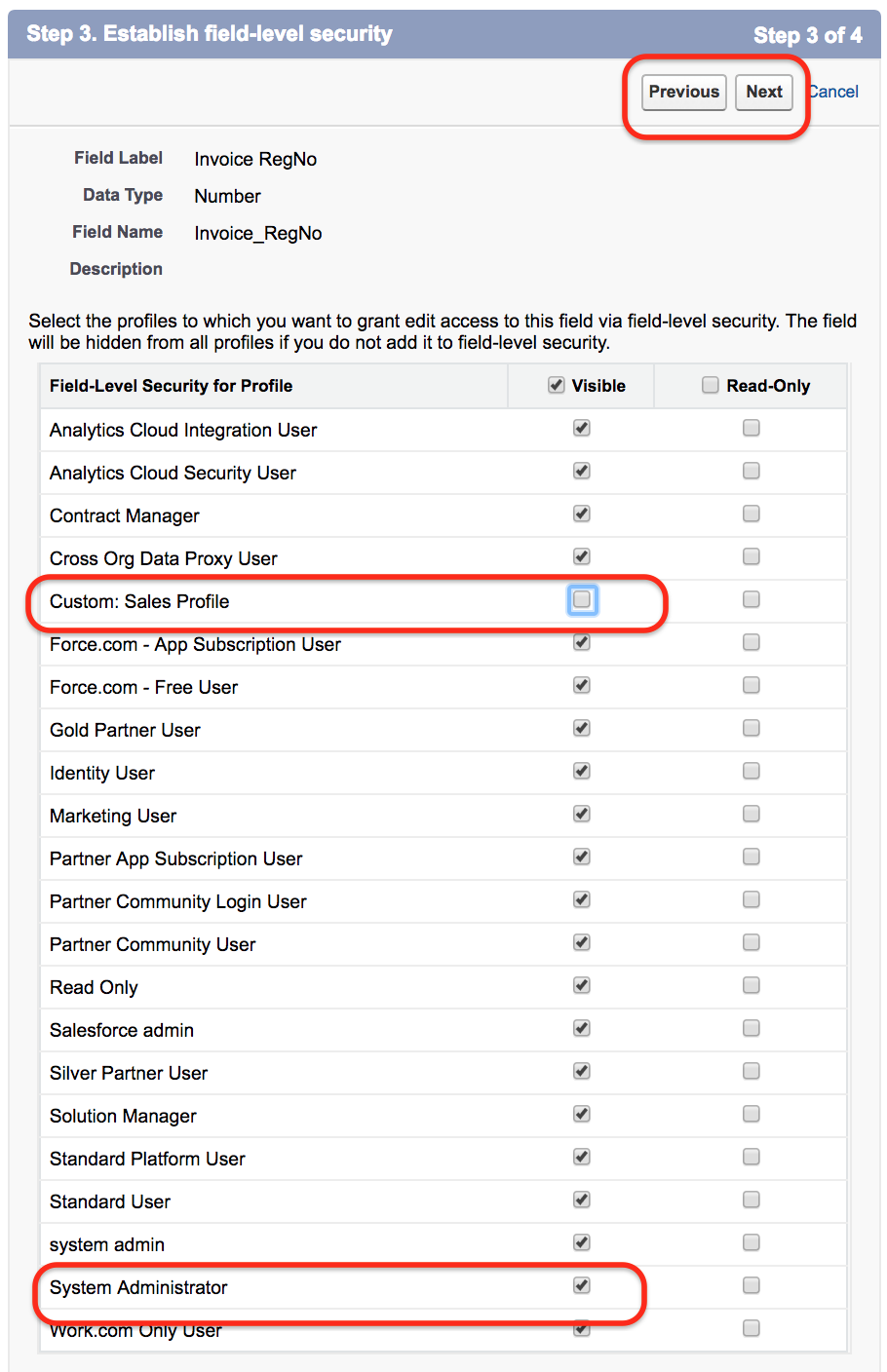
Now we are going to establish field level security in Salesforce. As we have a scenario that the field Invoice RegNo must be visible to system administrator only and not available to Custom Sales profile. Uncheck check box to custom salesforce profile and click on next button.
On this screen, the Visible checkbox controls whether the profile can see the field. If the field should be hidden from a profile, keep the Visible checkbox unchecked for that profile. If the field should be visible but not editable, keep it visible and use the read-only setting where applicable.
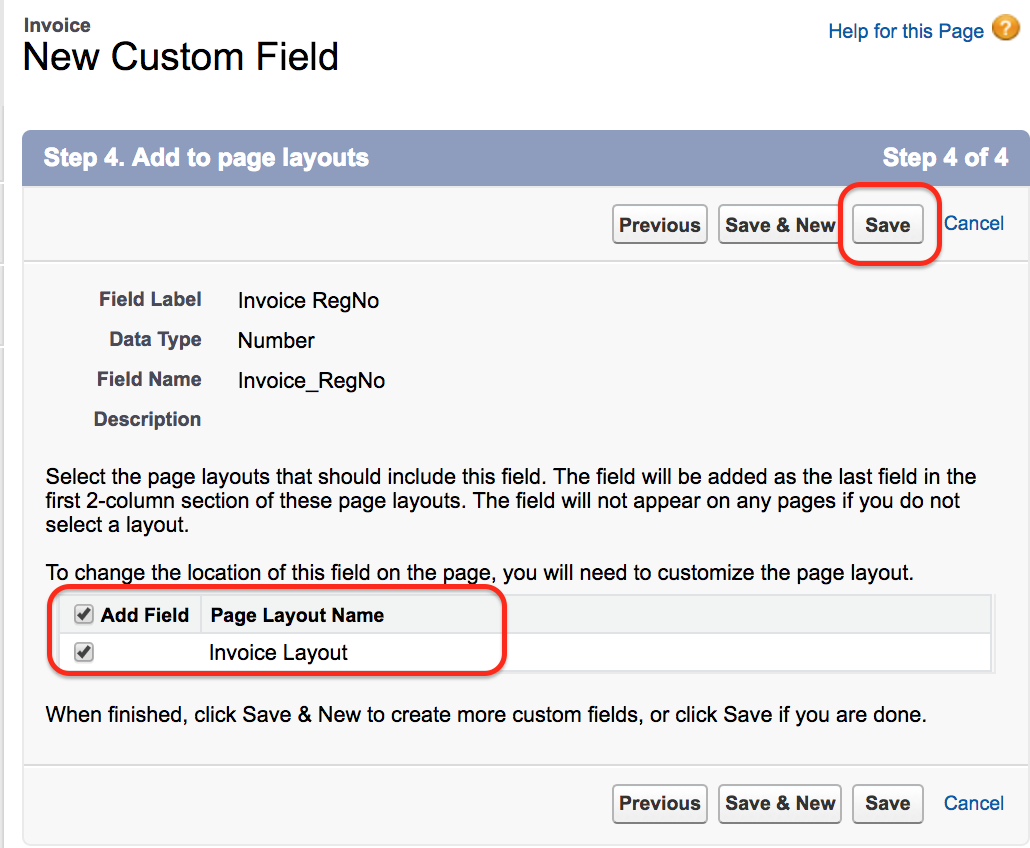
- Click on Save button.
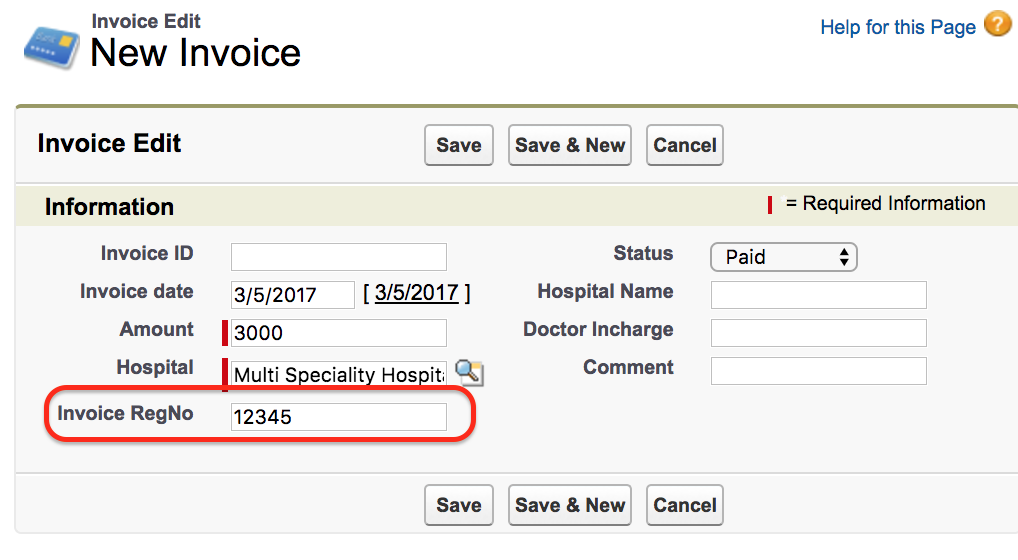
Now go to Invoice Object and create a record.
View Field Accessibility for Invoice RegNo in Salesforce
Field Configuration – View Field accessibility.
- To check the field configurations go to field.

Click on Invoice RegNo as shown above.
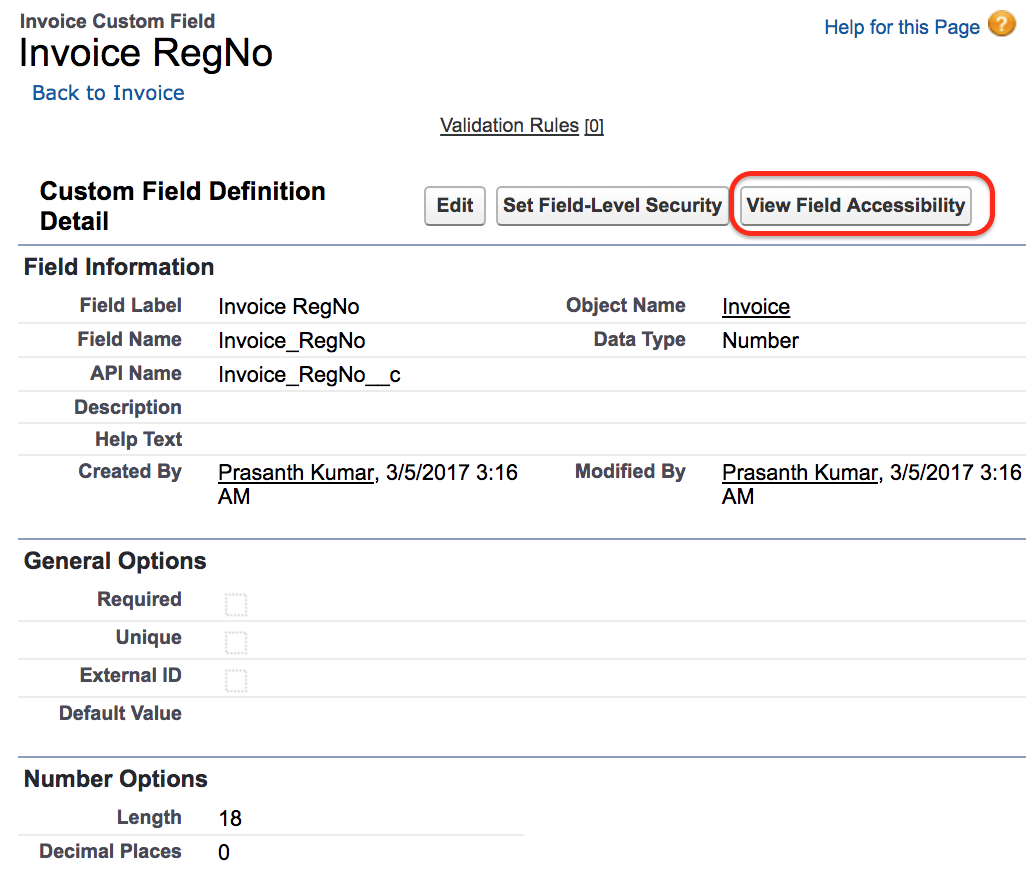
- Now click on View field accessibility button as shown above.
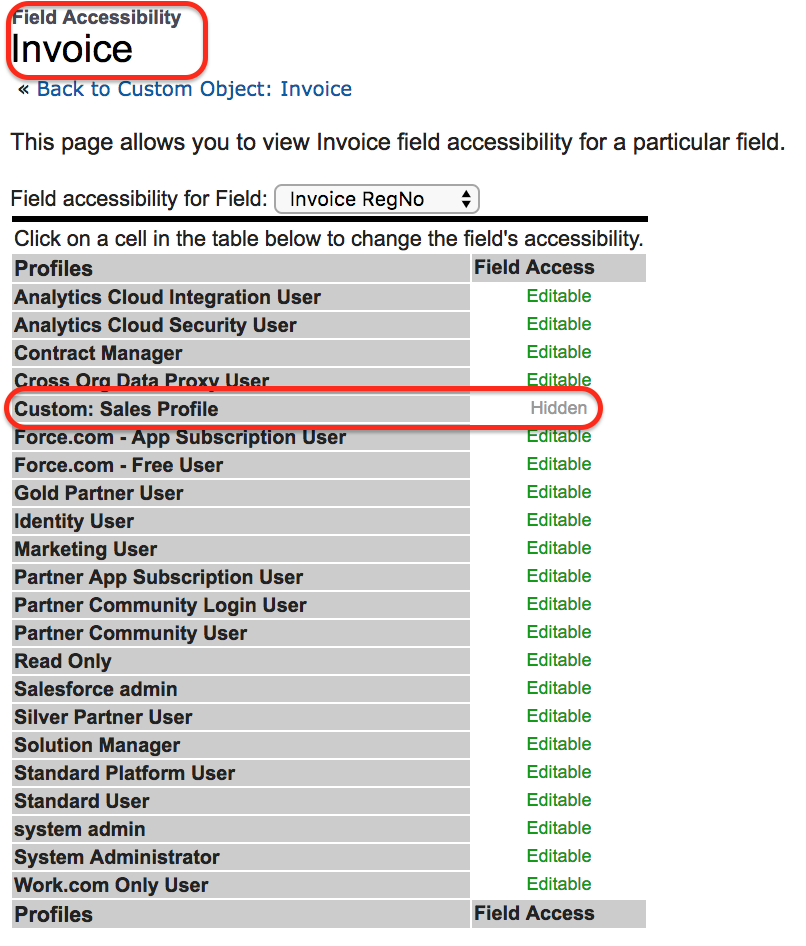
We can see the information for which this profile this field is editable and Hidden.
- Click on Hidden as shown above.
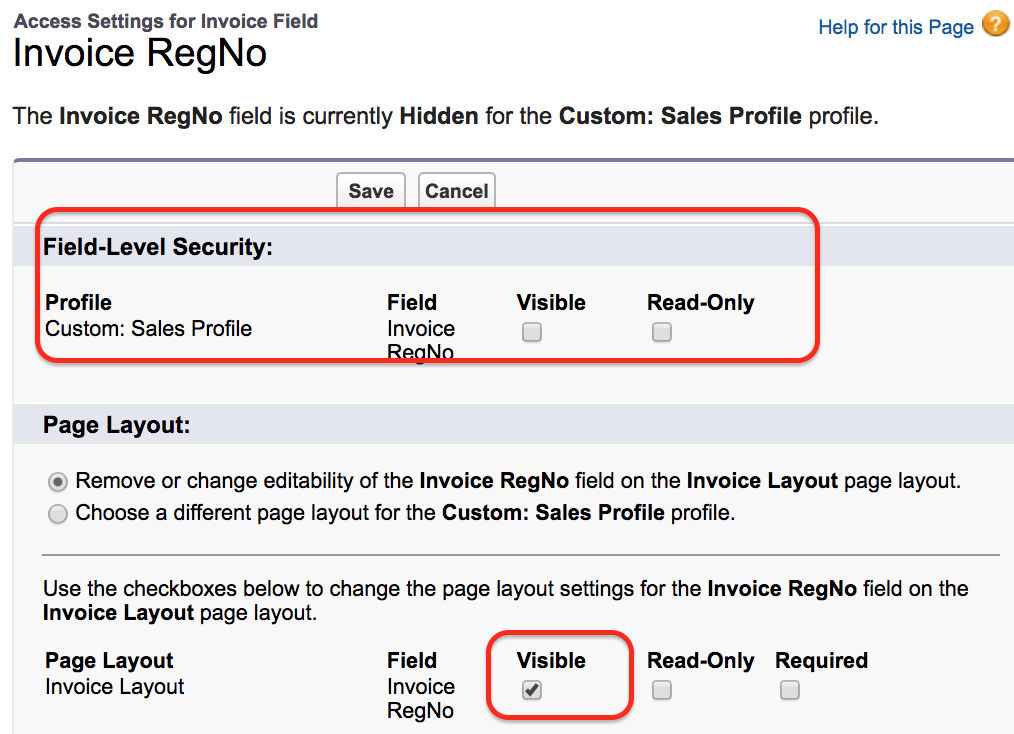
As the field is set to visible in page layout and not in Field level Security so the field is hidden for custom Sales Profile. This Invoice RegNo is available for system administrator profile. Now login as User2 and create a new record in Invoice Object. We cannot see RegNo field for User2 because Salesforce Field Level Security hides the field for that profile.
Field Level Security and Page Layout Behavior in Salesforce
Field level security and page layouts can both affect what appears on the screen, but they do not serve the same purpose. FLS is a security control. Page layout is mainly a presentation and data-entry control. A good Salesforce admin should check both before deciding why a field is visible, hidden, editable, or read-only.
| FLS setting | Page layout setting | What the user normally experiences |
|---|---|---|
| Hidden | Field placed on layout | Field is not visible to the user |
| Visible | Field not placed on layout | Field does not appear on that layout, though it may be accessible in other allowed contexts |
| Visible and editable | Field marked read-only on layout | Field appears read-only on that layout |
| Visible and read-only | Field editable on layout | Field remains read-only because field security is more restrictive |
If a field is hidden by FLS, adding it to the layout will not make it visible. If a field is visible through FLS but missing from the layout, users may not see it on that specific record page. This is why field visibility issues should be reviewed from both the field security screen and the page layout screen.
Profiles, Permission Sets, and Field Level Security in Salesforce
Field level security can be managed from profiles and permission sets. Profiles provide the base access for a user, while permission sets are commonly used to grant additional access without changing the user’s profile. For example, the Custom Sales Profile can keep Invoice RegNo hidden, while a permission set can be assigned only to selected sales managers who need read-only or edit access to that field.
For clean administration, avoid giving field access broadly unless the users actually need it. If only a small group needs access to a sensitive field, a permission set is often easier to review than creating many profile variations. This also makes audits easier because the special access is visible as an assigned permission set.
Common Salesforce Field Level Security Mistakes
- Adding a field to a page layout and assuming all users can now see it.
- Hiding a field from the page layout and assuming it is fully secured.
- Granting field access in multiple profiles without documenting why each profile needs it.
- Forgetting to test field visibility by logging in as a user or using an appropriate access review method.
- Making a sensitive field visible to integration or reporting users without checking the business requirement.
Interview Questions on Field Level Security in Salesforce
- What are the different options available in Field Level Security FLS?
In Field Level Security (FLS), the main access settings are Visible and Read Only. Visible controls whether the field can be seen. Read Only controls whether the field can be edited by users with that access.
- What are features that we can control using Page Layouts?
In page layouts, for any field we can control two common features: Read-Only and Required. Page layouts also control where the field appears on the page, but they should not be treated as the primary security mechanism for sensitive fields.
- Suppose if a field is set to visible in FLS and not visible in page layout settings then what will happen?
In this scenario, the field does not appear on that page layout. However, because FLS allows visibility, the field may still be available through other layouts, related features, reports, APIs, or tools depending on the user’s other permissions and access paths.
- Suppose if a field is on the page layout but hidden in FLS then what will happen?
The field will not be visible to the user. Field level security is a stronger access control than simply placing the field on the layout.
FAQs on Salesforce Field Level Security
What is field level security in Salesforce?
Field level security in Salesforce controls whether a user can view or edit a specific field on an object. It is used when different users need different access to fields on the same object or record.
Does page layout override field level security in Salesforce?
No. If field level security hides a field, adding the field to the page layout will not make it visible. Page layout can affect how a visible field appears, but it does not override FLS.
Can field level security be assigned through permission sets?
Yes. Field access can be granted through permission sets. This is useful when only selected users need extra access without changing the access of every user on the same profile.
Why can a Salesforce user access a record but not see one field?
The user may have object and record access but may not have field access. Check the field level security settings for the user’s profile and permission sets, and also confirm whether the field is present on the assigned page layout.
Should sensitive Salesforce fields be hidden only from page layouts?
No. Sensitive fields should be protected with field level security. Removing a field from a page layout may hide it from that screen, but FLS is the proper control for restricting field visibility and edit access.
Editorial QA Checklist for Salesforce Field Level Security Tutorial
- The tutorial explains that field level security controls field visibility and editability, not object access.
- The Invoice RegNo example clearly shows why page layout alone is not enough.
- The System Administrator and Custom Sales Profile access difference is described consistently.
- The content explains the relationship between FLS, page layouts, profiles, and permission sets.
- The FAQ answers cover common admin issues such as hidden fields, read-only fields, and permission set access.
Conclusion on Salesforce Security Field Level Security
In this Salesforce tutorial we have learned about FLS field level security and how to make a field visible and Read Only using field level security in Salesforce. In our next Salesforce Tutorial we are going to learn about Permission Sets in Salesforce.