 TutorialKart.com
Profiles and Permission Sets in Salesforce
In this Salesforce admin Tutorial, we learn what a profile is, what a permission set is, how to assign permission sets to users, and the practical difference between Profiles and Permission Sets in Salesforce.
The simple rule is this: every Salesforce user must have one profile, but a user can have zero, one, or many permission sets. Profiles provide the baseline access for a user. Permission sets add extra access without changing the user’s profile.
What is a Profile in Salesforce?
A profile in Salesforce is the basic access container assigned to a user. It controls the minimum set of permissions and settings that the user receives, such as object permissions, field permissions, app access, tab settings, login hours, login IP ranges, and system permissions.
Each user has exactly one profile. Because of this, profiles are best used for common access that applies to a group of users with the same job type or baseline responsibility.
What is a Permission Set in Salesforce?
Permission Sets in Salesforce extend a user’s functional access without changing their profile. A permission set is a collection of settings and permissions that can be assigned to selected users whenever they need additional access.
For example, a sales user may have a standard sales profile, but only a few sales users may need access to a special app, report folder, custom object, or admin function. Instead of creating a separate profile for each variation, an administrator can create a permission set and assign it only to those users.
Difference between Profiles and Permission Sets in Salesforce
The main difference between profiles and permission sets in Salesforce is that a profile gives the required baseline permissions, while permission sets give additional permissions to selected users. A user can have only one profile, but the same user can have multiple permission sets or no permission set.
| Area | Profile | Permission Set |
|---|---|---|
| Assignment rule | One profile is required for every user. | A user can have zero, one, or many permission sets. |
| Main purpose | Defines baseline access for a user type. | Adds extra access for specific users. |
| Best use | Common permissions shared by a group of users. | Special permissions needed by only some users. |
| Access model | Acts as the starting point for permissions. | Expands access beyond the profile. |
| Maintenance | Too many profiles can become difficult to manage. | Helps avoid creating many small profile variations. |
Salesforce Profile and Permission Set Example
Example :–
There is a Profile system administrator and Two users user1 and user2 will have the same profile. We have a requirement that User1 must have access to marketing app.
If we have the same profile for both users, the Marketing App becomes accessible to both users. But in our requirement, only User1 must access the Marketing App. Creating a new profile and assigning it to User1 is not the best solution because it can lead to too many profiles in Salesforce.com. Here the concept of Permission Set comes into picture. We can create a new permission set and assign it only to User1.
This approach keeps the shared profile clean and uses the permission set only for the extra access. It also makes future maintenance easier because the administrator can remove the permission set when User1 no longer needs access to the Marketing App.
Does a Permission Set Override a Profile in Salesforce?
A permission set does not normally override a profile by taking access away. Permission sets are mainly additive. They grant extra permissions on top of the profile. For example, if a profile does not provide access to an object, a permission set can add access to that object for selected users.
For this reason, permission sets are usually used to open additional access. They should not be treated as a tool for reducing access already granted by the profile. When designing Salesforce security, keep the profile as the minimum access level and add permission sets only where extra access is required.
When to Use Profiles and When to Use Permission Sets
Use profiles for access that every user in a broad job group must have. Use permission sets for access that only selected users need. This makes Salesforce security easier to audit and reduces the number of profiles an administrator has to maintain.
- Use a profile to define the basic access for a user group such as sales users, service users, or standard platform users.
- Use a permission set to grant access to a specific app, object, field, report, custom permission, or system permission.
- Use permission sets when temporary or role-specific access is needed for only a few users.
- Avoid creating a new profile for every small permission difference.
- Review permission assignments regularly so users do not keep access they no longer need.
How to create Permission Sets in SFDC?
To create Permission Sets, login to Salesforce and navigate to Manage Users | Permission Sets.
- Now click on permission Sets.
- Click on New button to create new permission Set in Salesforce.
- Enter Label, API Name, Description and User license.
- Now click on Next button.
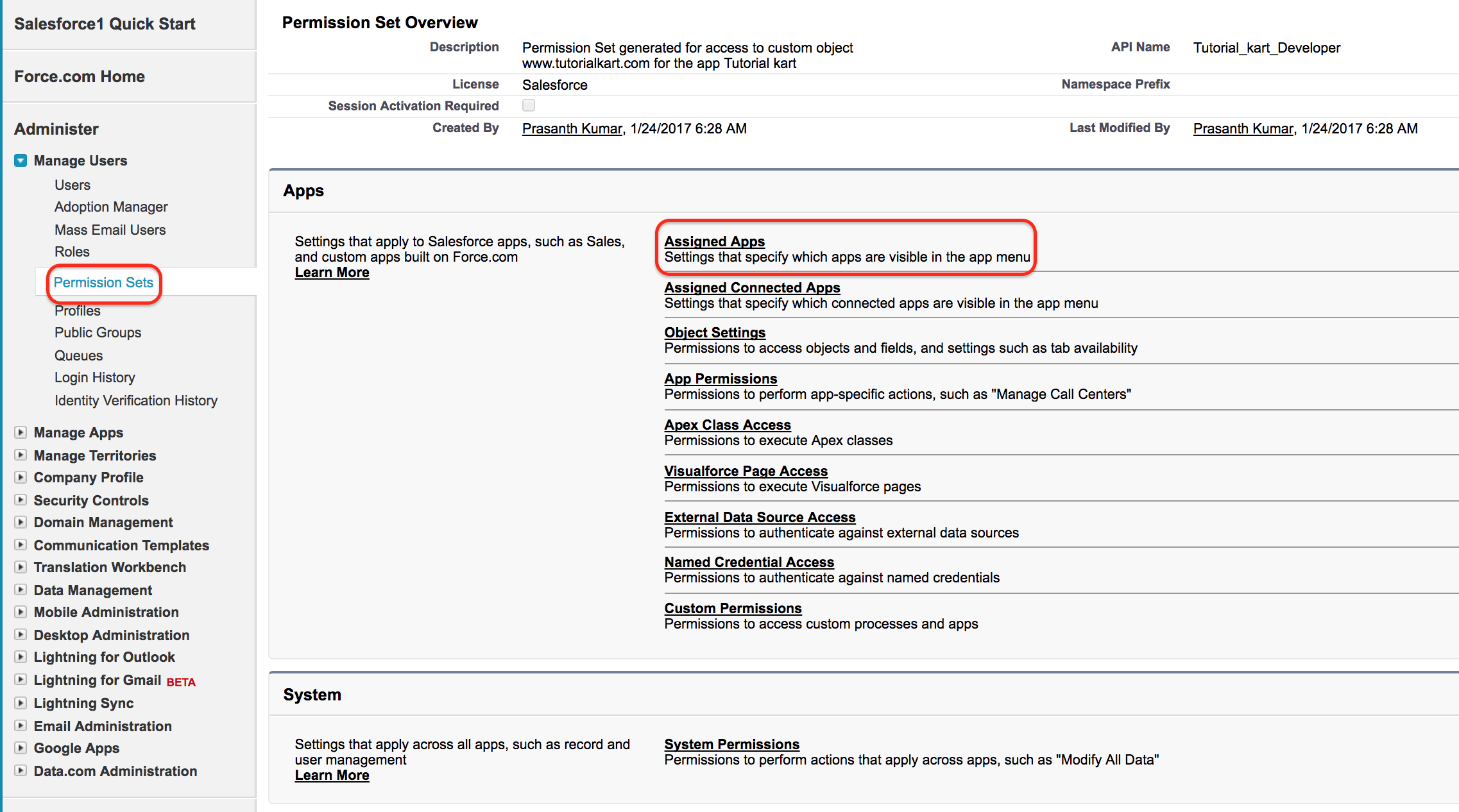
The Label is the display name visible to administrators. The API Name is used internally and in metadata. The User License value is important because it controls which users can receive the permission set. If you select a specific license, only users with a compatible license can be assigned that permission set.
- Now go to Apps section and click on Assigned Apps as shown above.
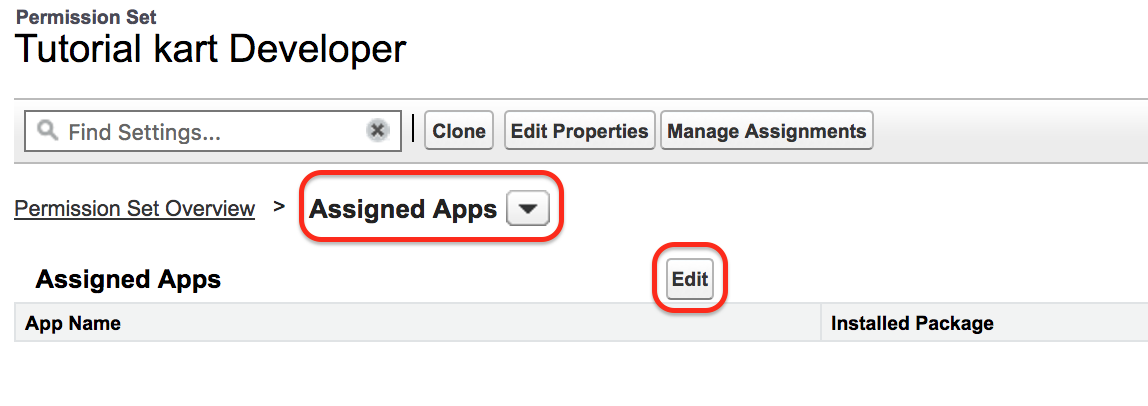
- Select Assigned Apps and click on Edit button.
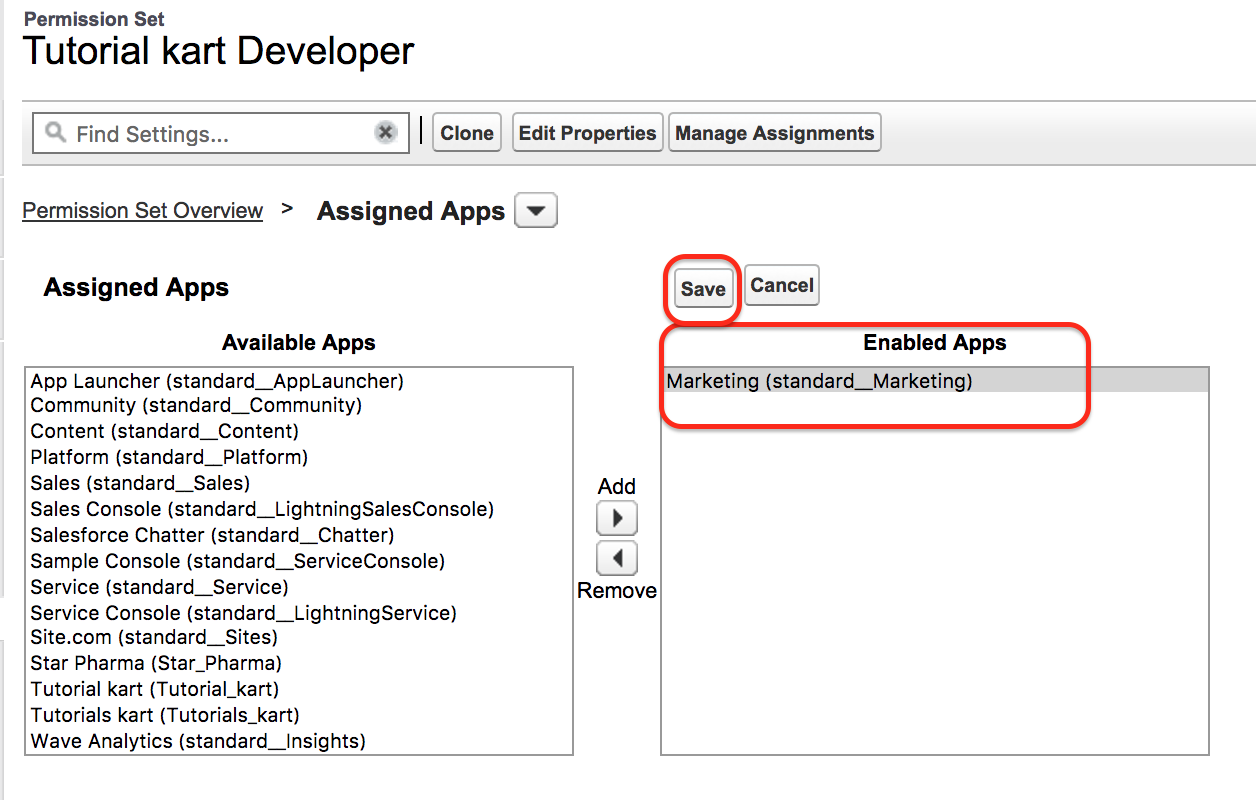
Select Marketing App from available Apps to Enabled Apps as shown above. Finally click on Save button to save all settings.
Assigning permission Sets to a User.
To Assign Permission Sets to a user in Salesforce go to Permission Sets | Click on permission set label | Manage Assignments.

- Click Manage Assignments.
- Click Add Assignments.
- Select the user who needs this permission set.
- Click Assign to complete the assignment.
- A successful message will be displayed.
After assignment, the user receives the additional permissions included in that permission set. If the user logs in and still cannot access the expected app or feature, verify that the permission set has the correct app, object, tab, field, and system permissions.
Common Permission Set Options in Salesforce
Permission sets can be used for many types of additional access. The exact options depend on the Salesforce edition, enabled features, installed packages, and user license.
- We can create Voice Feature to a permission Set.
- We can create Wave Analytics permission Sets.
- We can create SOQL permission set.
- Can create Session Based Permission Sets in Salesforce.
- We can provide app access, tab access, object permissions, field permissions, Apex class access, Visualforce page access, and custom permissions where required.
Permission Set Groups in Salesforce Access Management
Permission set groups help administrators combine multiple permission sets and assign them as one bundle. This is useful when a job function needs several permission sets together. Instead of assigning each permission set one by one, the administrator can assign the permission set group to the user.
For example, a marketing operations user may need access to a marketing app, campaign fields, report folders, and a few custom permissions. These can be placed in separate permission sets and grouped together in one permission set group for easier assignment and review.
Best Practices for Profiles and Permission Sets in Salesforce
- Keep profiles focused on the minimum access required for a user type.
- Use permission sets to grant extra access instead of creating many similar profiles.
- Name permission sets clearly so administrators can understand the purpose from the label.
- Add a meaningful description to each permission set so future admins know why it exists.
- Review assignments when a user changes role, team, or responsibility.
- Use permission set groups when multiple permission sets are commonly assigned together.
- Test access with a sample user before assigning permissions widely.
FAQ on Profiles and Permission Sets in Salesforce
What is the difference between a profile and a permission set?
A profile gives a Salesforce user the baseline access required to use the system. A permission set gives additional access to selected users without changing their profile.
Can a Salesforce user have more than one permission set?
Yes. A Salesforce user can have multiple permission sets. The user still has only one profile, but permission sets can be added to provide extra access.
Does a permission set override a profile in Salesforce?
A permission set generally adds permissions on top of the profile. It does not normally remove access already granted by the profile. Administrators should design profiles as the minimum access level and use permission sets for extra access.
When should I create a permission set instead of a new profile?
Create a permission set when only some users need additional access, such as access to a specific app, object, field, report, or custom permission. Create or update a profile only when the access is part of the common baseline for that user group.
What is a permission set group in Salesforce?
A permission set group is a collection of permission sets assigned together. It helps administrators manage access when users need several related permission sets for a job function.
Editorial QA Checklist for Profiles and Permission Sets
- Does the tutorial clearly explain that every user has one profile but can have multiple permission sets?
- Does the example show why a permission set is better than creating a new profile for one extra app?
- Does the article explain that permission sets are mainly additive and do not usually remove profile access?
- Are the permission set creation and assignment steps easy to follow for a Salesforce admin beginner?
- Does the content mention permission set groups for managing related permissions together?
Conclusion.
Permission Sets in salesforce is a part of Salesforce Security where user can access Settings and permissions. Profiles define the required baseline access, while permission sets add extra permissions for selected users. In our next Salesforce tutorial we are going to learn about Organization Wide Defaults(OWD) in Salesforce.