 TutorialKart.com
Lightning Component Attribute (aura:attribute) is used to declare a named value inside an Aura component or Aura application. It is similar to a member variable in Apex: the value is declared in markup, displayed with the v value provider, and read or updated from the JavaScript controller. The <aura:attribute> tag is used to add an attribute to the lightning component and Salesforce lightning App.
- Each attribute must have name and type.
- To make an attribute required, use
required="true". - To set an initial value, use
default="value". - To display an attribute in markup, use
{!v.attributeName}. - To read or update it in JavaScript, use
component.get("v.attributeName")andcomponent.set("v.attributeName", value).
aura:attribute syntax for Salesforce Lightning Aura components
The basic syntax of an Aura attribute is shown below. The attribute is declared inside <aura:component> or <aura:application>.
<aura:attribute name="attributeName"
                type="String"
                default="Default value"
                required="false"
description="Explain what this attribute stores" />| aura:attribute property | Purpose | Example |
|---|---|---|
name | Name used in markup and JavaScript. | name="num1" |
type | Data type stored by the attribute. | type="Integer" |
default | Initial value before the user or controller changes it. | default="100" |
required | Marks the attribute as required. | required="true" |
access | Controls where the attribute can be accessed. | access="public" |
Attribute naming rules for aura:attribute name
An attribute name must follow these naming rules.
- Must begin with a letter or an underscore.
- Must contain only alphanumeric or underscore characters.
- Should describe the value clearly, such as
recordId,isLoading,num1, orsum.
Common aura:attribute types in Lightning components
Choose the attribute type based on the value you want to store. Common Aura attribute types include String, Boolean, Integer, Long, Double, Decimal, Date, DateTime, Object, Map, and Aura.Component[]. Avoid using Object for every value when a more specific type is available.
What is lightning Component Attribute : Aura:attribute
In this Salesforce tutorial, we are going to learn about Lightning Component attributes and how can to use <aura:attribute> tag in Salesforce lightning app and lightning component.
In this Salesforce example, we are going to create an application and a component called “addition”. Here we will add two integers and will find the sum of two integers. And also we add styling to the Salesforce lightning component.
- Navigate to Developer console and create new Lightning component.
Here we have to define two tags they are <aura:component> and <aura:attribute>. This lightning Component Attribute will have name and type.
<aura:component >
    <h1> Addition of Two Numbers</h1>
    <aura:attribute name="num1" type="integer" default="100" />
    <aura:attribute name="num2" type="integer" default="20" />
    <aura:attribute name="sum" type="integer" />
    <br></br>
    <div class="addC" >
            {!v.num1} + {!v.num2} = {!v.sum}
    </div>
        <br></br>
    <p>
    	<ui:button label="submit" press="{!c.add}" />
    </p>

</aura:component>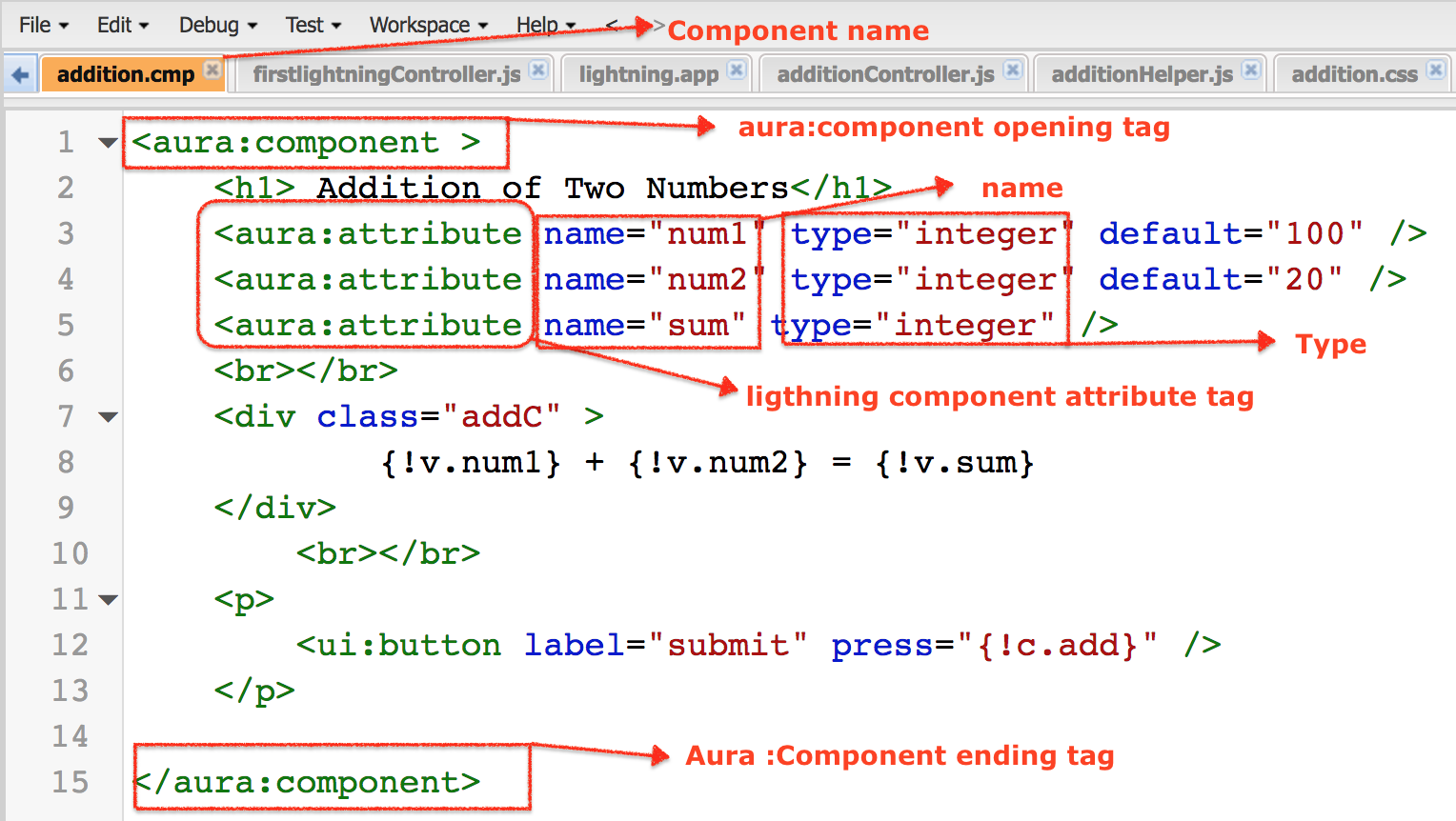
As shown above, we have selected type as integer because we are storing numbers. And if we want to provide default values enter default=”value”. To display two numbers we have to use particular expression like {!v.num1} + {!v.num2} = {!v.sum}.
- We also defined a button called submit. When a submit button is clicked the result will be displayed on the screen.
- The sum value will not be displayed in the output when we click on submit because we have not defined what should happen when submit button is clicked.
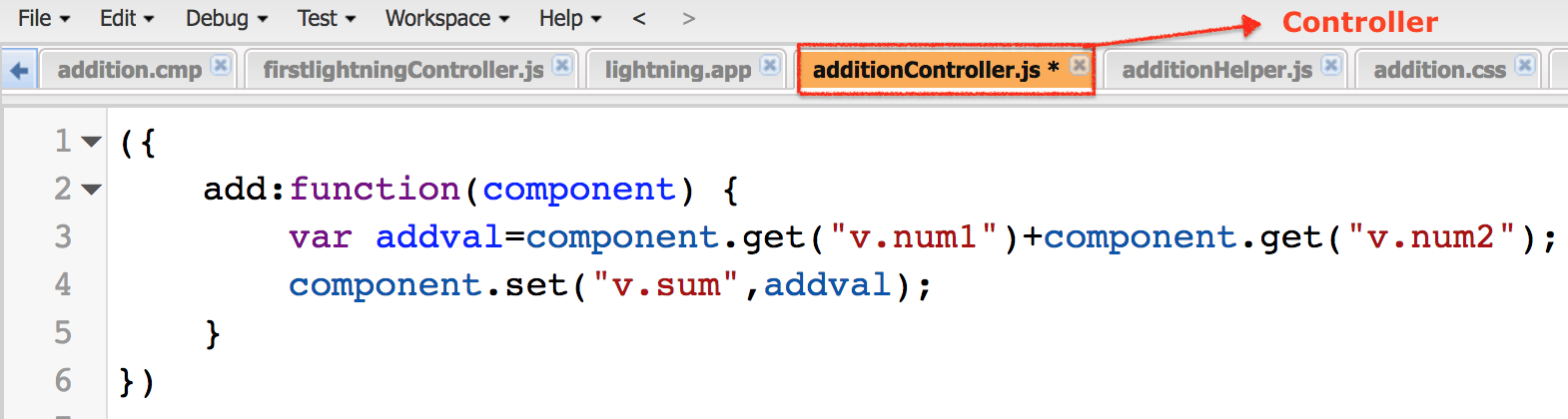
Here we have to add a call a method called {!c.add}. Now click on controller in the component and add the controller as shown below.
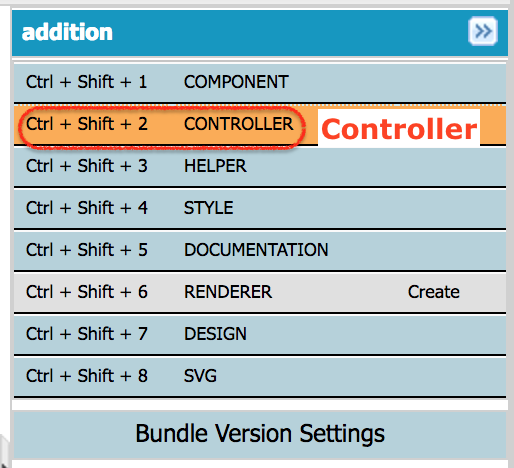
When we click on Controller, Controller file will be created automatically. We want to call {!c.add} function.
({
	add:function(component) {
		var addval=component.get("v.num1")+component.get("v.num2");
        component.set("v.sum",addval);
	}
})
- Click on Save button.
How the Aura controller reads and updates aura:attribute values
The JavaScript controller reads the values with component.get("v.num1") and component.get("v.num2"). It then updates the result with component.set("v.sum", addval). The name after v. must match the attribute name declared in the component markup.
When values come from text inputs, convert them before numeric calculation so that JavaScript does not concatenate strings.
var addval = Number(component.get("v.num1")) + Number(component.get("v.num2"));
component.set("v.sum", addval);
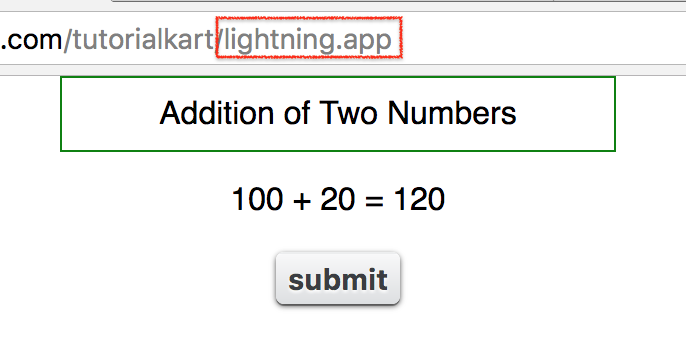
lightning Component Attribute output.
When we preview the lightning application, the output will be as follow.
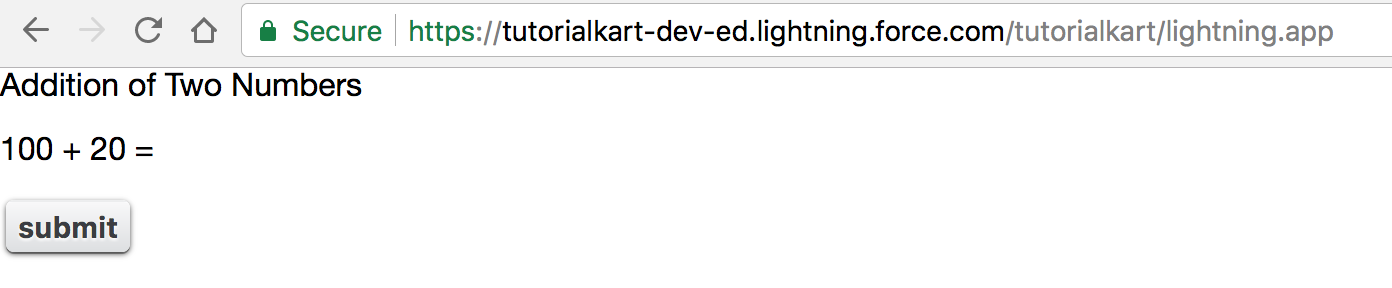
The look and feel of the output will be changes by adding style to lightning component. Click on Style and add the following css code given below.
.THIS {
    background-color: white;
    font-family:sans-serif;
    text-align:center;
}

body.THIS {
    border: 2px solid grey;
}

H1.THIS {
    background-color: white;
    font-weight:strong;
    width: 20%;
    border: 1px solid green;
    padding: 10px;
    font-family:sans-serif;
    text-align:center;
    margin:auto;display:block;
}

body.THIS {
    text-align:center;
}

p.THIS {
    text-align: center;
}

button.THIS {
    position: absolute;
    top: 50%;
}

addC.THIS {
    margin:auto;
    display:block;
}
In Aura component CSS, .THIS scopes the style to the component. For a class inside the component, a selector such as .THIS .addC is clearer.
.THIS .addC {
    margin: auto;
    display: block;
}
Output :
Common mistakes with aura:attribute in Salesforce Aura components
- Using an attribute name in
component.get()that is not declared in the markup. - Using
Objectwhen a specific type such asString,Boolean, orIntegeris clearer. - Forgetting a default value for UI state attributes such as
isLoadingorshowModal. - Adding values from text inputs without converting them to numbers.
- Mixing Aura syntax and Lightning Web Component syntax in the same example.
Official Salesforce references for aura:attribute and lightning:icon
For more detail, refer to Salesforce documentation for Aura component attributes, the aura:attribute reference, and the lightning:icon Aura component.
Aura attribute QA checklist for this tutorial
- Every
aura:attributeexample has bothnameandtype. - Every
{!v...},component.get(), andcomponent.set()reference matches a declared attribute. - Numeric examples do not accidentally concatenate string values.
- FAQ answers distinguish Aura components from Lightning Web Components.
- Official Salesforce references are included for attribute syntax and related Aura components.
FAQs on aura:attribute in Salesforce Lightning Aura components
What is an aura:attribute type in Salesforce?
An aura:attribute type defines the kind of value stored by the attribute. Examples include String, Boolean, Integer, Date, Map, and Aura.Component[].
How do I get an aura:attribute value in an Aura controller?
Use component.get("v.attributeName") to read the value and component.set("v.attributeName", newValue) to update it.
What is the difference between an Aura component and a Lightning component?
Lightning component is often used as a broad term for components on the Salesforce Lightning platform. Aura components are the older Lightning component model, while Lightning Web Components are the newer model.
Why is LWC usually preferred over Aura for new components?
Lightning Web Components are usually preferred for new custom UI work because they follow modern JavaScript and web standards. Aura is still used for existing Aura code and Aura-specific use cases.
What is lightning:icon in an Aura component?
lightning:icon is a Salesforce base Aura component for displaying icons from the Salesforce Lightning Design System. It uses its own attributes, such as iconName, size, and alternativeText.
Conclusion : In this Salesforce tutorial, we have learned about lightning Component Attribute and created Salesforce lightning component for addition of two integer. In our upcoming Salesforce training, we will learn about Salesforce lightning Component composition with an example.