 TutorialKart.com
In this Salesforce tutorial, you will learn how to create a many-to-many relationship in Salesforce using a junction object. The example connects the Invoice object and the Pharma Product object so that one invoice can include many products and one product can appear on many invoices.
Many-to-many relationship in Salesforce
Many-to-many relationship in Salesforce means one record from one object can be related to many records from another object, and each of those records can also be related back to many records from the first object.
Salesforce does not provide a separate field type named many-to-many relationship. Instead, you create this relationship by adding a third custom object between the two objects. This third object is called a junction object.
For example, an invoice can contain multiple pharma products, and the same pharma product can appear on multiple invoices. To model this correctly, we create a junction object named Pharma Product Invoice and connect it to both parent objects.
How Salesforce resolves many-to-many relationships with a junction object
A many-to-many relationship is usually resolved by splitting it into two one-to-many relationships. In Salesforce, this is done with a junction object that has two relationship fields pointing to the two parent objects.
| Salesforce object | Role in this example | Relationship purpose |
|---|---|---|
| Invoice | Parent object | One invoice can be connected to many junction records. |
| Pharma Product | Parent object | One product can be connected to many junction records. |
| Pharma Product Invoice | Junction object | Each junction record connects one invoice with one pharma product. |
Each record in the junction object represents one association. If Invoice 1 contains Product A and Product B, two junction records are created. If Product A is also used in Invoice 2, another junction record is created for that second association.
What is a junction object in Salesforce?
A junction object in Salesforce is a custom object that connects two other objects to create a many-to-many relationship. In the common Salesforce pattern, the junction object has two master-detail relationship fields, one to each parent object.
Salesforce Trailhead describes a junction object as a custom object with two master-detail relationships and uses it as the key pattern for creating a many-to-many relationship. You can also review Salesforce relationship considerations in the official documentation before using this design in production.
- Salesforce Trailhead: Create a Custom Junction Object
- Salesforce Help: Considerations for Object Relationships
Invoice and Pharma Product many-to-many relationship example
In this tutorial, we create a many-to-many relationship between Invoice and Pharma Product. The junction object is named Pharma Product Invoice.
- One invoice can have many pharma products.
- One pharma product can appear on many invoices.
- The Pharma Product Invoice object stores the connection between one invoice and one pharma product.
This structure is more accurate than trying to store multiple products directly on the Invoice object or multiple invoices directly on the Product object. The junction object gives each association its own record, which can also store additional fields such as quantity, price, batch number, or discount if your business process needs them.
Before creating a many-to-many relationship in Salesforce
Before creating the relationship fields, confirm that the two parent objects already exist. In this example, the parent objects are Invoice and Pharma Product. You should also decide whether the junction object needs its own fields for information about the relationship itself.
- Use a junction object when both sides can have multiple related records.
- Use meaningful object and field labels so users can understand related lists.
- Check whether master-detail relationship behavior is suitable for ownership, sharing, deletion, and reporting needs.
- If master-detail is not suitable for your data model, review whether lookup relationships are a better fit for your requirement.
Create the Salesforce junction object for many-to-many relationship
Let us create the junction object first. In Salesforce Lightning Experience, go to Setup > Object Manager > Create > Custom Object. In older Salesforce Classic navigation, you may see the path as Setup | Build | Create | Objects | New.
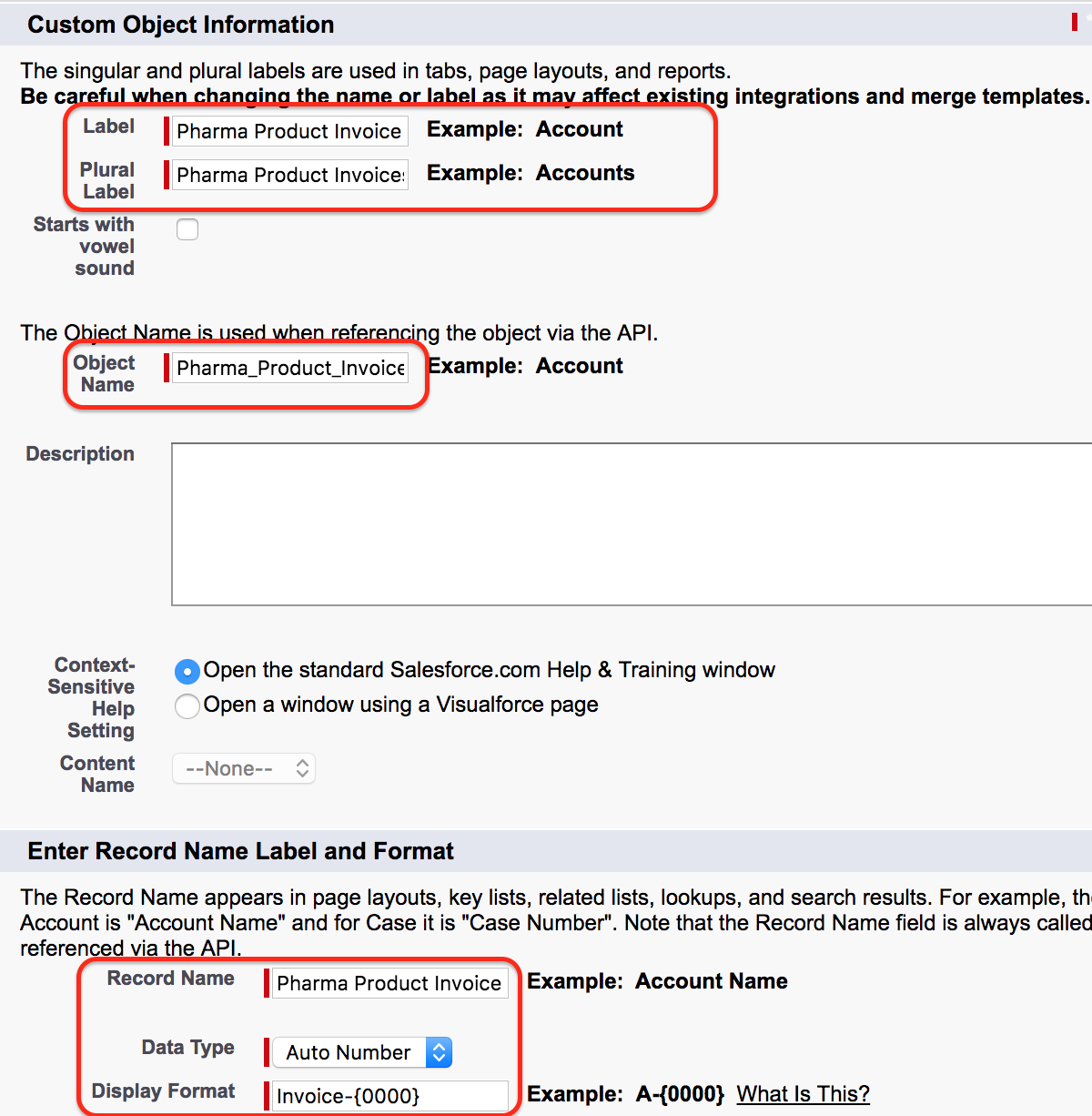
Click the New button to create a new object. Enter the label and plural label for the junction object as shown below. In this example, the junction object is named Pharma Product Invoice.
- Open Setup.
- Go to Object Manager.
- Create a new custom object.
- Enter the object label as Pharma Product Invoice.
- Enter the plural label based on your naming standard.
- Save the custom object.
Add the two master-detail relationships to the Salesforce junction object
After the junction object is created, add two master-detail relationship fields on the Pharma Product Invoice object.
- Create the first master-detail relationship from Pharma Product Invoice to Pharma Product.
- Create the second master-detail relationship from Pharma Product Invoice to Invoice.
- Add the related lists to the page layouts where users need to see the connected records.
- Create sample junction records to confirm that the relationship behaves as expected.
Click here :- Learn how to create master detail relationship in Salesforce.
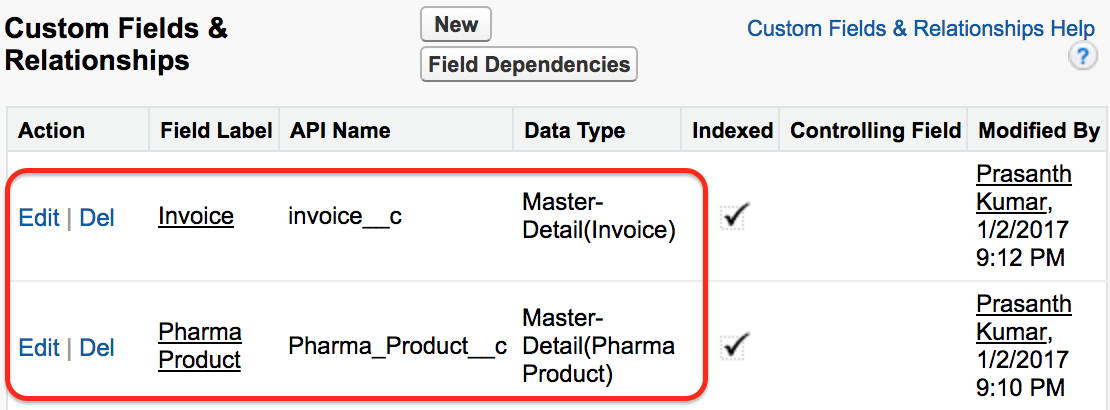
As shown above, the child object, Pharma Product Invoice, contains two master-detail relationships. One relationship points to the Pharma Product object, and the other points to the Invoice object.
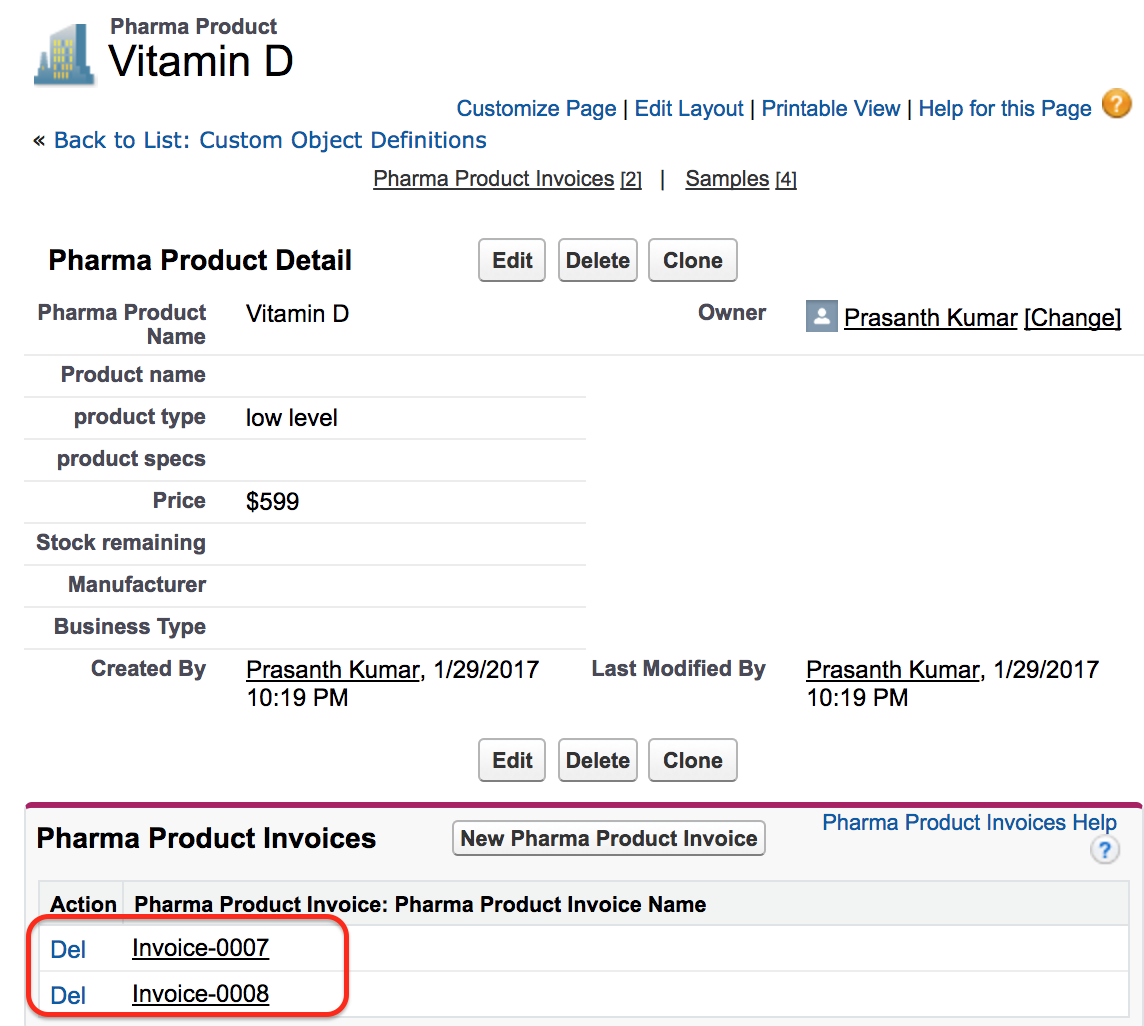
Here, multiple invoices can be related to one product, and multiple products can be related to one invoice. The junction object records make these connections possible.
Primary and secondary master-detail fields in a Salesforce junction object
When you create two master-detail relationships on a junction object, the first master-detail relationship created is treated as the primary relationship. The second one is the secondary relationship. This order can matter for some Salesforce behavior and administration tasks, so plan the junction object carefully before building it.
For example, decide which parent object should be created first from a business process point of view. In this tutorial, if the junction record is mainly entered while working from the Invoice page, you may choose the Invoice relationship as one of the key page layout related lists. If users mostly work from the Pharma Product page, make sure that related list is also easy to find.
Testing the many-to-many relationship in Salesforce records
After creating the junction object and the two master-detail fields, test the relationship with sample records.
- Create or open an Invoice record.
- Create or open a Pharma Product record.
- Create a Pharma Product Invoice junction record that selects both the invoice and the pharma product.
- Create another junction record for the same invoice and a different product.
- Create another junction record for a different invoice and the same product.
- Open the related lists on Invoice and Pharma Product to confirm that the records appear from both sides.
This test confirms the many-to-many behavior: one invoice can show several related products, and one product can show several related invoices.
Common mistakes while creating many-to-many relationships in Salesforce
- Creating only one relationship field: a junction object needs two relationship fields to connect the two parent objects.
- Putting relationship fields on the wrong object: create the master-detail fields on the junction object, not on both parent objects separately.
- Choosing unclear names: use labels that make sense in related lists, reports, and page layouts.
- Ignoring delete behavior: master-detail relationships affect what happens to detail records when a parent record is deleted.
- Forgetting page layouts: after creating the fields, add related lists so users can see and create the linked records.
QA checklist for a Salesforce many-to-many relationship setup
- The junction object has a clear label, plural label, and API name.
- The junction object has one relationship field to each parent object.
- Related lists are visible on both parent object page layouts.
- Sample records confirm that one invoice can link to many products.
- Sample records confirm that one product can link to many invoices.
- Reports can include the parent records and junction object fields needed by users.
- The deletion, ownership, and sharing behavior is acceptable for the business process.
FAQs on many-to-many relationship in Salesforce
How do you create a many-to-many relationship in Salesforce?
You create a many-to-many relationship in Salesforce by creating a custom junction object and adding two relationship fields on it. In the common pattern, the junction object has two master-detail relationships, one to each parent object.
What is a junction object in Salesforce many-to-many relationship?
A junction object is a custom object that stores the connection between two parent records. Each junction record connects one record from the first object with one record from the second object.
Can Salesforce create a many-to-many relationship without a junction object?
Salesforce does not provide a separate many-to-many field type. A junction object is the standard data modeling approach for representing a many-to-many relationship between two objects.
Should a Salesforce junction object use master-detail or lookup fields?
The classic Salesforce many-to-many pattern uses two master-detail fields. However, lookup fields may be considered when the records should not have master-detail dependency behavior. Choose the relationship type based on ownership, sharing, deletion, reporting, and roll-up requirements.
What is the purpose of the Pharma Product Invoice object in this tutorial?
Pharma Product Invoice is the junction object. It connects Invoice records and Pharma Product records so that one invoice can have many products and one product can appear on many invoices.
Many-to-many Salesforce relationship recap
In this Salesforce tutorial, we learned how to create a many-to-many relationship in Salesforce using a junction object. The Invoice and Pharma Product objects are connected through the Pharma Product Invoice junction object, which contains two master-detail relationships. In the next Salesforce tutorial, we are going to learn about Schema Builder.