 TutorialKart.com
Salesforce Cross Object Formula Field
Salesforce Cross Object Formula field is a formula field that displays data from a related record on the current record. In our previous Salesforce Tutorial, we learned how to create a formula field. In this tutorial, we will learn what a cross-object formula field is, when to use it, how it differs from a roll-up summary field, and how to create a custom cross-object formula field in Salesforce.
What is a Cross Object Formula Field in Salesforce?
A Salesforce Cross Object Formula field references a field on a related object and shows that value on the object where the formula field is created. It is useful when users need to see parent record information without opening the parent record separately.
For example, if Invoice records are related to Hospital records, then Hospital is the parent object and Invoice is the child object. If every Invoice page should show the Hospital Email Address, we can create a cross-object formula field on the Invoice object and reference the Email field from the related Hospital record.
The formula field does not copy the value permanently into the Invoice record. It calculates and displays the value from the related Hospital record. When the Hospital Email value changes, the formula result shown on the Invoice record also reflects the updated value.
Where Cross Object Formula Fields Are Used in Salesforce
Cross-object formulas are commonly used when a child record needs to display information from a parent record. Some common examples are:
- Showing Account Industry on Opportunity records.
- Showing Contact Email or Account Phone on a custom child object.
- Showing Hospital Email Address on Invoice records.
- Displaying parent record category, owner, region, or status on child records.
- Using related record values in reports, page layouts, validation rules, and automation conditions.
A cross-object formula is best when the requirement is to display or evaluate a parent field value. It is not the right tool when the requirement is to total, count, or summarize many child records.
Cross Object Formula Field Syntax Example
In Salesforce formulas, related object fields are referenced through the relationship name. For a custom lookup or master-detail relationship, the relationship name usually ends with __r, while the custom field API name ends with __c.
Hospital__r.Email__cIn this example, Hospital__r represents the related Hospital record, and Email__c represents the Email field on that Hospital record.
Limitations of Formula Fields and Cross Object Formula Fields in Salesforce
A formula field is a system-calculated, read-only field. Users cannot directly edit the value of a formula field because the value comes from the formula expression.
- Formula fields are read-only on record pages.
- A formula field derives its value from the formula expression.
- When the source field value changes, the formula result is recalculated automatically.
- Formula expressions can be used in formula fields, validation rules, workflow logic, Flow decisions, and other Salesforce features.
- Cross-object formulas can reference fields from related parent records, but they do not summarize multiple child records.
- Some field types and relationship patterns may not be available in formula expressions.
- Very complex formulas can become hard to maintain, so formula logic should be kept readable.
Cross Object Formula Field vs Roll-Up Summary Field in Salesforce
Cross-object formula fields and roll-up summary fields solve different problems. A cross-object formula usually pulls a value from a related parent record and displays it on the current record. A roll-up summary field calculates a value from multiple child records and stores the summarized result on the parent record.
| Feature | Cross Object Formula Field | Roll-Up Summary Field |
|---|---|---|
| Main purpose | Displays a value from a related record | Summarizes child records |
| Typical direction | Child record references parent record | Parent record summarizes child records |
| Common use | Show Account, Hospital, or parent details on a child record | Count records, sum amounts, find minimum or maximum values |
| Editable by users | No | No |
| Example | Show Hospital Email on Invoice | Show total Invoice Amount on Hospital |
If you need to show a parent field on a child record, use a cross-object formula field. If you need to calculate a total, count, minimum, or maximum from child records on the parent record, use a roll-up summary field where the relationship supports it.
How to Create Salesforce Cross Object Formula Field on Invoice Object
Here we are going to create a Salesforce Cross Object formula field named Hospital Email Address on the Invoice object. This field will display the Email value from the related Hospital record.
Go to Setup | Build | Create | Object | Invoice | Custom Fields and Relationships | New.
Step 1 :- Creating New custom field.
Create new Custom field of Data type Formula and click on Next.
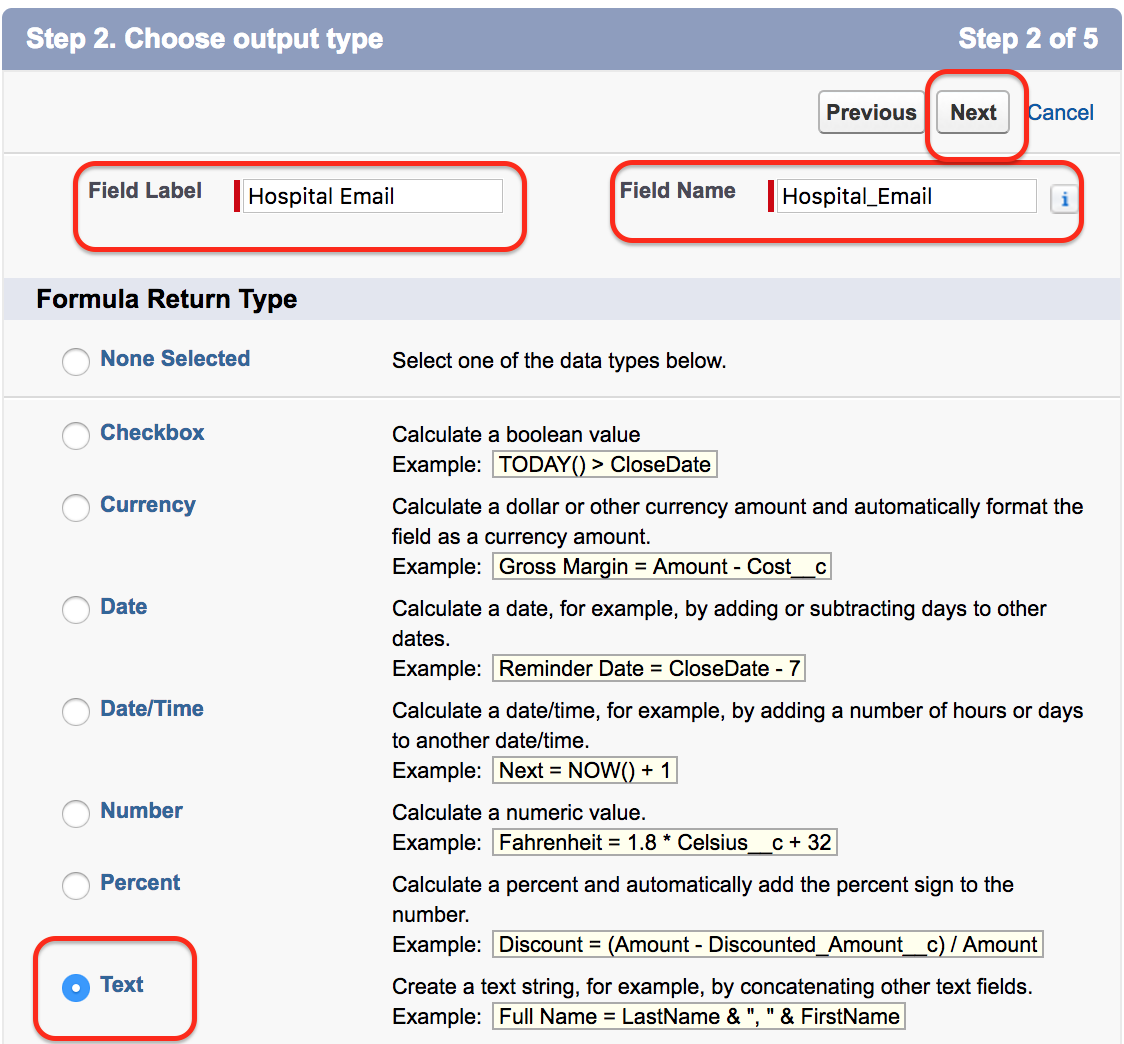
Enter Field label and Field name. Select the appropriate return type based on the value you want to display. Since we are displaying an email address from the Hospital record, select a return type that matches the required output and click on the Next button as shown above.
Select the Related Hospital Email Field in the Formula Editor
- Now go to Insert field => Invoice => Hospital Object => Email =>Insert.
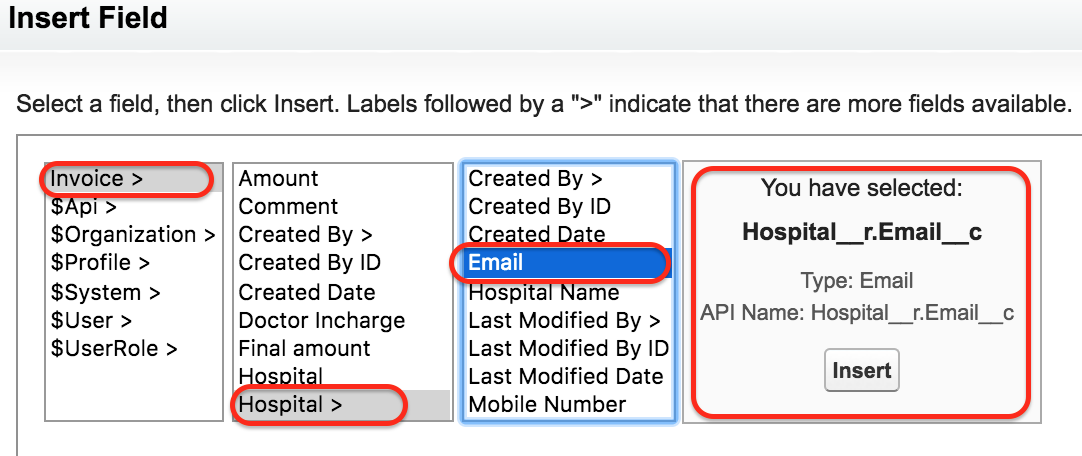
After inserting the related field, Salesforce adds the correct relationship path into the formula editor. Review the formula carefully and make sure it points to the correct parent object field.
Now click on Next button.
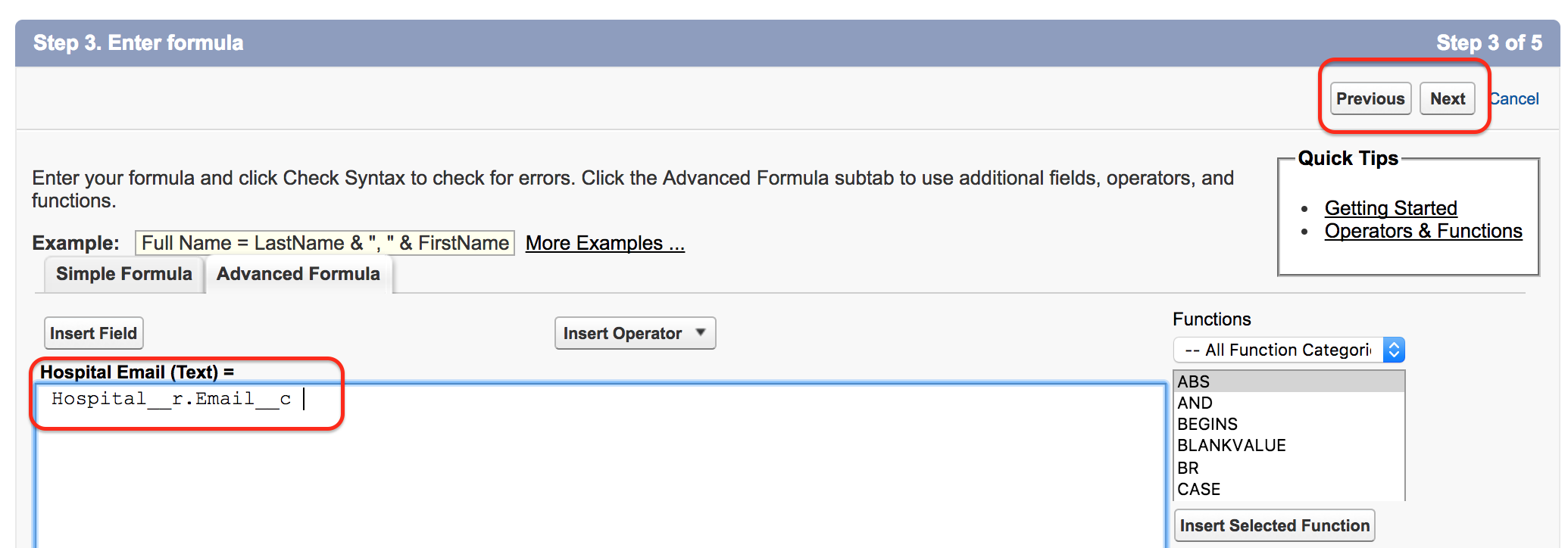
Set field-level security for the profiles that should see this formula field. Then add the field to the required page layouts, click on the Next button, and Save all the settings.
How Salesforce Cross Object Formula Field Works on an Invoice Record
Now go to an Invoice record and check whether the Hospital Email field is visible. The value displayed in this field comes from the related Hospital record.
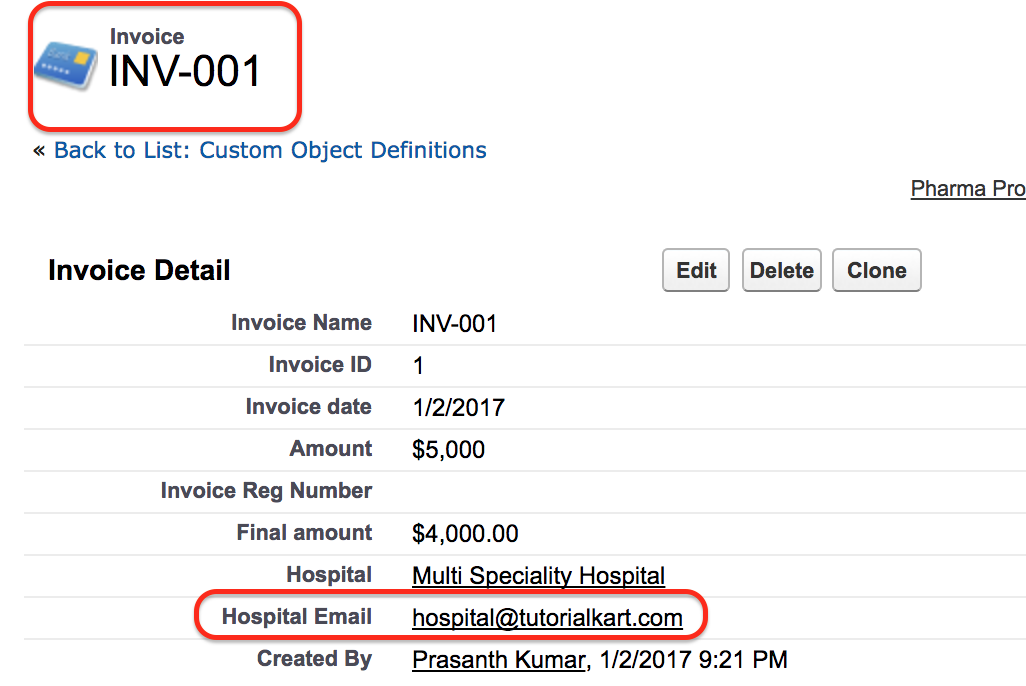
If the Hospital Email value is changed on the Hospital record, the Invoice formula field displays the updated result. This helps users view related information without duplicating the same data on every Invoice record.
Common Mistakes While Creating Salesforce Cross Object Formula Fields
- Choosing the wrong return type for the formula result.
- Selecting a field from the wrong related object in the formula editor.
- Using a cross-object formula when a roll-up summary field is actually required.
- Forgetting to add the formula field to the page layout.
- Not checking field-level security after creating the field.
- Creating a long formula that is difficult for other admins to understand later.
QA Checklist for Salesforce Cross Object Formula Field Tutorial
- Confirm that the Invoice object has a lookup or master-detail relationship to Hospital.
- Confirm that the Hospital Email field exists and is visible to the required users.
- Check that the formula return type matches the value being displayed.
- Test the formula on an Invoice record with a related Hospital record.
- Update the Hospital Email value and confirm that the Invoice formula result changes.
- Verify that the field is added to the correct Invoice page layout.
FAQs on Salesforce Cross Object Formula Field
What is the capability of cross-object formula fields in Salesforce?
A cross-object formula field can reference fields from a related parent record and display or evaluate that value on the current record. It helps users see related record data without storing duplicate values.
What is the difference between cross-object formula and roll-up summary field?
A cross-object formula displays a value from a related record, usually from parent to child. A roll-up summary field calculates values from multiple child records and displays the summarized result on the parent record.
Can users edit a Salesforce cross-object formula field?
No. A cross-object formula field is read-only. Users must update the source field on the related record if the displayed value needs to change.
Can a cross-object formula count child records?
No. A cross-object formula is not used to count or summarize many child records. For totals, counts, minimums, and maximums from child records, use a roll-up summary field where supported, or use automation such as Flow when a roll-up summary is not available.
Why is my cross-object formula field blank?
The formula result may be blank if the related parent record is missing, the referenced field on the parent record is blank, or the formula references the wrong relationship field. Check the relationship, source field value, formula expression, field-level security, and page layout.
Conclusion: Creating a Salesforce Cross Object Formula Field
In this Salesforce Tutorial, we learned what a Salesforce Cross Object Formula field is and how to create a custom Cross Object Formula field in Salesforce.com. A cross-object formula field is useful when a record needs to display information from a related parent record, such as showing Hospital Email Address on an Invoice record. In our upcoming SFDC Training tutorial, we are going to learn about Validation Rules in Salesforce.