 TutorialKart.com
Salesforce Security Model | Salesforce Security Overview
In this Salesforce Admin Tutorial, we will learn the Salesforce Security Model, the main levels of data access, and how system security and application security work together. Salesforce data is stored in objects, fields, and records, so a good security design must control who can log in, what objects they can use, which fields they can see or edit, and which individual records they can access.
Introduction to Data Security in Salesforce
Data security in Salesforce is not handled by one setting alone. It is a layered model. A user may be allowed to log in, but still may not have access to a particular object. A user may have access to an object, but still may not be able to view a sensitive field. A user may have access to the object and field, but may still be restricted from viewing another user’s record.
We have four important levels of data access in Salesforce.com. They are:
- Organization level Security or system level Security.
- Objects level Security
- Field level Security.
- Record level Security
Salesforce Security Model levels at a glance
The easiest way to understand Salesforce security is to read it from broad access to narrow access. First, Salesforce checks whether a user can access the organization. Then it checks object permissions, field permissions, and record access.
| Salesforce security level | What it controls | Common admin settings |
|---|---|---|
| Organization or system level security | Who can log in and under what conditions | Users, password policies, login hours, login IP ranges, session settings, MFA, network access |
| Object level security | Whether users can create, read, edit, or delete records of an object | Profiles, permission sets, permission set groups |
| Field level security | Whether users can view or edit specific fields on an object | Field-level security, page layout behavior, profile and permission set field permissions |
| Record level security | Which records of an object a user can access | OWD, role hierarchy, sharing rules, teams, manual sharing, Apex managed sharing |
For Salesforce admins, this layered approach is important because a user’s final access is decided by the combination of these settings. When troubleshooting access, check each layer instead of checking only the user’s profile.
Organization or System level Security.
System level security is the highest level of security in Salesforce where we maintain a list of authorized users to login, Password policies, Login IP ranges, limiting login access to certain hours, Session Security, Login Flows, Network Access.
Organization level security answers the first question: can this person access this Salesforce org? It includes user activation, authentication policies, password controls, multi-factor authentication, trusted IP ranges, session timeout, login hours, and login flow requirements. If the user cannot pass this layer, object, field, and record permissions do not matter because the user cannot enter the org.
- Users: each person should have a unique user account and a suitable license.
- Password policies: define password length, complexity, expiration, and lockout behavior.
- Login hours: restrict when users assigned to a profile can log in.
- Login IP ranges: restrict login access to approved network ranges.
- Session settings: control session timeout, session security level, and related protections.
- Login flows: add custom checks or screens during login when business rules require them.
Object Level Security in Salesforce using profiles and permission sets
Object Level Security or Profiles.
Object Level Security in Salesforce is done at profile level by setting permissions on Objects.
- We can prevent user to edit, Create, Delete, View of a record in that Object.
Object level security controls whether a user can access an object such as Account, Contact, Opportunity, Case, or a custom object. The most common object permissions are Read, Create, Edit, Delete, View All, and Modify All. Profiles provide a baseline set of permissions, while permission sets and permission set groups are commonly used to grant additional access without changing a user’s main profile.
For example, a support user may need Read and Edit access on Case records, but may not need Delete access. A finance user may need access to Invoice custom objects, while a sales user may not. Object permissions decide whether the object is available to the user before record sharing is evaluated.
Field Level Security in Salesforce for sensitive fields
Field Level Security in Salesforce.
- In Field Level Security, User can’t access certain fields in an object.
Field level security controls whether a user can view or edit a particular field on an object. This is useful for fields such as salary, credit score, margin, personal identification information, internal comments, approval notes, or confidential business values.
Page layouts only control how fields appear on record pages. They should not be treated as the main security control. If a field must be hidden from a user, configure field-level security through profiles or permission sets. This helps protect the field across record pages, reports, related views, APIs, and other access paths where applicable.
Record level Security in Salesforce with OWD, roles and sharing
Record level Security in Salesforce.
In Record level Security in Salesforce grant user to access some object records and not all. Record level sharing or Security can be done by
- Orgaization-wide Sharing settings.
- Role Hierarchy.
- Sharing Rules.
- Manual Sharing.
- Apex Managing sharing
Record level security answers this question: which individual records can this user see or edit? For example, two sales users may both have Read and Edit access to the Opportunity object, but each user may be allowed to work only on opportunities owned by their team. This is where organization-wide defaults, role hierarchy, sharing rules, teams, manual sharing, and Apex managed sharing become important.
| Record sharing feature | Purpose in the Salesforce security model |
|---|---|
| Organization-Wide Defaults | Set the baseline record access for each object, such as Private, Public Read Only, or Public Read/Write. |
| Role Hierarchy | Opens access upward in the hierarchy, usually so managers can access records owned by users below them. |
| Sharing Rules | Automatically extend access to groups of users based on owner or record criteria. |
| Manual Sharing | Allows record owners or permitted users to share individual records when manual sharing is available. |
| Apex Managed Sharing | Uses Apex code to create sharing entries for custom sharing requirements. |
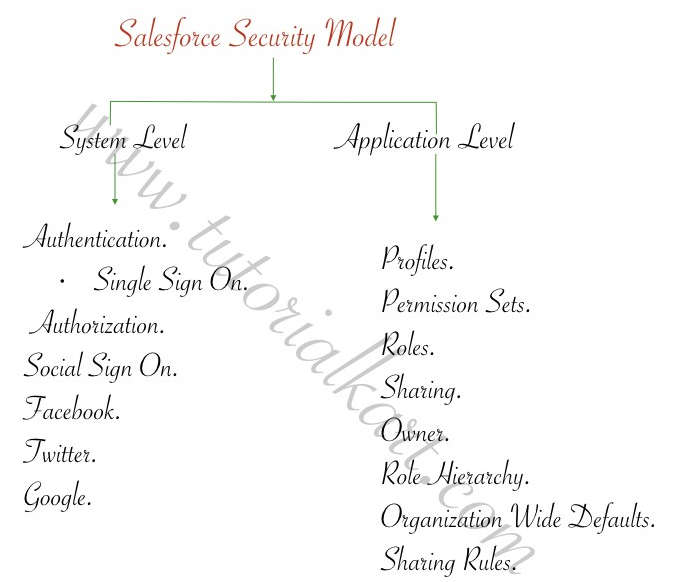
Salesforce Security Model Classification.
Security in Salesforce is broadly classified in to two types. They are
- System Level Security.
- Application Level Security.
System Level Security in Salesforce.
System Level Security in Salesforce is basically various security controls that we have to login into Salesforce Application.
In our upcoming Salesforce Admin Tutorials we covers System Level Security, topics on the following.
- Authentication.
- Authorization.
- Social Sign On.
Application Level Security in Salesforce
Application Level Security in Salesforce controls and restricts what the user can Edit, Delete and View the values of the field of an Object. This Salesforce security type is done after salesforce login.
In our upcoming Salesforce tutorials we will cover topics on Application Level Security in Salesforce given below.
- Profiles.
- Permission Sets.
- Roles.
- Sharing.
How Salesforce checks user access in practice
When a user says, “I cannot see this record” or “I cannot edit this field,” review the access in the correct order. This avoids changing a profile or sharing rule without understanding the real cause.
- Confirm login access: check whether the user is active and allowed by login hours, IP ranges, MFA, and session settings.
- Check object permissions: confirm that the user has the required Create, Read, Edit, Delete, View All, or Modify All permission.
- Check field permissions: confirm that the required field is visible and editable for the user’s profile or permission set.
- Check record access: review OWD, owner, role hierarchy, sharing rules, teams, manual sharing, and Apex sharing.
- Check page layout and app visibility: if access exists but the user cannot find the field or tab, review app, tab, record page, and layout configuration.
Salesforce security model example scenario for an admin
Assume that a sales executive must work on only their own Opportunity records, while the sales manager must see the team’s Opportunity records. A basic Salesforce security design can be planned like this:
- Set the Opportunity organization-wide default to Private if users should not see all opportunities by default.
- Give sales users the required Opportunity object permissions through a profile or permission set.
- Use field-level security to hide sensitive fields such as margin or approval comments from users who do not need them.
- Create a role hierarchy where sales managers are above sales executives, so managers can access records owned by users below them when hierarchy access applies.
- Add sharing rules only when users outside the owner or role hierarchy need access based on clear business rules.
This example shows why object access and record access are different. Object permissions may allow a user to read Opportunity records, but record sharing decides which Opportunity records the user can read.
Salesforce security model best practices for admins
A Salesforce admin should design security with least privilege in mind. Give users the access they need for their job, but avoid broad permissions when a narrower permission will work.
- Keep profiles simple and use permission sets to grant additional access for specific job needs.
- Use permission set groups when several permission sets must be assigned together.
- Start record sharing with the most restrictive practical OWD setting, then open access using roles and sharing rules.
- Avoid using View All and Modify All unless the user truly needs broad access to all records of an object.
- Do not rely on page layouts alone to protect sensitive fields; use field-level security.
- Review inactive users, login history, permission assignments, and high-risk permissions regularly.
- Document why each sharing rule, permission set, and exception exists, so future admins can maintain the model safely.
Salesforce Security Model QA checklist
Use this checklist when reviewing a Salesforce security model or preparing an admin training article on Salesforce data security.
- Does the article clearly explain the four Salesforce security levels: organization, object, field, and record?
- Does the design separate object permissions from record access instead of treating them as the same setting?
- Are field-level security and page layouts explained as different controls?
- Does the record sharing section mention OWD, role hierarchy, sharing rules, manual sharing, and Apex managed sharing?
- Are broad permissions such as View All, Modify All, and administrative access explained carefully?
- Does the example follow least privilege instead of granting access through one large profile?
Official Salesforce data security reference
For current Salesforce security behavior and setup details, use Salesforce’s official learning and documentation resources along with this tutorial. A useful starting point is the Trailhead module on Data Security, which explains object, field, and record access in Salesforce.
FAQs on Salesforce Security Model
What are the four levels of security in Salesforce?
The four main levels of security in Salesforce are organization level security, object level security, field level security, and record level security. Together they control login access, object permissions, field visibility, and access to individual records.
What is the difference between object level security and record level security in Salesforce?
Object level security controls whether a user can access an object and perform actions such as read, create, edit, or delete. Record level security controls which individual records of that object the user can access.
Why is field-level security important in Salesforce?
Field-level security is important because some fields may contain sensitive or restricted information. It controls whether a user can view or edit specific fields, even when the user has access to the object and record.
Do profiles or permission sets control Salesforce record access?
Profiles and permission sets mainly control object permissions, field permissions, system permissions, app access, and related permissions. Record access is mainly controlled by OWD, role hierarchy, sharing rules, teams, manual sharing, and Apex managed sharing.
What should I check first when a Salesforce user cannot see a record?
First confirm that the user can log in and has Read access to the object. Then check field-level security if a field is missing. Finally, review record access through OWD, ownership, role hierarchy, sharing rules, teams, manual sharing, and Apex sharing.
Conclusion on Salesforce Security Model
The Salesforce Security Model is a layered data access model. Organization level security controls login access, object level security controls permissions on objects, field level security controls visibility and edit access for fields, and record level security controls access to individual records. In our next Salesforce Admin Tutorial, we are going to learn about System Level Security in Salesforce.