 TutorialKart.com
Salesforce Rollup Summary Field Meaning in Master-Detail Relationships
In this Free Salesforce Training Tutorial we are going to learn about Salesforce Rollup Summary Fields and what is Salesforce Rollup Summary Field definition.
A Salesforce rollup summary field is a read-only field on the parent record that calculates a value from related child records in a master-detail relationship. It is used when the parent record must show a total, count, minimum value, or maximum value based on records stored under the detail object.
For example, a Pharma Product record can show the total quantity of all related Sample records. Users do not type the value manually. Salesforce calculates it from the child records and displays the result on the parent record.
What is Rollup Summary field?
Rollup Summary field is a read only field which is used to calculate the count of child records, Sum, Minimum, Maximum of a field on the child object. It is enable for master in Master – Detail Relationship.
- Roll-Up Summary field means working on the child object.
- Rolling up the child records and computing the value on the Parent record.
- Rollup Summary Field can not be created in lookup relationship.
- Using Apex Trigger we can create Rollup Summary field in Lookup relationship.
Salesforce documentation describes roll-up summary fields as fields that summarize values from records on a related object. Salesforce Trailhead also explains the same idea: the value is calculated from detail records and shown on the master record. You can read the official Salesforce references here: Salesforce Help: Roll-Up Summary Field and Trailhead: Roll-Up Summary Fields.
Roll-Up Summary Field Calculations: COUNT, SUM, MIN, and MAX
In Salesforce.com, we can make four function to work with Rollup Summary field. They are
- Count – Number, Currency.
- Sum – Number, Currency.
- Minimum – Number, Currency, Date.
- Maximum – Number, Currency, Date.
The calculation type should match the business question you want to answer on the parent record.
| Roll-up type | What Salesforce calculates | Common example |
|---|---|---|
| COUNT | Number of related child records | Count all Sample records under one Pharma Product |
| SUM | Total of a numeric, currency, or percent field | Total sample quantity for a product |
| MIN | Smallest value from the selected child field | Earliest sample date or lowest quantity |
| MAX | Largest value from the selected child field | Latest sample date or highest quantity |
Use COUNT when you only need the number of child records. Use SUM, MIN, or MAX when you need Salesforce to evaluate a specific field on the child object.
Before You Create a Salesforce Rollup Summary Field
Check the relationship and the field type before you create the roll-up summary field. Most errors happen because the summarized object is not in a master-detail relationship with the object where the roll-up field is being created.
- Create the roll-up summary field on the master object, not on the detail object.
- Confirm that the child object is connected through a master-detail relationship.
- Use filter criteria if only some child records should be counted or summarized.
- For SUM, MIN, and MAX, confirm that the child field type is supported for that calculation.
- Plan the field label clearly, because the result appears directly on the parent record page.
If the relationship is a lookup relationship, the child object will not appear as a summarized object for a standard roll-up summary field. In that case, consider whether the relationship should be master-detail, or whether the requirement should be handled with Flow, Apex, or another approved automation pattern.
How to Create Salesforce Rollup Summary Field?
Here we are going to create field(Rollup Summary field) on the parent record(Pharma product). To create Rollup Summary Field in Salesforce go Setup | Build | Create | Objects | Pharma Product | Custom Fields & relationships | New.
In Salesforce Lightning Experience, the navigation is usually through Setup > Object Manager > Pharma Product > Fields & Relationships > New. The older Setup path shown above may still help if you are working from Salesforce Classic training screens.
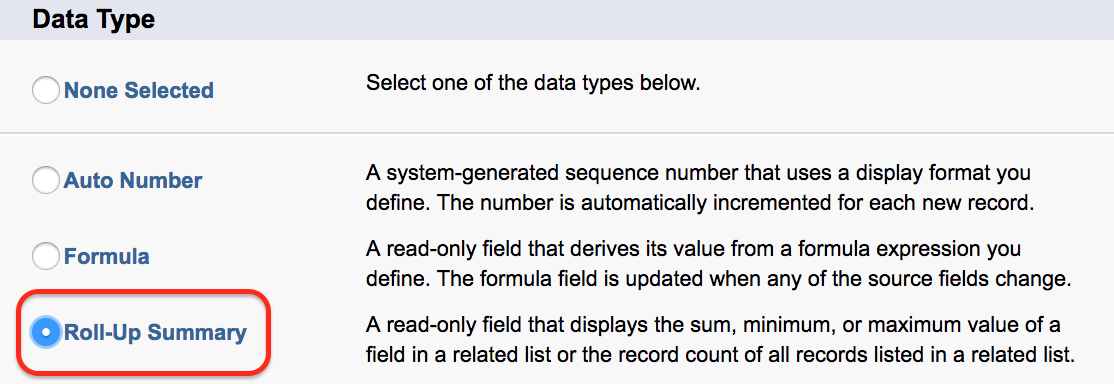
- Select the Data type as Roll-Up Summary as shown above. Now click on next button.
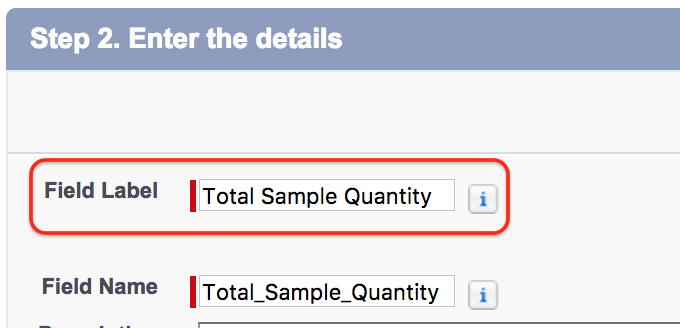
- Enter Field label and field name as shown above and click on next button.
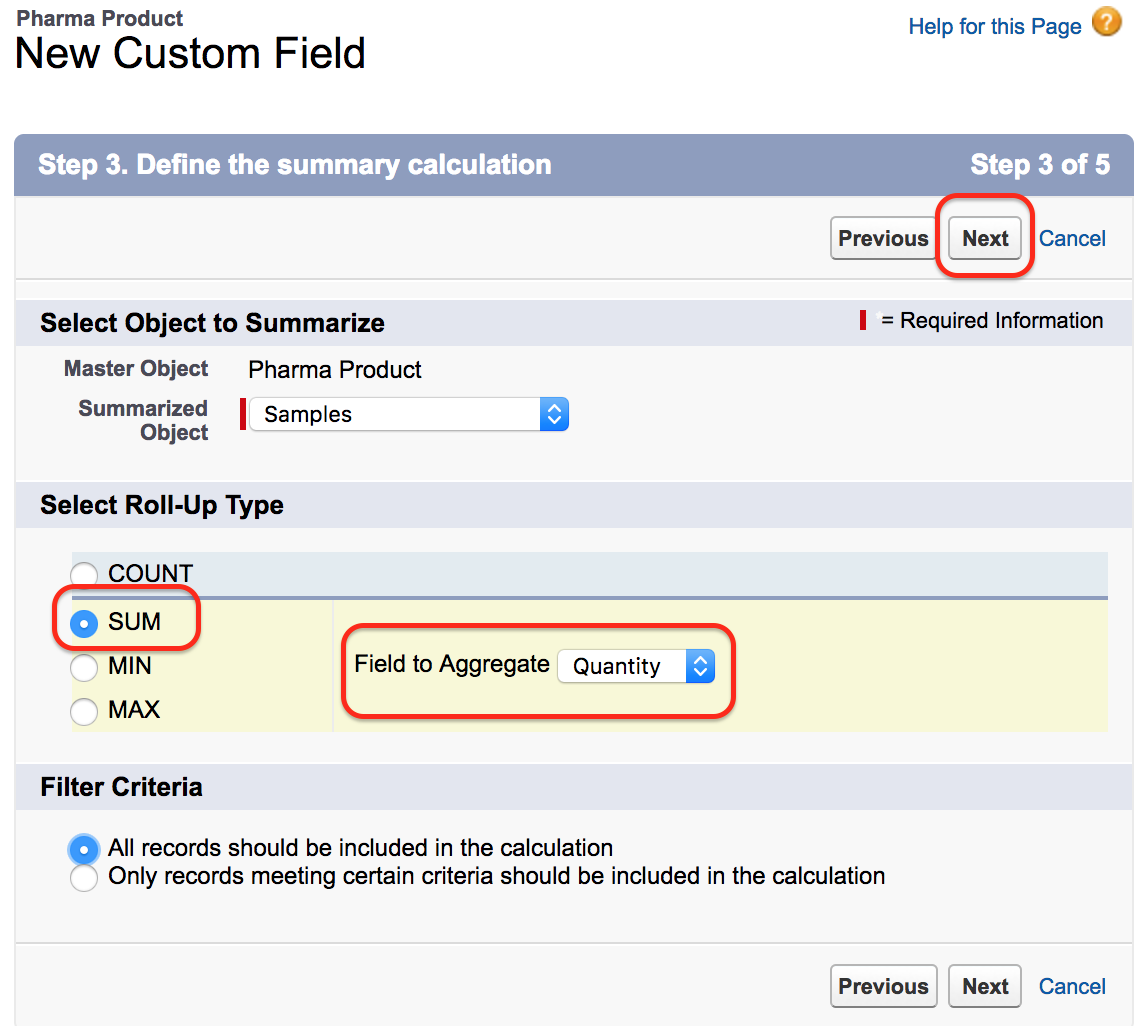
Defining the Salesforce Roll-Up Summary Calculation
Defining the summary calculation.
It displays list of all child object for the pharma product. If any child object is related to pharma product via lookup relationship it can not be listed here.
- Select Sample object as Summarized object.
- Now select Roll-Up type
- Select filter criteria.
- Select the field to be aggregated.
- Click on Next button.
Here in this Salesforce tutorial we are calculation the total number of the Samples. Click on Sum as shown above.
When you define the calculation, pay attention to the filter criteria. If you select All records should be included in the calculation, every related Sample record contributes to the result. If you select filter criteria, Salesforce includes only the child records that match those conditions.

As shown above we have successfully creates Roll-Up Summary field in Salesforce.
- Now go to Pharma product object and click on any records.
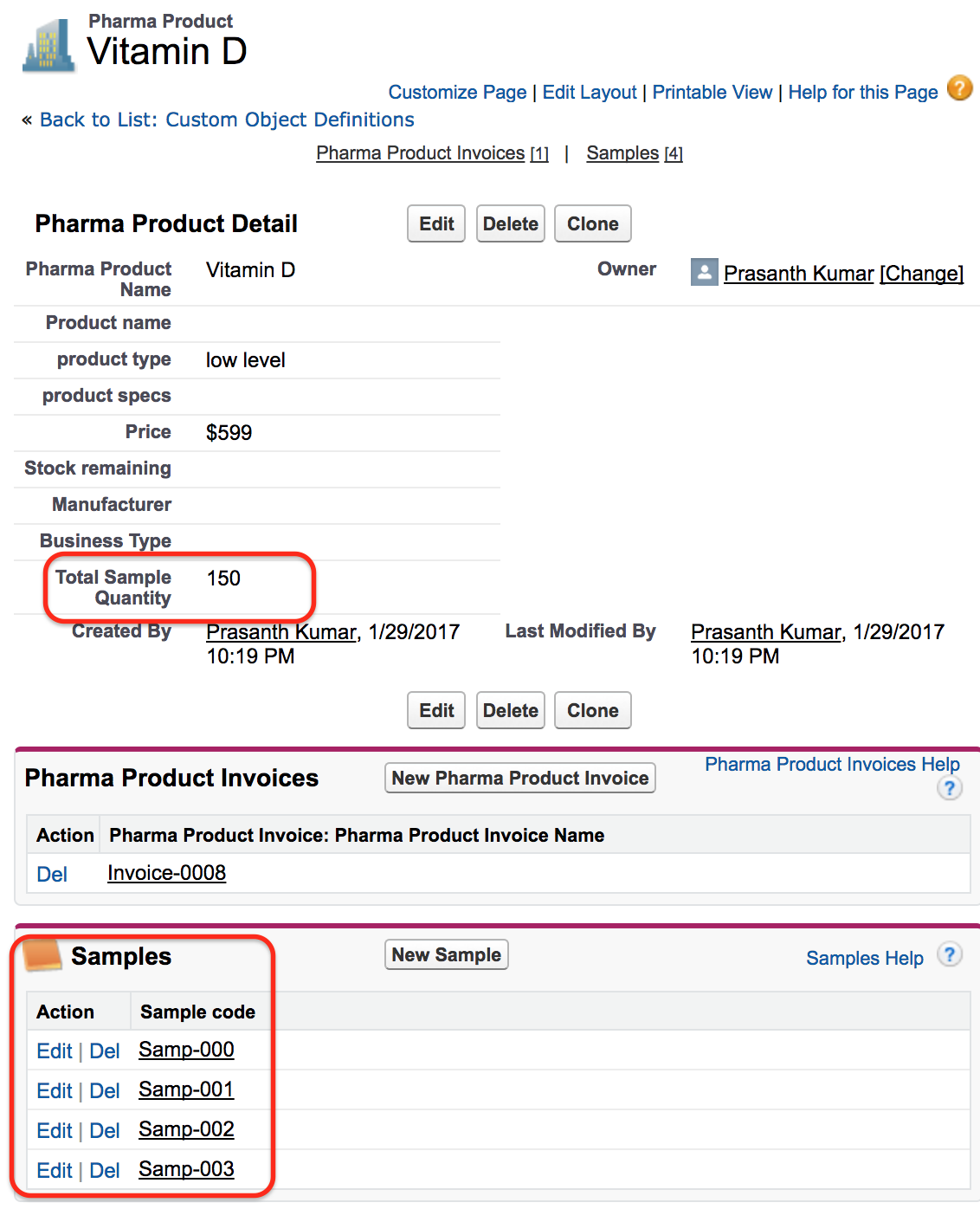
As shown above we have 4 sample records and the total sample quantity is 150.
Why the Summarized Object May Not Appear in Roll-Up Summary Setup
If the expected child object is missing in the summarized object list, check the relationship first. A standard Salesforce rollup summary field works when the object where the field is created is the master side of a master-detail relationship. A lookup relationship does not make the child object available in this setup screen.
- The roll-up field must be created on the parent master object.
- The summarized object must be the child detail object.
- The child field must be eligible for the selected summary type.
- For lookup relationships, use a different design such as Flow or Apex after testing the business requirement.
Salesforce Rollup Summary Field Example: Total Sample Quantity
In this tutorial, the parent object is Pharma Product and the child object is Sample. The roll-up summary field is created on Pharma Product. Salesforce reads the related Sample records and calculates the total sample quantity. If the four Sample records together have a quantity of 150, the Pharma Product record displays 150 in the roll-up summary field.
This is useful because the parent record always shows the calculated value without the user opening each child record and adding values manually.
Salesforce Rollup Summary Field Limits and Alternatives
Roll-up summary fields are simple and reliable for supported master-detail scenarios, but they are not a replacement for every type of aggregation. They do not calculate every possible formula, and they are not available directly on lookup relationships.
- Use a standard roll-up summary field when the relationship is master-detail and the calculation is COUNT, SUM, MIN, or MAX.
- Use filter criteria when only selected child records should be included.
- Use Salesforce Flow or Apex when the relationship is lookup or the logic is more complex.
- Test roll-up behavior with create, update, delete, and undelete actions on child records before using it in production.
Salesforce Rollup Summary Field FAQ
Can we create a Salesforce rollup summary field on a lookup relationship?
No. A standard Salesforce rollup summary field is created for master-detail relationships. For lookup relationships, use another approach such as Flow, Apex, or a carefully reviewed automation design.
Where is a roll-up summary field created in Salesforce?
It is created on the parent object, which is the master side of the master-detail relationship. The field summarizes values from records on the child detail object.
Which calculations are supported by Salesforce roll-up summary fields?
Salesforce roll-up summary fields support COUNT, SUM, MIN, and MAX. The available child fields depend on the selected calculation type.
Why is the child object not showing in the summarized object list?
The most common reason is that the child object is connected through a lookup relationship instead of a master-detail relationship. Also confirm that you are creating the field on the correct parent object.
Can users edit the value of a Salesforce rollup summary field?
No. A roll-up summary field is read-only. Salesforce calculates the value from related child records and displays the result on the parent record.
Editorial QA Checklist for Salesforce Rollup Summary Field Tutorial
- Confirm that the tutorial explains the difference between master-detail and lookup relationships.
- Check that COUNT, SUM, MIN, and MAX are described with Salesforce-specific examples.
- Verify that the roll-up summary field is created on the parent master object.
- Confirm that the example result, total sample quantity 150, matches the screenshots.
- Make sure official Salesforce Help or Trailhead references are included for readers who want platform documentation.
Salesforce Rollup Summary Field: What You Should Remember
In this Salesforce Tutorial we have learned about Roll-Up Summary field in Salesforce. In our upcoming Salesforce Tutorial we are going to learn about Field dependencies in Salesforce.com
A Salesforce rollup summary field is best used when a parent record must display a calculated value from child records in a master-detail relationship. Create it on the master object, choose the correct summarized object, select COUNT, SUM, MIN, or MAX, and use filter criteria only when the calculation should include selected child records.