 TutorialKart.com
What is SAML in Salesforce single sign-on?
Security Assertion Markup Language, commonly called SAML, is an XML-based standard used to exchange authentication and authorization information between an identity provider and a service provider. In this Salesforce admin tutorial, we will learn what SAML means, how SAML works, what a SAML assertion contains, and how SAML settings are used for Salesforce Single Sign-On.
In a Salesforce SSO setup, Salesforce usually acts as the service provider. A company identity system, such as an enterprise identity provider, authenticates the user and sends a trusted SAML response to Salesforce. Salesforce reads that response and decides whether the user can be logged in.
SAML full form and basic meaning
SAML stands for Security Assertion Markup Language. It is called a markup language because SAML messages are written in XML. It is used mainly for federated identity, which means one trusted system can authenticate a user for another application without sending the user’s password to that application.
For example, an employee can sign in to the company identity provider once and then access Salesforce without entering a separate Salesforce password. This is the common Single Sign-On, or SSO, use case.
Why organizations use SAML for Salesforce access
Because of Cloud Computing, many organizations use several cloud applications for sales, service, marketing, analytics, and internal operations. Managing separate usernames and passwords for every application creates extra work for users and administrators.
SAML helps organizations centralize login through a trusted identity provider. The user authenticates with the identity provider, and the identity provider sends a signed SAML assertion to the service provider. In Salesforce, this allows administrators to implement SSO while keeping authentication policy, multi-factor authentication, and user access control closer to the organization’s identity system.
- SAML enables Single Sign-On for Salesforce and other cloud applications.
- SAML can support single logout when the identity provider and service provider are configured for it.
- Security Assertion Markup Language uses XML assertions to pass trusted identity information to Salesforce.
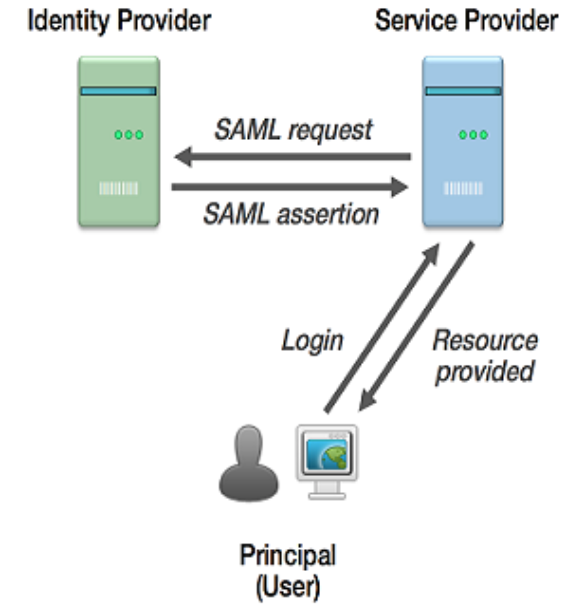
SAML roles: Identity Provider, Service Provider, and end user
A SAML login flow is easier to understand when the three main roles are clear.
- End user: The person who wants to access Salesforce.
- Identity Provider, or IdP: The trusted system that authenticates the user. It confirms who the user is.
- Service Provider, or SP: The application the user wants to access. In many Salesforce SSO configurations, Salesforce is the service provider.
The trust relationship is established before users log in. Salesforce must know which identity provider it should trust, which certificate should be used to verify the SAML response, and which user identifier should be matched to a Salesforce user record.
What information is inside a SAML assertion?
A SAML assertion is the part of a SAML response that carries statements about the user. Security Assertion Markup Language commonly uses three kinds of statements.
- Authentication statement: Confirms that the user was authenticated by the identity provider.
- Attribute statement: Sends user details such as username, email address, first name, last name, or other attributes configured by the organization.
- Authorization decision statement: Indicates whether the user is allowed to access a requested resource, when this type of statement is used.
In a Salesforce SSO configuration, the SAML assertion normally includes important values that allow Salesforce to validate the login attempt.
- Digital signature provide by Idp.
- Issuer: The name of the service Provider.
- Entity ID : The name of the service Provider
- The Subject: Salesforce.com user id.
For a clearer Salesforce explanation, think of these values as follows: the digital signature proves that the response came from the trusted identity provider; the issuer identifies the identity provider; the entity ID identifies the Salesforce service provider configuration; and the subject, often called the NameID, identifies the user who is trying to log in.
<saml:Assertion>
  <saml:Issuer>https://idp.example.com</saml:Issuer>
  <saml:Subject>
    <saml:NameID>user@example.com</saml:NameID>
  </saml:Subject>
  <saml:AttributeStatement>
    <saml:Attribute Name="FirstName">
      <saml:AttributeValue>Maria</saml:AttributeValue>
    </saml:Attribute>
  </saml:AttributeStatement>
</saml:Assertion>
The example above is only a simplified syntax demonstration. A real SAML response includes additional security, timing, destination, audience, and signature details.
How SAML works during a Salesforce login
SAML works mainly by passing trusted login information between the identity provider and the service provider. The exact flow can vary, but a common service-provider-initiated Salesforce SSO flow works like this:
- The user opens Salesforce or a Salesforce login URL.
- Salesforce identifies that SSO is configured and redirects the user to the identity provider.
- The identity provider authenticates the user using the organization’s login rules.
- The identity provider creates a SAML response that includes a SAML assertion.
- The identity provider signs the response or assertion with its certificate.
- The browser posts the SAML response back to Salesforce.
- Salesforce verifies the signature, issuer, audience, destination, timing, and user identifier.
- If the response is valid and the user can be matched, Salesforce creates a session and logs in the user.
This process is based on trust. Salesforce trusts the identity provider only after the administrator configures the correct SAML settings and certificate. If the certificate, issuer, entity ID, audience, or NameID mapping is wrong, the login can fail.
SAML protocol and SAML binding in Salesforce SSO
The SAML protocol defines the request and response messages used between the service provider and identity provider. In simple terms, it describes what messages are exchanged during SSO.
A SAML binding defines how those messages are transported. Browser-based SSO commonly uses HTTP Redirect binding for sending a SAML request and HTTP POST binding for sending the SAML response back to the service provider. The administrator does not usually write these messages manually, but understanding the binding helps when troubleshooting login problems.
How to configure SAML settings in Salesforce
We configure SAML settings in Salesforce to implement Single Sign-On. The exact values depend on the identity provider and the Salesforce org, but the setup normally follows these steps.
- Enable Single Sign-On in Salesforce: In Setup, search for Single Sign-On Settings and enable SAML if it is not already enabled.
- Create or obtain identity provider metadata: The IdP metadata usually includes the issuer, login URL, logout URL, and certificate.
- Download or upload the digital certificate: Salesforce uses the certificate to verify that the SAML response was signed by the trusted identity provider.
- Configure SAML Single Sign-On settings: Add values such as entity ID, ACS URL, issuer, certificate, NameID format, and user matching field.
- Configure the identity provider application: The identity provider must know the Salesforce ACS URL, entity ID, and user identifier mapping.
- Test with a real user: Test SSO with a Salesforce user whose federation ID, username, or mapped identifier matches the SAML assertion.
The common Salesforce user matching options include Federation ID and Username. Federation ID is often preferred in enterprise SSO because it allows the identity value to be managed separately from the Salesforce username.
Common SAML errors in Salesforce SSO setup
Most Salesforce SAML problems come from mismatched configuration values between Salesforce and the identity provider. When SSO fails, compare the SAML response with the Salesforce SSO settings.
- Invalid signature: The certificate in Salesforce may not match the certificate used by the identity provider.
- Issuer mismatch: The issuer value sent by the identity provider does not match the Salesforce SAML setting.
- Audience or entity ID mismatch: The SAML assertion is not intended for the Salesforce service provider configuration receiving it.
- NameID or user mapping mismatch: Salesforce cannot match the incoming user identifier to a Salesforce user.
- Expired assertion: The SAML response is outside the allowed time window, often because of clock or validity-period differences.
- Wrong ACS URL: The identity provider posts the SAML response to the wrong Salesforce endpoint.
SAML security points Salesforce administrators should check
SAML does not mean that every login is automatically secure. The configuration must be reviewed carefully. Administrators should check the certificate, signature requirement, user mapping, login policy, and access policy in the identity provider.
- Use a trusted certificate and replace it before it expires.
- Require signed SAML responses or signed assertions according to the organization’s security policy.
- Confirm that the assertion audience is restricted to the correct Salesforce entity ID.
- Use a stable user identifier such as Federation ID when usernames may change.
- Test both IdP-initiated and SP-initiated login flows if both are enabled.
- Keep an administrator account available for emergency access if SSO is misconfigured.
SAML FAQ for Salesforce admins
How is Security Assertion Markup Language used in Salesforce?
Security Assertion Markup Language is used in Salesforce to support Single Sign-On. The identity provider authenticates the user and sends a signed SAML response to Salesforce. Salesforce validates the response and logs in the matched user.
What is the difference between an identity provider and a service provider in SAML?
The identity provider authenticates the user. The service provider is the application the user wants to access. In a typical Salesforce SSO setup, the company identity system is the identity provider and Salesforce is the service provider.
What is a SAML assertion?
A SAML assertion is an XML section inside a SAML response. It contains trusted statements about the user, such as who authenticated the user, which user identifier is being sent, and which attributes are included.
Does SAML send the Salesforce password to the identity provider?
No. In a SAML SSO flow, the user authenticates with the identity provider. Salesforce receives a signed SAML response. The user’s Salesforce password is not passed through the SAML assertion.
Why does a Salesforce SAML login fail even when the user is active?
A Salesforce SAML login can fail if the SAML response has a wrong certificate, issuer, entity ID, ACS URL, expired timestamp, or user identifier. The Salesforce user must also be active and must match the identifier sent by the identity provider.
Editorial QA checklist for this SAML Salesforce tutorial
- Confirm that SAML is described as an XML-based standard for exchanging authentication and authorization data.
- Check that Salesforce is clearly explained as the service provider in the common SSO scenario.
- Verify that IdP, SP, assertion, issuer, entity ID, ACS URL, certificate, and NameID are explained in Salesforce admin language.
- Ensure that SAML configuration steps do not claim one universal setup for every identity provider.
- Review the troubleshooting section for Salesforce-specific SAML errors such as certificate mismatch, issuer mismatch, and user mapping failure.
Conclusion: SAML and Salesforce Single Sign-On
Security Assertion Markup Language is a trusted way to connect Salesforce with an identity provider for Single Sign-On. A correct Salesforce SAML setup depends on matching metadata, certificates, entity IDs, login URLs, and user identifiers between Salesforce and the identity provider. In our next Salesforce admin tutorial we are going to learn about How to SSO using SAMl.