 TutorialKart.com
What is Cloud Computing?
Cloud computing is the delivery of computing resources such as servers, storage, databases, networking, software, analytics, and applications over the internet. Instead of buying and maintaining all hardware and software yourself, you use resources provided by a cloud service provider and access them when needed.
In simple terms, cloud computing means using computing services through the internet. Gmail, Salesforce CRM, online file storage, streaming platforms, and hosted business applications are common examples of services that run in the cloud.
Cloud Computing Definition in Simple Words
Cloud computing separates the application that a user works with from the physical hardware and software platform that runs it. The user normally needs only a device, an internet connection, and a browser or app. The servers, storage, operating systems, databases, updates, and scaling are handled by the cloud provider or the organization running the cloud environment.
The term “cloud computing” and “working in the cloud” refer to performing computer tasks using services delivered entirely over the internet.
A widely used formal definition is the NIST definition of cloud computing, which describes cloud computing as a model for convenient, on-demand network access to a shared pool of configurable computing resources that can be rapidly provisioned and released with minimal management effort.
Cloud Computing Example: Gmail and Salesforce CRM
Gmail is a simple example of cloud computing. To send an email, you do not install and manage email servers, databases, spam filters, storage systems, and backup systems on your own computer. You open Gmail in a browser or mobile app, sign in, and use the email service over the internet.
The same idea applies to Salesforce CRM. In Salesforce.com, an organization can create an account and start using CRM features without installing a complete CRM system on its own servers. Salesforce manages the platform, application availability, upgrades, security controls, and infrastructure behind the scenes.
So, when we ask what is Cloud Computing, the practical answer is: it is a way to use computing services over the internet while reducing direct dependence on locally owned hardware and manually installed software.
Why Cloud Computing Became Useful for Business Applications
Before cloud-based applications became common, many organizations had to purchase servers, install software, configure databases, arrange backups, apply updates, and maintain infrastructure teams. This model worked, but it required upfront cost, planning, physical space, and ongoing administration.
Cloud computing changed this model by allowing businesses to consume computing services as needed. A company can start with a small amount of storage, compute power, or application access and increase usage later. This is one of the reasons cloud-based CRM, collaboration tools, analytics platforms, and development platforms became widely used.
Relationship between Cloud Computing & Salesforce
Here we are to learn about What is Cloud Computing. Before learning about Cloud computing we have to understand what is the relationship between Cloud Computing and Salesforce.com. As there are so many CRM Softwares are available in the market but why Salesforce.com is emerged world’s #1 on demand CRM.
Considering People Soft CRM it came to market in Early 1980’s and Siebel CMR it came to market in early 1990’s. These Two CRM’s are more efficient CRM and have many happy customers but why there is a transition from other CRM’s to Salesforce CRM. The main differentiating feature from other CRM’s to Salesforce CRM is Cloud Computing.
Salesforce is the worlds #1 on Demand on Cloud CRM that based on Cloud Computing. It’s on Cloud CRM. Now we understand that Salesforce CRM is based on Cloud Computing so what is Cloud Computing? what is the term Cloud Computing mean?
Example : Gmail is the best example for cloud computing. If we want to send an email simply we log on to gmail.com and send an Email. Do we require any Software and Hardware dependencies to send Email from Gmail.com. Here the application(Gmail.com) is separated from Hardware and Software dependencies. The same way Salesforce.com works. In Salesforce.com, we have to create an account and start using Salesforce.com CRM.
Hardware and Software dependencies like servers and databases are maintained by Cloud Computing Vendors.
Important Features of Cloud Computing
The main features of cloud computing explain why it is different from traditional local computing or on-premise hosting.
- Network-based access: Cloud services are accessed through a network, usually the internet.
- On-demand self-service: Users can request computing resources when needed, without waiting for manual hardware setup in many cases.
- Shared resource pooling: Cloud providers use shared infrastructure to serve many customers while keeping workloads logically separated.
- Scalability: Resources such as storage, processing power, and application capacity can be increased or reduced based on demand.
- Measured usage: Many cloud services are billed based on usage, subscription level, users, storage, or compute consumption.
- Reduced local maintenance: The provider manages much of the infrastructure, updates, availability, and backend operations depending on the service model.
- Automatic upgrades: Cloud applications can receive new features and security updates without every user manually installing software.
- Multi-tenant architecture: A single cloud platform can serve many customers while keeping customer data and configuration separate.
- Security controls: Cloud platforms provide identity, access, encryption, monitoring, and compliance tools, but customers must still configure and use them correctly.
How Cloud Computing Works Behind the Browser
When a user opens a cloud application, the visible part may look simple: a login page, dashboard, form, report, or file viewer. Behind that interface, several cloud components may be working together.
- Front-end: The browser, mobile app, or desktop client used by the customer.
- Back-end servers: Compute resources that run application logic and process requests.
- Storage systems: Databases, object storage, file systems, and backups used to store data.
- Networking: Load balancers, virtual networks, firewalls, DNS, and content delivery systems.
- Management layer: Monitoring, logging, scaling, access control, billing, and automation tools.
This is why a user may experience cloud computing as a simple web application, while the provider manages a much larger technical system in the background.
Cloud Computing Service Models: SaaS, PaaS, and IaaS
Cloud computing is commonly explained using three service models: SaaS, PaaS, and IaaS. These models describe how much responsibility is handled by the provider and how much is handled by the customer.
- SaaS (Software as a Service).
- PaaS (Platform as a Service).
- IaaS (Infrastructure as a Service).
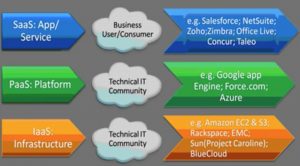
| Cloud model | What the user gets | Typical responsibility of the customer | Examples |
|---|---|---|---|
| SaaS | Ready-to-use software application | Use and configure the application | Salesforce, Gmail, Zoho, Microsoft 365 |
| PaaS | Platform for building and deploying applications | Build, deploy, and manage application code | Force.com, Google App Engine, Azure App Service |
| IaaS | Virtual servers, storage, and networking | Manage operating systems, runtime, applications, and data | Amazon EC2, cloud virtual machines, cloud storage |
SaaS (Software as a Service) in Cloud Computing
In Software as a Service model, Softwares are distributed over the cloud. No need to install software and no physical infrastructure is required. The final product or application is available in this service.
In SaaS, users access a complete application through a browser or app. The provider manages the application, servers, storage, updates, and much of the security architecture. The customer normally manages users, permissions, data, and configuration.
Examples of SaaS cloud providers.
- Salesforce.
- NetSuite.
- Zoho.
- Zimbra.
- Office Live.
- Concur.
- Taleo.
PaaS (Platform as a Service) in Cloud Computing
In Platform as a Service, the cloud service providers will provide Hardware, Storage, Network services over the cloud. Here the application is not available as a service but they provide platform to develop our application.
PaaS is useful for developers because it reduces the need to manage the full server environment. Developers can focus on code, application logic, integrations, and data models while the platform handles much of the underlying infrastructure.
Examples of PaaS cloud providers.
- Google App Engine.
- Force.com.
- Azure.
IaaS (Infrastructure as a Service) in Cloud Computing
In Infrastructure as a Service model, the cloud service providers will provide infrastructure like Servers, hosting services. Here we don’t have any final product or a platform to develop application, here we have a space to setup platform and then we have to build the application and use it.
IaaS gives more control than SaaS or PaaS. A customer can create virtual machines, attach storage, configure networks, install operating systems, and deploy applications. With that control comes more responsibility for operating system updates, application security, backups, and monitoring.
Examples of IaaS cloud providers.
- Amazon EC2 and S3.
- Rackspace.
- EMC.
- Sun(project Caroline).
- BlueCloud.
Cloud Deployment Models: Public, Private, Hybrid, and Multi-Cloud
Apart from service models, cloud computing is also classified by deployment model. This explains where the cloud runs and who uses it.
| Deployment model | Meaning | When it is used |
|---|---|---|
| Public cloud | Cloud infrastructure is provided by a third-party provider and shared across customers with logical separation. | Common for SaaS apps, web hosting, storage, analytics, and scalable workloads. |
| Private cloud | Cloud infrastructure is dedicated to one organization. | Used when an organization needs more direct control, specific compliance handling, or dedicated infrastructure. |
| Hybrid cloud | Combines private infrastructure with public cloud services. | Used when some systems stay on-premise while others run in the cloud. |
| Multi-cloud | Uses services from more than one cloud provider. | Used for flexibility, vendor-specific services, availability strategy, or business requirements. |
Benefits of Cloud Computing for Students, Developers, and Businesses
- Lower initial infrastructure cost: Users can start without buying large amounts of hardware.
- Faster setup: Servers, databases, applications, and storage can often be created quickly.
- Flexible scaling: Resources can be increased or decreased as usage changes.
- Access from different locations: Users can access cloud applications from supported devices through the internet.
- Managed updates: Many cloud services include platform updates, patches, and new features.
- Backup and recovery options: Cloud platforms usually provide tools for snapshots, backups, replication, and disaster recovery planning.
- Development speed: Developers can use managed databases, APIs, authentication, storage, and deployment tools instead of building everything from scratch.
Cloud Computing Limitations and Responsibilities
Cloud computing reduces many infrastructure tasks, but it does not remove all responsibility from the customer. The exact responsibility depends on whether the service is SaaS, PaaS, or IaaS.
- Internet dependency: Many cloud services require a reliable internet connection.
- Configuration mistakes: Weak passwords, excessive permissions, exposed storage, and poor access control can create security risks.
- Cost monitoring: Usage-based services must be monitored to avoid unexpected charges.
- Data governance: Organizations must understand where data is stored, who can access it, and how long it is retained.
- Vendor dependence: Moving applications and data between providers may require planning and technical effort.
- Shared responsibility: The provider secures the cloud infrastructure, but customers still need to secure accounts, data, access policies, and application-level settings.
Cloud Computing and AI: Are They the Same?
Cloud computing and artificial intelligence are not the same. Cloud computing provides infrastructure, platforms, storage, networking, and software delivery over the internet. AI uses algorithms and data to perform tasks such as prediction, classification, natural language processing, image recognition, recommendation, and automation.
AI does not replace cloud computing. In many real systems, AI depends on cloud computing because AI workloads often require scalable storage, powerful compute resources, GPUs, managed data platforms, and deployment infrastructure. At the same time, cloud platforms use AI to improve monitoring, security, automation, analytics, and support services.
Cloud Computing Quick Comparison with Traditional On-Premise IT
| Point | Traditional on-premise IT | Cloud computing |
|---|---|---|
| Hardware | Owned and maintained by the organization | Provided by a cloud provider or managed cloud environment |
| Setup time | Can take longer because hardware and software must be arranged | Resources can often be provisioned quickly |
| Scaling | Requires new hardware or capacity planning | Can scale based on service limits and configuration |
| Cost model | Higher upfront purchase and maintenance cost | Subscription or usage-based cost is common |
| Maintenance | Handled mostly by the organization | Shared between provider and customer depending on the model |
Common Cloud Computing Terms Beginners Should Know
- Virtual machine: A software-based computer that runs on cloud infrastructure.
- Storage bucket: A cloud storage container used to store files or objects.
- Region: A geographic area where a cloud provider has data centers.
- Availability zone: A separate data center location within a region, used to improve reliability.
- API: A programming interface used by applications to communicate with cloud services.
- Elasticity: The ability to add or remove resources as demand changes.
- Uptime: The amount of time a service is available and operational.
- Identity and access management: Tools used to control who can access cloud resources and what actions they can perform.
Cloud Computing Learning Path After This Tutorial
After understanding the definition and features of cloud computing, a beginner can learn the topic in this order:
- Understand the difference between SaaS, PaaS, and IaaS.
- Learn the difference between public cloud, private cloud, hybrid cloud, and multi-cloud.
- Study basic networking terms such as IP address, DNS, firewall, VPN, and load balancer.
- Learn cloud security basics such as authentication, authorization, encryption, and least privilege access.
- Try a simple cloud application such as hosted CRM, cloud storage, or a basic virtual machine.
- Understand cloud cost monitoring, backups, logging, and disaster recovery basics.
Cloud Computing FAQ
What is cloud computing in one sentence?
Cloud computing is the delivery of computing services such as servers, storage, databases, software, and applications over the internet instead of running everything on local computers or privately owned servers.
What is the best example of cloud computing?
Gmail is an easy example because users send, receive, and store email through the internet without managing email servers themselves. Salesforce CRM is another example because companies use CRM features through the cloud instead of installing the full CRM system locally.
What are the three main cloud computing service models?
The three main cloud computing service models are SaaS, PaaS, and IaaS. SaaS provides complete software, PaaS provides a platform for building applications, and IaaS provides infrastructure such as virtual servers, storage, and networking.
Is AI replacing cloud computing?
No. AI and cloud computing solve different problems. AI uses data and algorithms to perform intelligent tasks, while cloud computing provides the infrastructure and platforms that often run AI workloads. In many cases, AI systems need cloud computing for scalable storage, processing power, and deployment.
Is cloud computing secure?
Cloud computing can be secure when the provider and customer both follow correct security practices. Providers secure the underlying infrastructure, but customers must manage passwords, user access, permissions, data protection, application configuration, and monitoring carefully.
Editorial QA Checklist for This Cloud Computing Tutorial
- Does the tutorial define cloud computing clearly before discussing history or examples?
- Are SaaS, PaaS, and IaaS explained with the customer responsibility difference?
- Does the Salesforce example show why CRM can be delivered as a cloud application?
- Are cloud benefits balanced with limitations such as cost monitoring, configuration mistakes, and shared responsibility?
- Does the AI section clearly state that AI and cloud computing are different but often used together?
- Are headings specific to cloud computing instead of generic section labels?