 TutorialKart.com
A Salesforce sandbox is an isolated copy of a Salesforce production org that teams use for development, testing, training, integration work, and release validation. A sandbox starts from production metadata, such as objects, fields, automation, Apex, Lightning pages, profiles, permission sets, and other setup configuration. Production record data is copied only for sandbox types that support data copy, such as Partial Copy and Full sandboxes.
The important point is isolation: work done in a Salesforce sandbox does not change the Salesforce production org until it is deliberately deployed or recreated in production. A sandbox is also a snapshot from the time it was created or refreshed. It is not automatically synchronized with production after that point.
What is Salesforce Sandbox?
Salesforce Sandbox is a separate Salesforce environment created from your production organization so admins, developers, QA teams, and trainers can make changes safely. It lets you test configuration changes, Apex code, Lightning Web Components, Flow updates, integrations, managed packages, and user training scenarios without affecting live users or live business data.
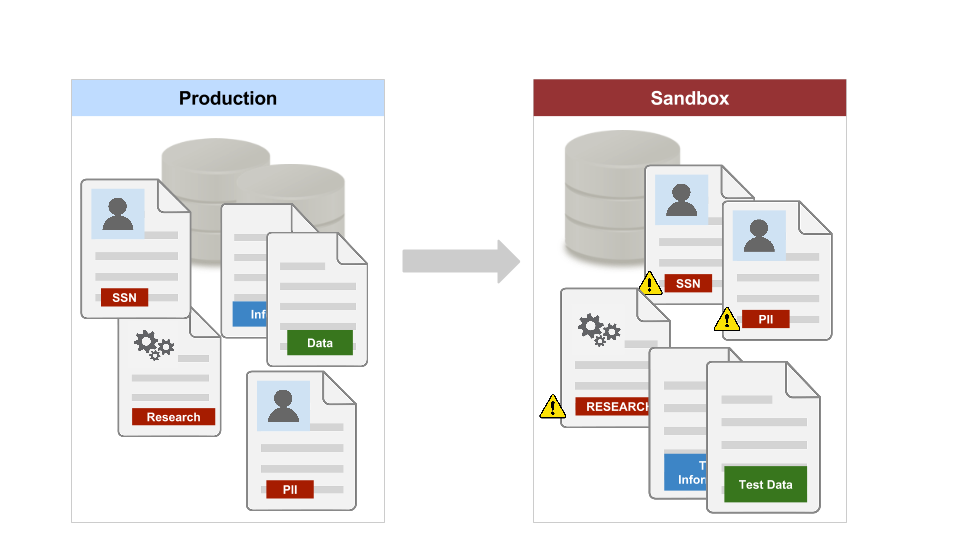
Salesforce Sandbox vs Production Org: Main Difference
A Salesforce production org is the live environment used by business users. A Salesforce sandbox is a non-production environment used to prepare and verify changes before those changes reach production.
| Area | Salesforce production org | Salesforce sandbox |
|---|---|---|
| Main purpose | Live business operations | Development, testing, QA, training, and staging |
| Users affected | Real users and customers can be affected | Only sandbox users are affected |
| Data | Current live business data | Metadata only, sample data, or copied production data depending on sandbox type |
| Change safety | Changes must be controlled carefully | Changes can be tested before deployment |
| Sync behavior | Source of truth for live org | Snapshot created or refreshed from production; not automatically synced afterward |
Types of Salesforce Sandboxes: Developer, Developer Pro, Partial Copy, and Full
Salesforce provides different sandbox types so teams can choose the right balance of speed, storage, copied data, and release risk. The four commonly used sandbox types are Developer, Developer Pro, Partial Copy, and Full.
| Salesforce sandbox type | What it copies | Best use | Typical refresh interval |
|---|---|---|---|
| Developer Sandbox | Production metadata only | Individual development, configuration changes, Apex tests, Flow testing, and small proof-of-concept work | Once per day |
| Developer Pro Sandbox | Production metadata only, with more storage than Developer | Larger development work, integration setup, package testing, and team testing where more space is needed | Once per day |
| Partial Copy Sandbox | Production metadata and a selected sample of production data based on a sandbox template | User acceptance testing, regression testing, role-based testing, and realistic business scenarios without copying all production data | Every 5 days |
| Full Sandbox | Production metadata and production data | Staging, performance testing, final release validation, data migration testing, and training that needs production-like records | Every 29 days |
Refresh intervals and storage limits can change based on Salesforce edition, purchased add-ons, and current Salesforce licensing. For current details, verify the sandbox limits in Salesforce Setup and the official Salesforce Help pages for sandbox licenses and storage limits and sandbox refresh intervals.
When to Use Each Salesforce Sandbox Type
Choose the Salesforce sandbox type based on the work being performed, not just on the size of the environment. A small metadata-only sandbox is often enough for development, while a production-like sandbox is better for final validation and training.
- Use a Developer Sandbox for building and unit testing individual changes such as fields, validation rules, record-triggered flows, Apex classes, or Lightning pages.
- Use a Developer Pro Sandbox when development or integration testing needs more storage than a Developer sandbox provides.
- Use a Partial Copy Sandbox when testers need realistic sample records, related records, profiles, sharing behavior, and approval paths without copying the full production database.
- Use a Full Sandbox when release teams need a production-like environment for staging, performance testing, end-to-end testing, or complex data migration rehearsal.
How Salesforce Sandbox Refresh Works
Refreshing a Salesforce sandbox replaces the sandbox with a new copy taken from production. After a refresh, the sandbox receives current production metadata and, depending on the sandbox type, selected or full production data. Any configuration, code, or record data that existed only in the sandbox can be overwritten during refresh.
- Developer and Developer Pro sandboxes can usually be refreshed once per day.
- Partial Copy sandboxes can usually be refreshed every 5 days.
- Full sandboxes can usually be refreshed every 29 days.
- A sandbox does not receive later production changes unless you refresh it or deploy those changes into the sandbox.
- Before refreshing, export or commit any sandbox-only work that must be preserved.
Steps to Create a Salesforce Sandbox from Setup
Admins with the required permissions can create a sandbox from Salesforce Setup. The exact options depend on your org edition, available sandbox licenses, and the sandbox types already in use.
- Open Setup in the Salesforce production org.
- Search for Sandboxes in the Quick Find box.
- Select New Sandbox.
- Enter a sandbox name and description that clearly identify its purpose, such as Dev, QA, UAT, Training, or Staging.
- Select the sandbox type: Developer, Developer Pro, Partial Copy, or Full.
- For Partial Copy, choose a sandbox template that controls which objects and related data are copied.
- Review the options and start sandbox creation.
- After the sandbox is ready, log in, verify users and permissions, check integrations, and complete post-refresh steps.
Salesforce also provides a detailed official introduction to deploying with sandboxes, including how sandbox environments fit into the release process.
Why Salesforce Sandbox Is Not a Production Backup
Salesforce Sandbox is useful for development, testing, quality assurance, staging, and training. It should not be treated as a formal backup of production data or configuration.
- A Full sandbox has a longer refresh interval than smaller sandbox types, so it cannot be refreshed whenever a backup is needed.
- Full sandbox availability and cost depend on the Salesforce edition, contract, and purchased sandbox add-ons.
- Sandbox data may be changed by testers, developers, integrations, refreshes, and post-refresh scripts, so it may not remain an accurate recovery copy.
A sandbox can be refreshed, overwritten, deleted, or repurposed. It may also contain changed metadata, test data, masked data, or incomplete data. For backup and recovery planning, use a proper Salesforce backup strategy instead of relying on a sandbox copy.
Salesforce Sandbox Deployment Flow for Safer Releases
Most Salesforce teams use multiple sandboxes to reduce release risk. A common flow is to build in a Developer sandbox, test in a QA or Partial Copy sandbox, validate in a Full sandbox, and then deploy approved changes to production.
- Development: Build metadata changes such as fields, objects, flows, Apex, validation rules, and Lightning pages.
- Integration testing: Verify connected systems, named credentials, external services, middleware, and API behavior in a controlled environment.
- User acceptance testing: Let business users confirm that the changes work for real business scenarios.
- Staging: Validate the final release package in an environment close to production.
- Production deployment: Move approved metadata using Change Sets, Salesforce CLI, DevOps Center, Metadata API tools, or another governed deployment process.
Salesforce Sandbox Best Practices for Admins and Developers
- Name each sandbox by purpose: Use names such as DEV, QA, UAT, TRAINING, and STAGING so users understand the role of each environment.
- Document the refresh date: Add the refresh date and source org details in the sandbox description or release notes.
- Protect sensitive data: Mask or limit production data in sandboxes when real customer or employee data is not required.
- Disable risky integrations: Review email deliverability, scheduled jobs, outbound messages, webhooks, API credentials, and payment or ERP integrations after refresh.
- Use source control for code: Keep Apex, Lightning Web Components, and metadata changes in version control instead of relying only on a sandbox copy.
- Run tests before deployment: Execute Apex tests, Flow tests, regression checks, and integration checks before moving changes to production.
- Plan refresh timing: Do not refresh a sandbox while active development or UAT work exists only in that sandbox.
Common Salesforce Sandbox Mistakes to Avoid
- Assuming sandbox and production stay synchronized: They do not. A sandbox reflects production only at creation or refresh time.
- Refreshing without saving work: Sandbox-only metadata and records can be overwritten during refresh.
- Using Full sandbox for every task: Development and unit testing often work better in smaller sandboxes that refresh more frequently.
- Testing integrations with production endpoints: Connected systems should be reviewed carefully so sandbox tests do not update live external systems.
- Ignoring data privacy: A sandbox with copied production data still needs access control and data protection.
Salesforce Sandbox FAQ
What is the difference between Salesforce and Salesforce sandbox?
Salesforce production is the live org used for real business work. A Salesforce sandbox is a separate non-production copy used for development, testing, training, and release validation. Changes in a sandbox do not affect production until they are deployed or manually recreated in production.
How many sandboxes are there in Salesforce?
Salesforce commonly provides four sandbox types: Developer, Developer Pro, Partial Copy, and Full. The number of sandbox environments your org can create depends on your Salesforce edition, included licenses, and any additional sandbox purchases.
How much does a Salesforce Full Sandbox cost?
Salesforce Full Sandbox pricing and entitlement depend on the edition, contract, and add-ons for the customer org. Some editions or packages may include Full sandboxes, while other orgs may need to purchase them separately. Check your Salesforce contract, Setup sandbox license usage, or Salesforce account team for the current cost.
What is a sandbox and why is it used in Salesforce?
A sandbox is an isolated environment where teams can safely build, test, and train before changing the live Salesforce production org. It is used to reduce release risk, validate business processes, test automations, verify integrations, and train users without affecting live data.
Does refreshing a Salesforce sandbox delete existing sandbox changes?
Yes, a refresh can overwrite changes and records that exist only in the sandbox. Before refreshing, save required metadata in source control, deploy it elsewhere, export needed test data, or document anything that must be recreated.
Salesforce Sandbox Editorial QA Checklist
- Confirm that the article clearly distinguishes Salesforce production from Salesforce sandbox.
- Verify that the four sandbox types are described accurately: Developer, Developer Pro, Partial Copy, and Full.
- Check that refresh intervals are current: Developer and Developer Pro daily, Partial Copy every 5 days, and Full every 29 days.
- Make sure the tutorial does not present a sandbox as a replacement for a backup and recovery plan.
- Confirm that official Salesforce Help links are used for sandbox limits, refresh intervals, and deployment guidance.