 TutorialKart.com
In this Salesforce tutorial, we are going to learn about value provider and global value providers in Salesforce Lightning Aura components. In our previous Salesforce lightning, we learned about expressions in lightning components.
A value provider is the part of an Aura expression that tells Salesforce where a value or action comes from. For example, {!v.accountName} reads a component attribute, while {!c.handleClick} points to a client-side controller action. Global value providers such as $Browser, $Locale, $Label, and $Resource expose framework-level values that are available in Aura markup without defining a component attribute first.
What is a value provider in Salesforce Lightning Aura?
Value Providers in lightning Component encapsulate related values together and used to access data. In Salesforce lightning, we have two value providers for a component they are v (View) and c (Controller).
In practical Aura development, you see value providers inside expressions written with the {!…} syntax. The first part of the expression, such as v, c, or $Locale, identifies the source. The rest of the expression identifies the attribute, action, label, static resource, locale setting, or browser property that should be used.
| Expression example | Value provider | What it accesses |
|---|---|---|
| {!v.prasanth} | v | A component attribute named prasanth. |
| {!c.saveRecord} | c | A client-side controller action named saveRecord. |
| {!$Browser.isPhone} | $Browser | Information about the user’s browser or device form factor. |
| {!$Locale.language} | $Locale | The user’s locale-related settings. |
v value provider for Aura component attributes
Using this Value provider, user can access the values of a lightning components attribute in the component markup.
The v value provider is the most common value provider in beginner Aura examples. It reads values declared with <aura:attribute>. If the attribute value changes, the expression can update the rendered markup where it is used.
Example
<aura:application>
    <aura:attribute name="prasanth" type="String" default="world"/>
    Hello {!v.prasanth}!
</aura:application>
As shown above, the name of the attribute is defined as “prasanth”, where v is the value provider for a component attribute which represent the view.
When the application renders, {!v.prasanth} is replaced with the current value of the prasanth attribute. Because the default value is world, the visible text becomes Hello world!.
Hello world!c value provider for Aura client-side controller actions
c (Controller) Value Provider enables us to wire up event handlers and action for the component. Client side controller handles events within a component. It’s a JavaScript resource that defined the functions for all of the components actions.
The c value provider is usually used in markup when you need to connect a component event to a JavaScript controller method. The expression does not call the function immediately while the markup is read. It points the framework to the action that should run when the event occurs.
<aura:component>
    <aura:attribute name="message" type="String" default="Not clicked" />
    <lightning:button label="Click" onclick="{!c.handleClick}" />
    <p>{!v.message}</p>
</aura:component>({
handleClick : function(component, event, helper) {
component.set("v.message", "Button clicked");
}
})In the markup, {!c.handleClick} connects the button click to the JavaScript controller method. Inside JavaScript, the attribute is changed with component.set(“v.message”, “Button clicked”), not with the {!…} expression syntax.
What are global value providers in Lightning components?
Global Value providers in lightning components are global values and methods that a component can use in expression.
Unlike v, global value providers do not come from attributes declared in the component. They are provided by the Aura framework and can be referenced directly in component markup. They are useful for device checks, locale-aware formatting decisions, custom labels, static resources, and content assets.
In Salesforce, we have five global value providers they are
| Global value provider | Description |
| globalID | It returns global ID for a component and every component will have unique globalId. |
| $Browser | This return information about system hardware and Operating system. |
| $Label | The $Label global value provider enables you to access labels stored outside your code. |
| $Locale | It returns the information about current user’s preferred locale. |
| $Resource | This provider lets you reference images, style sheets and JSP. |
The table above covers the commonly used global value providers in Aura. In current Salesforce documentation, you may also see $ContentAsset for content asset references. In modern Salesforce development, Lightning Web Components do not use Aura global value providers in the same way; LWC uses JavaScript imports and platform modules instead.
$Browser global value provider for device and form factor checks
The $Browser global value provider returns browser and device-related values that can be used in Aura expressions. It is commonly used when a component needs to adjust a small part of its markup for phone, tablet, Android, iOS, or desktop-like form factors.
Lightning component
<aura:component>
    Browser is on Tablet : {!$Browser.isTablet}<br></br>
    Is it running of IOS : {!$Browser.isIOS}<br></br>
    IS the mobile device is Iphone : {!$Browser.isPhone}<br></br>
    Is it running on Android : {!$Browser.isAndroid}<br></br>
    Where I am running : {!$Browser.formFactor}<br></br>
</aura:component>
Output
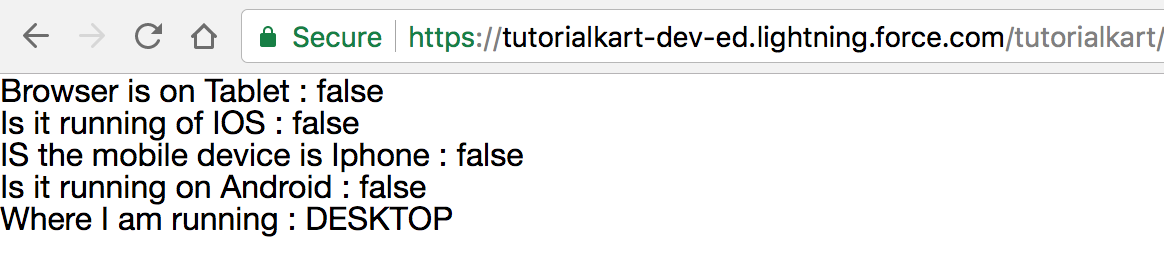
The exact output depends on where the component is running. For example, {!$Browser.isPhone} returns a Boolean value, and {!$Browser.formFactor} returns the detected form factor value.
$Label global value provider for custom labels in Aura
The $Label global value provider lets an Aura component read Salesforce custom labels. This is useful when text must be managed outside the component source code, especially for translated or reusable UI text.
<aura:component>
    <p>{!$Label.c.Welcome_Message}</p>
</aura:component>
In this example, c represents the default custom label namespace, and Welcome_Message is the custom label name. In a managed package, the namespace part may be different.
$Locale global value provider for user locale values
The $Locale global value provider exposes locale-related information for the current user. It can be used when Aura markup needs to display or branch based on values such as language, country, currency, date format, or time zone settings.
<aura:component>
    <p>Language: {!$Locale.language}</p>
    <p>Country: {!$Locale.country}</p>
    <p>Timezone: {!$Locale.timezone}</p>
</aura:component>
Use $Locale for display decisions only. If business logic depends on locale, keep that logic clear and test it separately instead of hiding too much logic inside markup expressions.
$Resource global value provider for static resources
The $Resource global value provider is used to reference files uploaded as Salesforce static resources. These files can include images, CSS files, JavaScript files, and zipped resource bundles.
<aura:component>
    <img src="{!$Resource.CompanyLogo}" alt="Company logo" />
</aura:component>
If the static resource is a zipped folder, combine the resource reference with the path inside the archive. Keep resource names stable so that components do not break when files are reorganized.
$ContentAsset global value provider for Salesforce content assets
The $ContentAsset global value provider is used for referencing Salesforce content assets from Aura markup. Use it when your asset is managed as a content asset rather than as a static resource.
<aura:component>
    <img src="{!$ContentAsset.SiteLogo}" alt="Site logo" />
</aura:component>
Choose $Resource for static resources and $ContentAsset for content assets. The right provider depends on how the file is stored in Salesforce.
Value provider syntax rules in Aura expressions
- Use {!…} in Aura markup: Expressions such as {!v.name} and {!$Browser.isPhone} are written in component markup.
- Use component APIs in JavaScript: In a controller or helper, use component.get(“v.name”) and component.set(“v.name”, value).
- Use the correct provider for the source: Use v for attributes, c for controller actions, $Label for labels, $Resource for static resources, and $Locale for locale values.
- Keep expressions readable: Avoid placing complex logic directly inside markup. Store the final value in an attribute when the expression becomes hard to read.
Common mistakes with Salesforce Lightning value providers
- Confusing v and c: v reads component attributes, while c points to controller actions.
- Using Aura global value providers in LWC: Lightning Web Components use JavaScript imports and LWC-specific modules instead of Aura expression value providers.
- Hard-coding text instead of using $Label: Use custom labels when text must be translated or maintained centrally.
- Using $Browser for major layout decisions only: Prefer responsive CSS for general layout. Use $Browser only when a component needs a framework-provided device or form factor value.
- Referencing the wrong asset provider: Static resources and content assets are referenced through different global value providers.
Official Salesforce references for Aura value providers
For deeper reference, see Salesforce documentation on Aura expression value providers, $Resource, $Locale, $ContentAsset, and migrating global value providers to Lightning Web Components.
Value Provider and Global Value Providers FAQs
What is the difference between v and c value providers in Aura?
v accesses component attributes declared with <aura:attribute>. c references client-side controller actions, usually for event handlers such as button clicks.
What does $Browser do in Salesforce Lightning components?
$Browser exposes browser and device-related values, such as whether the component is running on a phone, tablet, Android, iOS, or a specific form factor.
When should I use $Label in an Aura component?
Use $Label when UI text should come from Salesforce custom labels instead of being hard-coded in the component. This is especially useful for reusable and translated text.
Are Aura global value providers used the same way in Lightning Web Components?
No. Lightning Web Components do not use Aura expression global value providers in the same markup style. LWC uses JavaScript imports, scoped modules, and component properties instead.
Should I use $Resource or $ContentAsset for images in Salesforce?
Use $Resource when the image is stored as a static resource. Use $ContentAsset when the image is stored as a Salesforce content asset.
Editorial QA Checklist for Salesforce Lightning value providers
- Verify that v and c are explained as component-level value providers, not global value providers.
- Confirm that each global provider example matches its source: $Browser, $Label, $Locale, $Resource, and $ContentAsset.
- Check that all new code examples use PrismJS-compatible classes such as language-xml syntax, language-javascript syntax, or output.
- Ensure the existing image URL and existing code blocks remain unchanged.
- Review the official Salesforce documentation links before updating this tutorial for future Aura or LWC migration changes.