 TutorialKart.com
Salesforce Einstein is the artificial intelligence layer built into the Salesforce platform. It helps teams use CRM data to discover patterns, predict outcomes, recommend next actions, generate useful content, and automate selected work inside sales, service, marketing, commerce, and analytics processes. In practical terms, Einstein brings AI into the daily Customer Relationship Management tasks that users already perform in Salesforce.
The name Salesforce Einstein can refer to several related AI capabilities. Some are predictive, such as lead scoring or opportunity insights. Some are generative, such as drafting summaries, replies, or CRM record updates. Salesforce also uses Einstein with Agentforce and the Einstein Trust Layer to support AI agents and grounded responses based on business data. Exact features depend on the Salesforce products, licenses, data setup, and permissions enabled in an organization.
What is Salesforce Einstein in Salesforce CRM?
Salesforce Einstein is a layer within the Salesforce platform that infuses Artificial Intelligence(AI) features and capabilities across Salesforce Clouds. Einstein takes care of the data prep, modeling, and infrastructure needed to embed and scale predictive models throughout your Salesforce workflows.
For administrators and business users, the main value of Salesforce Einstein is that AI appears close to the CRM record or workflow where the decision is made. A sales representative may see a lead score or a suggested next step. A service agent may receive a case summary or recommended reply. A manager may use analytics to identify the factors that influence a business outcome. These features are useful only when the underlying Salesforce data is accurate, relevant, and governed properly.
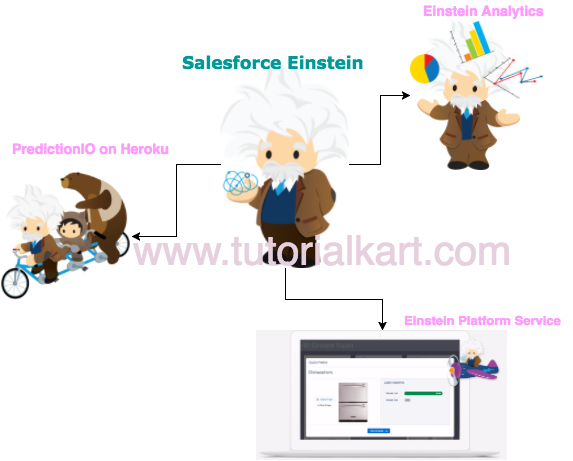
How Salesforce Einstein AI fits with Agentforce, generative AI, and CRM data
Salesforce AI has expanded from classic predictive features into generative AI and AI agents. Einstein remains the AI foundation used across Salesforce applications, while Agentforce focuses on building and using autonomous agents that can reason, answer questions, and take actions in connected business processes. The Salesforce artificial intelligence overview and Trailhead Einstein AI learning trail are useful official starting points for current product direction.
A simple way to understand the relationship is this: Salesforce records provide the business context, Einstein provides AI capabilities, the trust and security layer controls how data is used, and Agentforce can use those capabilities to assist or act within defined business boundaries. This does not remove the need for configuration, testing, user training, and data governance.
Core Salesforce Einstein capabilities for CRM users
Salesforce Einstein features vary by cloud and edition, but most capabilities fall into four practical groups:
- Predict: use CRM data to estimate likely outcomes, such as whether a lead may convert or an opportunity may close.
- Recommend: suggest the next best action, content, offer, or response based on the record context and business rules.
- Generate: draft summaries, emails, replies, descriptions, or other CRM text with user review before use.
- Automate: reduce repeated manual steps by combining AI output with Salesforce automation, approvals, flows, or agent actions.
These capabilities should be treated as decision support, not as a replacement for business judgment. Users should review AI-generated text, confirm predictions against known account context, and follow company policies for customer data.
Salesforce Einstein Vision for image recognition use cases
Salesforce.com has released add-ons for image recognition for Heroku. Salesforce Einstein Vision enables you to tap into the power of Artificial Intelligence (AI) and train deep learning models to recognize and classify images at scale. Image recognition can be helpful for marketers, sales teams, and Service Cloud users when the business process depends on visual information. For example, image recognition may support retail inventory checks, product categorization, visual search, and remote evaluation of product issues.
Before using image recognition in a production Salesforce process, define what the model must identify, collect representative training images, test the results on real-world examples, and decide what a user should do when the prediction confidence is low.
Salesforce Einstein Discovery for predictive analytics and explanations
SFDC Einstein Data Discovery platform uses Natural Language Processing (NLP) and machine learning to generate stories that are exported to the CSV or Salesforce Analytics Cloud. To discover insights from huge volume datasets, organizations previously required data scientists who could apply mathematical models to find hidden patterns in data. Using Einstein Discovery, teams can analyze many dataset combinations and identify factors that may influence an outcome.
Einstein Discovery is most useful when the dataset has a clear outcome field, enough historical examples, and trusted fields that explain the business process. For example, a team might analyze why cases breach service targets, why opportunities are lost, or which account attributes are associated with higher renewal risk.
Salesforce Einstein examples across Sales Cloud, Service Cloud, and Marketing
| Salesforce area | Einstein AI use case | What the user should verify |
|---|---|---|
| Sales Cloud | Lead scoring, opportunity insights, forecast support, email drafting, and account summaries. | Data quality, sales stage definitions, activity capture, and whether the recommendation matches account context. |
| Service Cloud | Case classification, suggested replies, article recommendations, case summaries, and agent assistance. | Knowledge article accuracy, escalation rules, customer tone, and privacy requirements for support data. |
| Marketing and Commerce | Product recommendations, audience insights, content suggestions, and customer engagement analysis. | Consent rules, segmentation logic, personalization limits, and campaign performance data. |
| Analytics and platform teams | Predictive analysis, AI-assisted data exploration, prompt configuration, and agent actions. | Model inputs, permissions, test results, audit needs, and how AI output is used in automation. |
Salesforce Einstein setup considerations before enabling AI features
Salesforce Einstein feature must be enabled in Salesforce and assigned to the right users. In many orgs, the setup work is less about switching on a feature and more about preparing the CRM process around it. Review these items before rolling Einstein out to a team:
- Data readiness: check duplicate records, missing fields, inconsistent stages, and outdated picklist values.
- Security and access: confirm that users only see AI outputs based on data they are allowed to access.
- Business objective: define the outcome clearly, such as improving lead prioritization, reducing case handling time, or summarizing customer interactions.
- User review: decide which AI suggestions require human approval before they are sent to customers or used in automation.
- Testing and monitoring: compare AI output with actual outcomes and refine the configuration when business conditions change.
Salesforce Einstein learning path for administrators and developers
If you are new to Salesforce AI, begin with the CRM concepts first, then move into Einstein features. A practical learning order is to understand Salesforce objects and records, review automation basics, study Einstein use cases, and then learn prompt, agent, or analytics features as required by your project. Trailhead provides guided modules such as Drive Productivity with Einstein AI and Get Started with Einstein Generative AI.
Developers and architects should also understand how Salesforce permissions, data model design, integration patterns, and automation affect AI output. A prompt or agent is only as reliable as the data, instructions, and access controls behind it.
Salesforce Einstein features summary
Some of the commonly discussed Salesforce Einstein feature groups are:
- Discover: insights that bring clearer understanding of customers, cases, opportunities, and business trends.
- Predict: likely outcomes so users can prioritize work and make better informed decisions.
- Recommend: next actions, content, offers, or responses that fit the record context.
- Generate: draft text, summaries, and CRM content that users can review and edit.
- Automate: streamlined tasks that help users focus on customer conversations and higher-value work.
Salesforce Einstein FAQ
Is Salesforce Einstein the same as Salesforce AI?
Salesforce Einstein is a major part of Salesforce AI, but the broader Salesforce AI portfolio also includes generative AI, trust controls, Agentforce, analytics features, and AI capabilities across different Salesforce products.
Do I need coding knowledge to use Salesforce Einstein?
Many Einstein features are designed for administrators and business users through Salesforce setup and configuration. Developers may be needed for advanced integrations, custom automation, model-related work, or complex Agentforce actions.
What data does Salesforce Einstein need to make useful predictions?
Einstein works best with accurate historical CRM data, consistent field values, enough examples of the outcome being predicted, and a clear business process. Poor data quality usually leads to weak recommendations or predictions.
How is Einstein Discovery different from Einstein generative AI?
Einstein Discovery focuses on predictive analytics and explaining factors that influence outcomes. Einstein generative AI focuses on creating or summarizing text and helping users work with CRM information through prompts, assistants, or agents.
Should Salesforce Einstein automatically act on every recommendation?
No. Sensitive actions should usually require human review, clear rules, and testing. Automation is useful when the process is well understood, the data is reliable, and the organization has defined what should happen when AI confidence is low.
Editorial QA checklist for Salesforce Einstein content
- Confirm that the page explains Salesforce Einstein as CRM AI, not as a separate CRM product.
- Check that predictive AI, generative AI, Einstein Discovery, Einstein Vision, and Agentforce are described with clear boundaries.
- Verify that setup guidance mentions data quality, permissions, user review, and testing before production use.
- Avoid unsupported claims about exact pricing, availability, performance improvement, or feature entitlement.
- Ensure all official Salesforce and Trailhead links are still relevant and all existing Tutorialkart links remain unchanged.