 TutorialKart.com
In this SAP FICO tutorial, you will learn how to define accounts for exchange differences in SAP using transaction code OB09. This configuration is required so that the system can automatically post exchange rate gains and losses when open items are cleared in foreign currency. In the previous training, we learned how to maintain exchange rates for G, B, and M exchange rate types.
Purpose of defining exchange difference accounts in SAP
When foreign currency open items are posted and later cleared, the exchange rate on the original posting date and the exchange rate on the clearing date may be different. The SAP system calculates this difference and automatically posts it to the exchange rate difference accounts assigned in account determination.
For example, if a vendor invoice is posted in USD and cleared later when the USD to local currency rate has changed, SAP must post the realized foreign exchange gain or loss to the correct G/L account. For this, you create or identify the relevant G/L accounts and assign them for open item exchange rate differences using transaction code OB09.
How to define accounts for exchange differences in SAP
In order to handle exchange rate fluctuations, you need to define accounts for exchange rate differences and maintain automatic account determination. This allows SAP to post realized exchange gain or loss during open item clearing without manual account selection.
You can define accounts for exchange differences by using one of the following navigation methods.
- Transaction code: – OB09
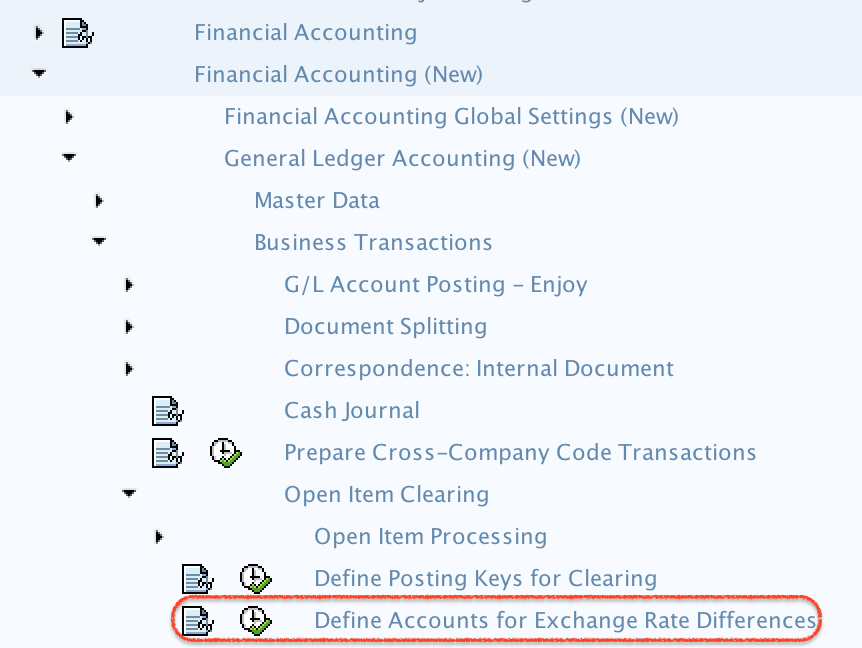
- Menu Path: – SPRO –> SAP Reference img –> Financial Accounting (New) –> General Ledger Accounting (New) –> Business Transactions –> Open Item Clearing –> Define accounts for exchange differences.
Before maintaining OB09 exchange difference accounts
Before starting the OB09 configuration, make sure the required G/L accounts are already created in the chart of accounts and company code. The accounts should be suitable for posting realized foreign exchange gains and losses. Also confirm that the relevant foreign currency accounts are managed as open item accounts where required.
- Confirm the chart of accounts used by the company code.
- Identify the G/L account for which open item exchange difference account determination is required.
- Create or verify separate gain and loss G/L accounts if your accounting policy requires separate reporting.
- Check whether the configuration is required for all currencies or only for a specific currency.
- Confirm whether the exchange difference is related to open item clearing and not a separate foreign currency valuation setup.
OB09 configuration steps for exchange rate difference accounts
Step 1) Follow the menu path and double click on Define accounts for exchange rate difference.
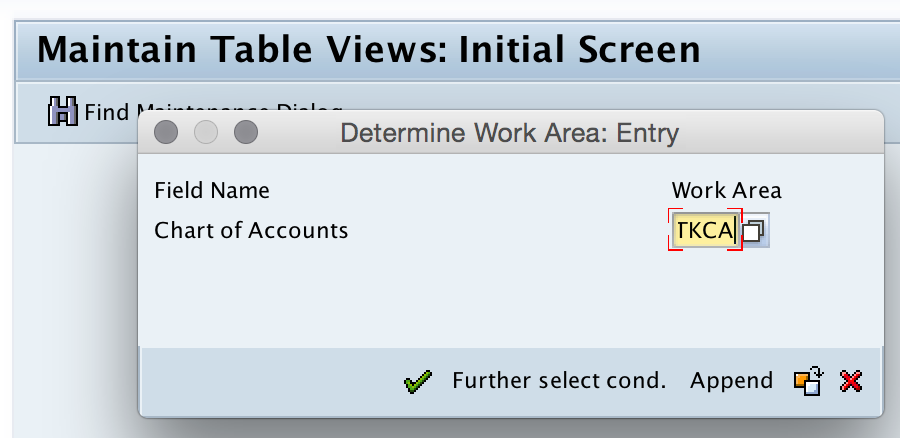
Step 2) Enter the chart of accounts key in the work area field and continue.
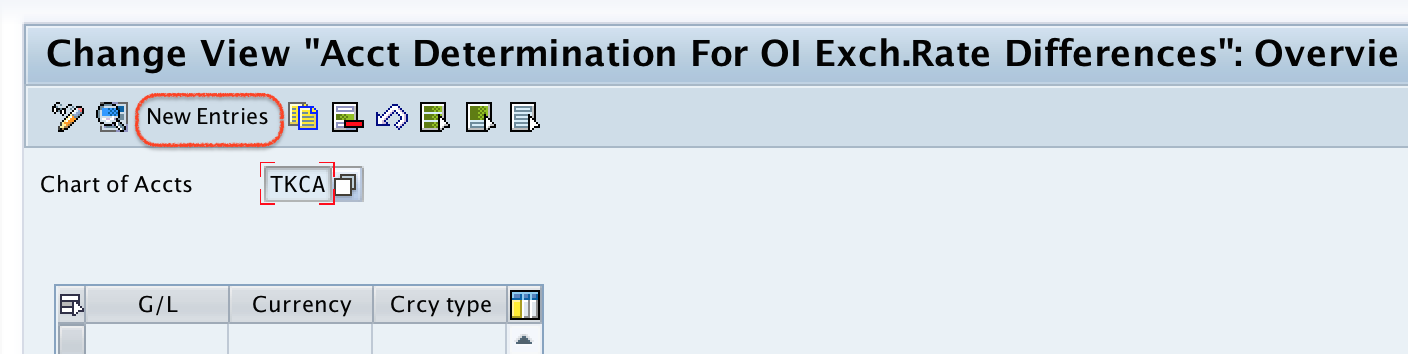
Step 3) On the Change View Account Determination for OI Exchange Rate Difference: Overview screen, click the New Entries button to maintain the accounts for exchange rate differences.
Step 4) On the new entries screen, update the required account determination fields.
| OB09 field | What to maintain | Purpose in exchange difference posting |
|---|---|---|
| G/L Account | Enter the general ledger account for which exchange differences are to be calculated. | SAP uses this as the source account for open item clearing difference determination. |
| Currency | Enter the currency key, if account determination should apply to a specific currency. | Use this when different exchange difference accounts are required for different currencies. |
| Currency Type | Select the required currency type from the list. | Controls the currency view for which the account assignment is relevant. |
| Exchange Rate Difference Realized | Enter the G/L account or accounts for realized exchange difference gain and loss. | SAP posts realized foreign exchange difference during open item clearing. |
- G/L Account: – Enter the general ledger account which we calculate the exchange rate differences.
- Currency : – Enter currency key.
- Currency type: – Select the currency type from the list.
- Exchange rate difference realized: – Enter G/L account for loss and gain exchange difference.
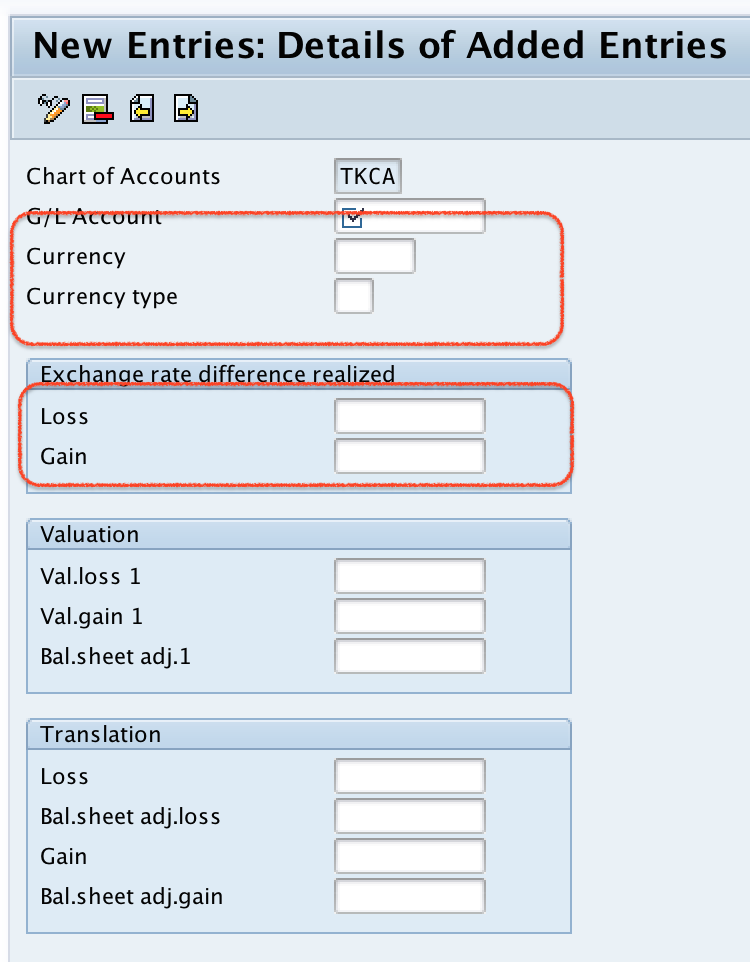
After updating the details, click the Save button and save the configured details.
Realized exchange rate differences during open item clearing
The OB09 setting is mainly used for realized exchange rate differences that arise when open items are cleared. A realized difference occurs because the exchange rate at the time of clearing is different from the rate used during the original posting.
Consider a foreign currency customer invoice posted at one exchange rate and cleared later through incoming payment at a different exchange rate. During clearing, SAP compares the local currency value of the invoice and payment. The difference is posted automatically to the exchange difference account maintained in OB09.
| Business situation | What SAP compares | Account determination result |
|---|---|---|
| Customer invoice cleared in foreign currency | Invoice exchange rate and payment exchange rate | Realized gain or loss is posted to the configured exchange difference account. |
| Vendor invoice paid in foreign currency | Invoice rate and payment rate | Exchange difference is posted automatically during clearing. |
| Foreign currency G/L open item cleared | Original open item value and clearing value | Difference is posted based on OB09 account assignment. |
Realized exchange differences and unrealized foreign currency valuation
Exchange difference configuration should not be confused with foreign currency valuation. OB09 is used for account determination for open item exchange rate differences during clearing. Foreign currency valuation is used to calculate unrealized gains or losses on open foreign currency balances at a reporting date, such as month-end or year-end.
| Area | Realized exchange difference | Unrealized foreign currency valuation |
|---|---|---|
| When it happens | When an open item is cleared. | At period-end valuation before the item is cleared. |
| Typical purpose | Post actual gain or loss after clearing. | Revalue open items or balances for reporting. |
| Configuration focus | Exchange difference accounts for open item clearing. | Valuation method, valuation area, and valuation account determination. |
| Common transaction context | Clearing customer, vendor, or G/L open items. | Foreign currency valuation program at period end. |
If your requirement is to post exchange differences at clearing, use the OB09 configuration explained in this tutorial. If your requirement is period-end foreign currency valuation, review the valuation configuration separately.
Example of exchange difference posting in SAP
Assume a vendor invoice is posted for USD 1,000 when the exchange rate is 1 USD = 80 INR. The local currency value at invoice posting is INR 80,000. Later, the invoice is paid when the exchange rate is 1 USD = 82 INR. The local currency value at payment is INR 82,000. The INR 2,000 difference is a realized exchange loss in this example and SAP posts it to the exchange loss account maintained in OB09.
| Transaction stage | Foreign currency amount | Exchange rate | Local currency value |
|---|---|---|---|
| Vendor invoice posting | USD 1,000 | 80 | INR 80,000 |
| Vendor payment clearing | USD 1,000 | 82 | INR 82,000 |
| Exchange difference | – | – | INR 2,000 loss |
The same logic can also result in an exchange gain if the exchange rate movement is favorable. The gain and loss accounts should be assigned according to your chart of accounts and reporting requirements.
Common checks for OB09 exchange difference account determination
If exchange rate difference postings are not working as expected, check the following points before changing the configuration.
- Verify that the correct chart of accounts was entered in the OB09 work area.
- Check whether the source G/L account is the correct open item managed account.
- Confirm whether the account determination should be maintained for a blank currency or a specific currency.
- Review the currency type selected in the configuration.
- Make sure the realized exchange gain and loss accounts are valid G/L accounts for the company code.
- Check whether exchange rates are maintained correctly for the clearing date in the relevant exchange rate type.
- Test the configuration with a controlled customer, vendor, or G/L open item clearing scenario.
OB09 exchange difference configuration errors and fixes
| Issue during clearing | Possible reason | What to check in SAP |
|---|---|---|
| Exchange difference account is missing | OB09 account determination is not maintained for the relevant G/L account. | Maintain the G/L account and exchange difference accounts in the correct chart of accounts. |
| Wrong gain or loss account is posted | Incorrect realized exchange difference account was assigned. | Review the gain and loss account assignment in OB09. |
| No exchange difference is calculated | Exchange rate may not have changed, or the transaction may not be relevant for open item exchange difference posting. | Check the document currency, local currency, clearing date, and exchange rate. |
| Configuration works for one currency but not another | Currency-specific account determination may be missing. | Check whether the Currency field is blank or maintained for a specific currency. |
| Posting fails during clearing | Configured G/L account may be blocked, missing in company code, or not allowed for posting. | Check the G/L account master data and company code assignment. |
FAQ on defining accounts for exchange differences in SAP
How do you define accounts for exchange rate differences in SAP?
You define accounts for exchange rate differences in SAP using transaction code OB09. Enter the chart of accounts, choose the relevant G/L account, and assign the realized exchange gain and loss accounts required for open item clearing.
What is the Tcode for exchange difference account determination in SAP?
The transaction code is OB09. It is used to maintain account determination for open item exchange rate differences.
How do you account for exchange rate differences in SAP?
SAP posts realized exchange rate differences automatically during open item clearing when the required account determination is maintained. The system compares the original posting value and clearing value, then posts the difference to the configured gain or loss account.
What is OB08 used for in SAP compared with OB09?
OB08 is used to maintain exchange rates for currency pairs and exchange rate types. OB09 is used to assign G/L accounts where exchange rate differences should be posted during open item clearing.
Is OB13 used to define exchange difference accounts in SAP?
No. OB13 is related to chart of accounts maintenance. For exchange difference account determination, use OB09 after confirming the correct chart of accounts and G/L accounts.
Editorial QA checklist for SAP exchange difference account tutorial
- Confirm that OB09 is identified as the transaction code for defining accounts for exchange differences.
- Check that the tutorial clearly separates OB08 exchange rate maintenance from OB09 account determination.
- Verify that realized exchange difference during open item clearing is explained with a practical example.
- Ensure that the chart of accounts work area and G/L account assignment steps match the screenshots.
- Review whether the troubleshooting section covers missing account determination, wrong currency, and wrong gain or loss account assignment.
Successfully, we have maintained accounts for exchange differences in SAP.