 TutorialKart.com
In this SAP FICO training tutorial, you will learn how to create and maintain number range intervals for assets in SAP Asset Accounting by using transaction code AS08. Asset number ranges control how asset master record numbers are assigned for a company code. You can define separate intervals for different asset classes, or you can use the same number range interval for more than one asset class when the business process allows it.
In our previous SAP FICO tutorials we have learned how to create screen layout rules for assets. Number ranges are another important part of asset class configuration because every fixed asset master record requires an asset number.
Also read:
- How to create chart of depreciation and depreciation areas in SAP
- Assign chart of depreciation to company code
- Specify account determination in SAP
Asset Number Range Intervals in SAP FI-AA
Asset number range intervals in SAP define the allowed range of numbers that can be used when fixed asset master records are created. The interval is maintained for a company code, and the interval key is later assigned to an asset class. When a user creates an asset master, SAP determines the number range through the asset class and company code combination.
For example, a company may use one interval for buildings, another interval for vehicles, and another interval for office equipment. This makes asset numbers easier to read and manage. Some companies prefer a shared interval for all assets to keep numbering simple. The correct design depends on reporting, audit, and master data maintenance requirements.
Internal and External Asset Number Assignment in SAP
When maintaining asset number range intervals in SAP, you can choose internal number assignment or external number assignment.
| Number assignment type | Meaning in SAP Asset Accounting | When to use |
|---|---|---|
| Internal assignment | SAP automatically assigns the next available asset number from the interval. | Use when the system should control asset numbering and avoid manual entry errors. |
| External assignment | The user manually enters the asset number while creating the asset master. | Use when asset numbers must follow an existing legacy or business numbering rule. |
For most new SAP FI-AA implementations, internal number assignment is easier to control. External number assignment should be used carefully because duplicate numbers, skipped formats, or inconsistent naming can create master data issues.
How to Maintain Number Range Intervals for Assets in SAP
You can create asset number range intervals by using one of the following navigation methods.
Transaction code: AS08
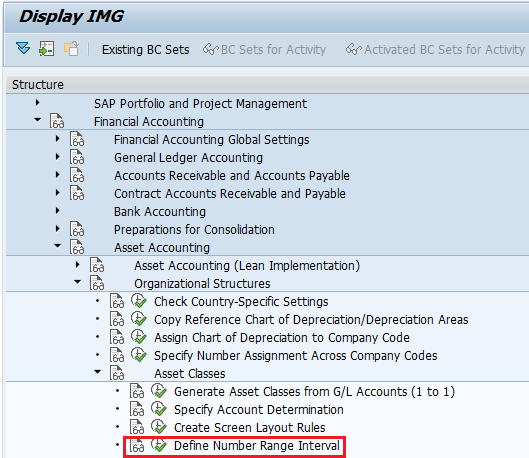
SAP IMG Path: – SPRO > SAP Reference IMG (F5) > Financial Accounting > Asset Accounting > Organization structure > Asset Classes > Create number range intervals.
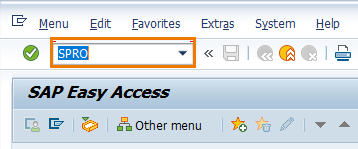
Step 1: – Enter transaction code SPRO in the SAP command field and enter.
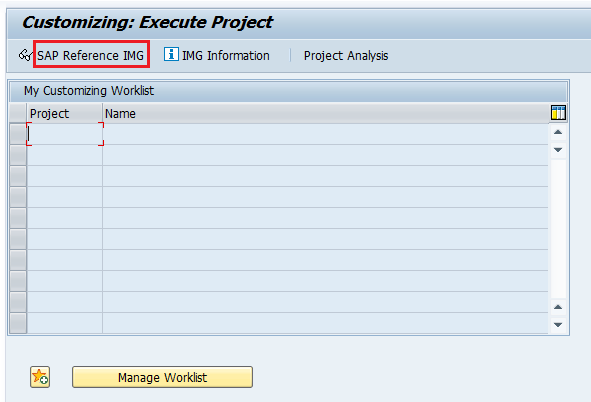
Step 2: – On customizing execute project choose “SAP Reference IMG“.
Step 3: – On display img screen, follow the menu path financial accounting – Asset accounting – Organizational structures – Asset classes and click on “define number range interval”.
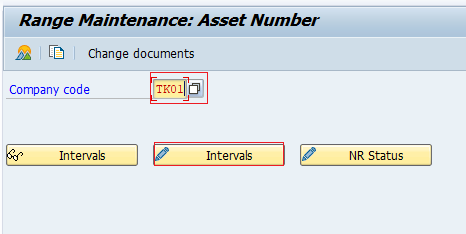
Step 4: – On range maintenance asset number screen, enter the company code “TK01” in the given field and click on change interval button.
Step 5: – On interval maintenance number range object asset number, subobject TK01 screen update the following details.
- No: – Update the two digits key that identifies the number range intervals for assets.
- From No: – Update the starting number for asset number range interval
- To Number: – Update the last number of asset number range interval.
- Ext: – Choose this option, if you like to define number interval for external assignment purpose.
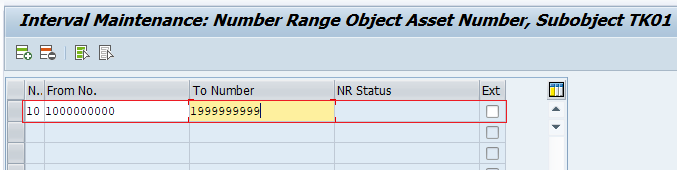
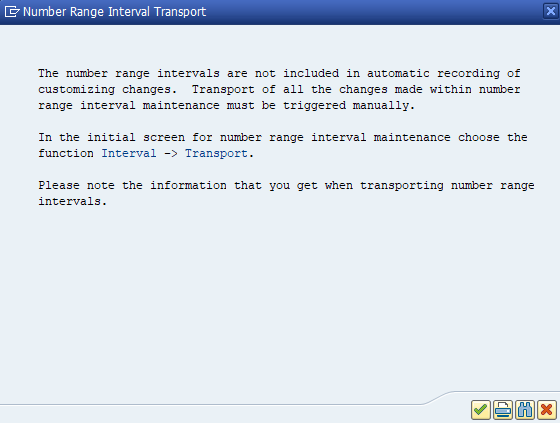
After updating all the required details, click on save button to save the configured details. A message displays with number range interval transport, ignore the message and press enter to save the data.
Successfully we have maintained number range intervals for assets in SAP.
Field Details for SAP Asset Number Range Interval Maintenance
The interval maintenance screen is simple, but the values must be planned before configuration. The number range key entered in the No field is assigned to asset classes. The From No and To Number fields define the allowed sequence. The Ext indicator decides whether the interval is used for external manual numbering.
| AS08 field | Purpose | Configuration note |
|---|---|---|
| No | Number range interval key | Use a clear two-character key that can be assigned to the relevant asset class. |
| From No | First asset number in the interval | Do not overlap this value with another interval for the same company code. |
| To Number | Last asset number in the interval | Keep enough capacity for future asset master records. |
| Ext | External number assignment indicator | Select only when users should manually enter asset numbers. |
Example Asset Number Range Plan for Company Code TK01
The following example shows how a company code can use separate intervals for different asset groups. The exact values depend on the organization’s internal numbering policy.
| Asset group | Number range key | From number | To number | Assignment type |
|---|---|---|---|---|
| Buildings | 01 | 100000 | 199999 | Internal |
| Plant and machinery | 02 | 200000 | 299999 | Internal |
| Vehicles | 03 | 300000 | 399999 | Internal |
| Legacy migrated assets | 90 | 900000 | 999999 | External |
In this example, normal asset creation is controlled by SAP through internal assignment. The external interval is reserved for legacy asset numbers that must be entered manually during migration or controlled master data creation.
Assigning Asset Number Range Intervals to Asset Classes
Maintaining the number range interval in AS08 only creates the interval. To use it during asset master creation, the interval must be assigned to the relevant asset class in Asset Accounting configuration. If the assignment is missing or incorrect, users may not get the expected asset number when creating an asset master record.
When designing asset classes, keep the number range assignment consistent with the chart of depreciation, account determination, screen layout rule, and other asset master settings. This helps keep fixed asset master data easier to control and audit.
Checks Before Saving Asset Number Range Intervals in SAP
- Check that the correct company code is entered before maintaining intervals.
- Make sure the number range interval does not overlap with another interval for the same company code.
- Use internal assignment unless there is a clear business reason for manual asset numbering.
- Reserve enough numbers in the interval for future asset creation.
- Confirm that the number range key will be assigned to the correct asset class.
Common Issues While Creating Asset Number Range Intervals in SAP
| Issue | Likely reason | What to check |
|---|---|---|
| Asset number is not assigned as expected | Wrong number range assigned to asset class | Check the asset class configuration and number range key. |
| User must enter asset number manually | External assignment indicator is selected | Review the Ext indicator in AS08. |
| Interval cannot be saved | Number range overlaps or invalid interval values | Check From No and To Number values. |
| Transport message appears while saving | Number range interval maintenance may be treated separately from normal customizing transport behavior | Read the system message and save according to project procedure. |
SAP Asset Number Range Interval Editorial QA Checklist
- Does the tutorial clearly mention transaction code AS08 for asset number range intervals?
- Does the article explain internal and external asset number assignment without mixing them?
- Are the AS08 fields No, From No, To Number, and Ext explained in SAP FI-AA context?
- Does the tutorial remind the reader that number ranges must be assigned to asset classes?
- Are company code, asset class, and interval planning explained with a practical SAP example?
Create Number Range Intervals for Assets in SAP FAQs
What is the transaction code to maintain asset number range intervals in SAP?
The transaction code to maintain asset number range intervals in SAP Asset Accounting is AS08. You can also reach the same activity through SPRO under Asset Accounting organizational structure and asset class configuration.
Why do we create number range intervals for assets in SAP?
Number range intervals are created so that SAP can assign valid asset numbers when fixed asset master records are created. They help control numbering by company code and asset class.
What is the difference between internal and external asset number assignment?
In internal assignment, SAP automatically gives the next available asset number from the interval. In external assignment, the user manually enters the asset number while creating the asset master record.
Can the same asset number range interval be used for multiple asset classes?
Yes, the same number range interval can be assigned to more than one asset class if the organization wants those asset classes to use the same numbering sequence. However, separate intervals are often easier for reporting and control.
What should be checked before saving an asset number range interval?
Before saving, check the company code, interval key, From No, To Number, internal or external assignment setting, and whether the interval will be assigned to the correct asset class.
Summary of Maintaining Asset Number Ranges in SAP
In this SAP FI-AA tutorial, we learned how to create number range intervals for assets in SAP using transaction code AS08. We also reviewed the SPRO path, internal and external number assignment, AS08 field meanings, interval planning, asset class assignment, and common checks before saving the configuration. A correctly maintained asset number range helps keep fixed asset master records consistent within each company code.