 TutorialKart.com
In this SAP FICO tutorial, you will learn what a retained earnings account is, why it is required for year-end balance carryforward, and how to create retained earnings account in SAP using transaction code OB53. The configuration links a P&L statement account type to a G/L account so that profit and loss balances can be transferred correctly during fiscal year closing.
Retained Earnings Account in SAP FICO
A retained earnings account in SAP is a G/L account used to carry forward the balance of profit and loss accounts at the end of a fiscal year. During balance carryforward, SAP transfers the net balance from P&L accounts to the retained earnings account. Balance sheet accounts are carried forward to the next fiscal year as opening balances.
The retained earnings account is maintained at chart of accounts level. This means the setting applies to the chart of accounts and can be used by company codes assigned to that chart of accounts. In SAP, this configuration is mandatory for proper year-end closing of P&L accounts.
If the retained earnings account is not defined, the balance carryforward process cannot correctly transfer P&L account balances to the next fiscal year. For this reason, OB53 is normally configured before live transactions are posted and before the first fiscal year closing is performed.
How OB53 Works for Retained Earnings in SAP
Transaction code OB53 is used to define the retained earnings account for a chart of accounts. In OB53, you maintain the P&L statement account type and assign a G/L account to it. The P&L statement account type is then used in the G/L account master data of profit and loss accounts.
When the balance carryforward program is executed, SAP checks the P&L statement account type assigned to each P&L G/L account. Based on that account type, SAP determines the retained earnings account maintained in OB53 and posts the carried-forward result accordingly.
| Configuration item | Purpose in retained earnings setup |
| Chart of accounts | Controls where the retained earnings account assignment is maintained |
| P&L statement account type | Groups P&L accounts for retained earnings determination |
| Retained earnings G/L account | Receives the carried-forward profit or loss balance |
| G/L account master data | Contains the P&L statement account type for P&L accounts |
Retained Earnings Account Scenario in SAP OB53
In this example, no retained earnings account has been created yet in the chart of accounts. However, we can still assign an account number in OB53. In a real project, the account should normally belong to the correct account group, such as reserves and surplus or retained earnings, based on the company’s chart of accounts design.
For this tutorial, we assign the following values:
| P&L Statement account type | Account |
| X | 100100 |
The appropriate retained earnings configuration may cover the following business movements:
- Yearly net income carried forward
- Distribution of dividends
- Transfers to appropriations and deductions from appropriations
- Transfer to minority interest and deductions from minority interest
Prerequisites Before Creating Retained Earnings Account in SAP
Before maintaining the retained earnings account in OB53, check the following configuration points. These checks help avoid errors during year-end balance carryforward.
- The chart of accounts has already been created in SAP.
- The company code is assigned to the correct chart of accounts.
- The retained earnings G/L account number is planned according to the company’s chart of accounts structure.
- The P&L statement account type, such as X, is known and will be used consistently for P&L accounts.
- The retained earnings account should be created later as a G/L account if it does not already exist.
Navigation to Define Retained Earnings Account in SAP
You can define retained earnings account in SAP by using one of the following navigation methods.
- Transaction code: – OB53
- Menu Path: – SPRO > SAP IMG > Financial Accounting > General ledger accounting >G/L Accounts > Master data >Preparations > Define retained earnings account.
Step-by-Step OB53 Configuration for Retained Earnings Account
Step 1) Enter SAP T-Code “OB53” in the command field and press Enter.

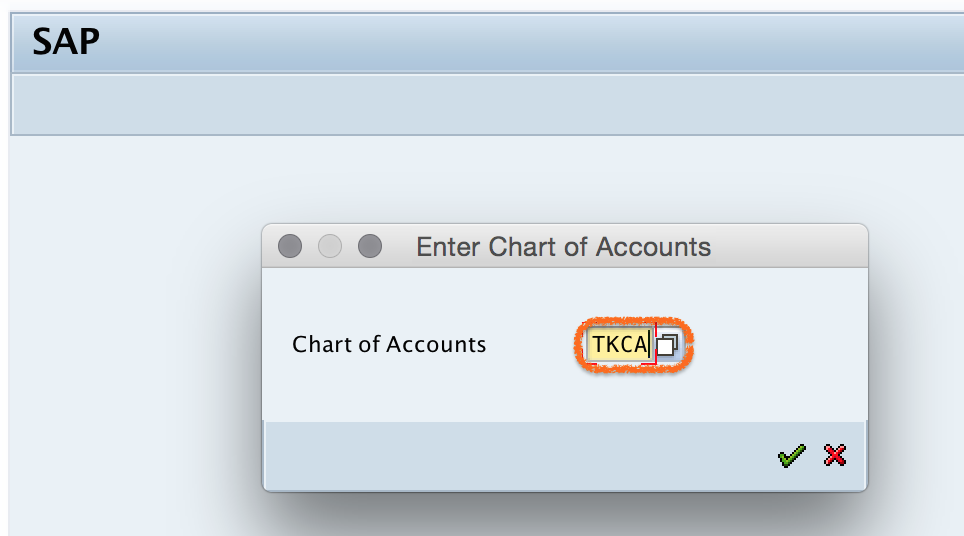
Step 2) A pop-up window is displayed for entering the chart of accounts. Enter chart of accounts key “TKCA” and press Enter to continue.
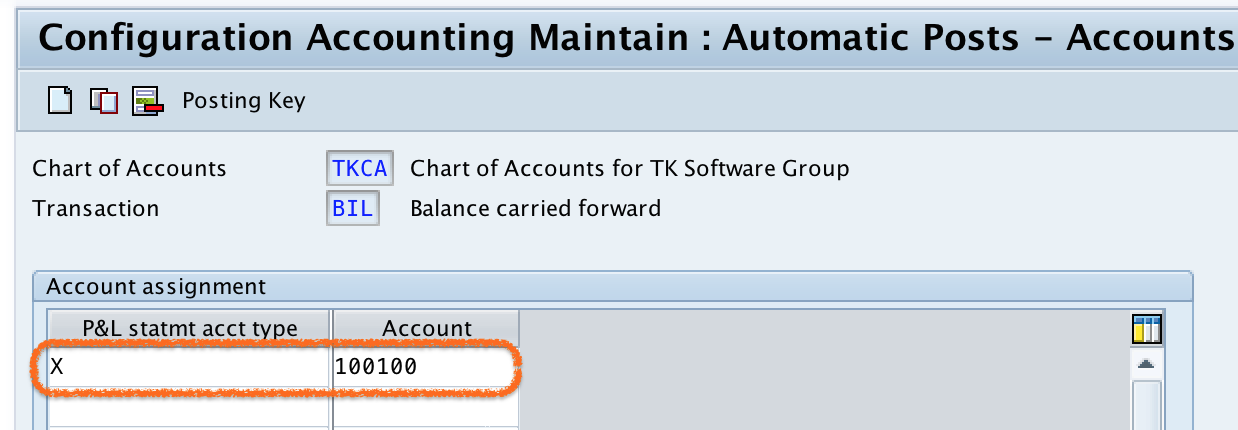
Step 3) On the configuration screen Maintain: Automatic Posts – Accounts, update the following details.
- P&L statement acct type: Update the P&L statement account type as “X”.
- Account: Enter the retained earnings G/L account number, such as “100100”.
Step 4) Click the save button. If the account has not yet been created in the chart of accounts, SAP displays a warning message such as “Account 100100 not created in chart of accounts TKCA”.

This message is a warning in this scenario because the retained earnings account number is being assigned before the G/L account is created. Press Enter to continue. In a live project, make sure the G/L account is created and extended as required before posting and closing activities are performed.
SAP then prompts you for a customizing request number. Select the appropriate request and press Enter to save the configuration.
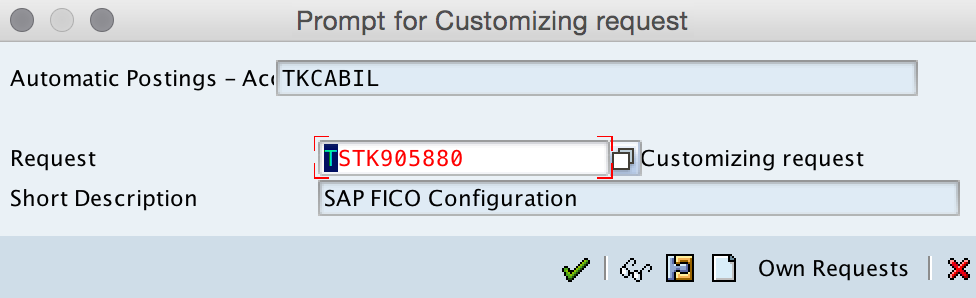
Successfully, we have defined retained earnings account in SAP using transaction code OB53.
OB53 Warning Message for Missing Retained Earnings G/L Account
The warning message about account 100100 not being created means the G/L account does not yet exist in the chart of accounts. OB53 allows you to save the retained earnings account assignment, but the account must be created properly before the configuration is used in accounting processes.
In a project system, do not ignore this message without follow-up action. Create the retained earnings G/L account with the correct account group, field status group, company code settings, and other required master data. After that, recheck OB53 and confirm that the account assignment is valid.
Difference Between OB53, OB13 and G/L Account Setup
OB53, OB13, and G/L account master data are related, but they are not the same configuration activity. OB53 is specifically used to assign retained earnings accounts. OB13 is used for chart of accounts settings. G/L account setup is where the actual account master data is created and maintained.
| SAP configuration area | Use in retained earnings process |
| OB53 | Defines retained earnings account by chart of accounts and P&L statement account type |
| OB13 | Maintains chart of accounts related settings |
| G/L account master data | Creates the retained earnings account and assigns P&L statement account type to P&L accounts |
| Balance carryforward | Uses the OB53 setting to carry forward P&L balances to retained earnings |
Retained Earnings Account Configuration Checks in SAP
After saving OB53, review these points before moving the configuration to quality or production systems.
- Confirm that the correct chart of accounts was selected in OB53.
- Verify that the P&L statement account type, such as X, matches the value used in P&L G/L accounts.
- Check that the retained earnings account belongs to the correct account group.
- Make sure the retained earnings G/L account is created before closing activities are performed.
- Confirm that the configuration is saved in the correct customizing transport request.
- Test balance carryforward in a non-production system before using the setup in production.
Common Mistakes While Defining Retained Earnings Account in SAP
- Using the wrong chart of accounts: OB53 is maintained at chart of accounts level, so selecting the wrong chart of accounts can affect the wrong company code environment.
- Assigning an account from an incorrect account group: The retained earnings account should follow the organization’s chart of accounts design.
- Not creating the retained earnings G/L account: OB53 assignment alone is not enough if the G/L account master data is missing.
- Using inconsistent P&L statement account types: If P&L accounts use a different account type, the balance carryforward may not use the expected retained earnings account.
- Saving in the wrong transport request: Always save configuration in the correct customizing request so it can be moved properly across systems.
FAQ on Retained Earnings Account in SAP OB53
What is OB53 in SAP?
OB53 is the SAP transaction code used to define retained earnings account assignment for a chart of accounts. It links a P&L statement account type to a retained earnings G/L account.
Why is retained earnings account mandatory in SAP FICO?
The retained earnings account is required because SAP uses it during year-end balance carryforward to transfer profit and loss account balances to the next fiscal year. Without this setting, P&L balances cannot be carried forward correctly.
Can I save OB53 if the retained earnings G/L account is not created?
Yes, SAP may allow you to save the OB53 assignment with a warning if the G/L account is not yet created. However, the retained earnings G/L account should be created and validated before the configuration is used for posting or closing activities.
What is the P&L statement account type in OB53?
The P&L statement account type is a key, such as X, that helps SAP determine which retained earnings account should receive the carried-forward balance of P&L accounts.
What is the difference between OB53 and OB13 in SAP?
OB53 is used to define retained earnings account assignment, while OB13 is used to maintain chart of accounts settings. OB53 depends on the chart of accounts, but it is a separate configuration activity.
Editorial QA Checklist for SAP Retained Earnings Account Tutorial
- Does the tutorial clearly explain that OB53 is maintained at chart of accounts level?
- Does it show the exact retained earnings account example with P&L statement account type X and account 100100?
- Does it explain the warning message when the retained earnings G/L account is not yet created?
- Does it distinguish OB53 from OB13 and G/L account master data?
- Does it remind the reader to create and validate the retained earnings G/L account before year-end closing?