 TutorialKart.com
In this SAP FICO tutorial, you will learn how to check exchange rate types in SAP using transaction code OB07 and the IMG menu path. Exchange rate types control which rate SAP uses for currency translation, foreign currency valuation, bank buying rates, bank selling rates, and average exchange rates. In our previous tutorials we have learned how to configure SAP financial accounting enterprise structure and global parameters.
What Exchange Rate Types Mean in SAP FICO
An exchange rate type in SAP is a key that groups exchange rates for a particular business purpose. Instead of using one exchange rate for every transaction, SAP can use different exchange rate types for accounting, bank buying, bank selling, planning, consolidation, and valuation processes.
For example, a company may use the average exchange rate for normal accounting postings, a bank buying rate for export receipts, and a bank selling rate for import payments. The exchange rate type helps SAP determine which rate should be read when amounts are translated from one currency to another.
Important Exchange Rate Types in SAP
The important exchange rate types are listed below.
| Exchange Rate Type | Description | Typical Use |
|---|---|---|
| G Type | Bank Buying Rate | This rate type is used when the bank is buying foreign currency from the Company. For example, exports. |
| B Type | Bank Selling Rate | This rate type is used when the bank is selling foreign currency to the company. For example, imports. |
| M Type | Average Rate | This is the average exchange rate type, commonly used for standard currency translation. |
In many SAP systems, exchange rate type M is used as the standard average rate. Other rate types such as B and G are used when the business process requires a buying or selling rate. The exact usage depends on the organization’s currency policy, accounting requirements, and configuration.
OB07 and OB08 Difference for Exchange Rates in SAP
OB07 and OB08 are related, but they are not the same configuration activity. OB07 is used to check or define exchange rate types. OB08 is used to enter exchange rates for currency pairs under a particular exchange rate type.
| Transaction Code | Purpose | Example |
|---|---|---|
| OB07 | Check or maintain exchange rate type settings | Define or review rate type M, B, or G |
| OB08 | Enter exchange rates for currency pairs | Maintain USD to INR exchange rate for rate type M |
Before maintaining exchange rates in OB08, the relevant exchange rate type must exist in OB07. In addition, currency translation ratios are maintained separately, and they support how SAP reads and applies exchange rates between two currencies.
Other important configurations to refer
- How to define translation ratios for currency translations
- How to enter exchange rates
- Define group currency and parallel currency.
- Define accounts for exchange rate differences.
Navigation to Check Exchange Rate Types in SAP
You can check exchange rate types by using one of the following SAP navigation methods.
- Transaction code: – OB07
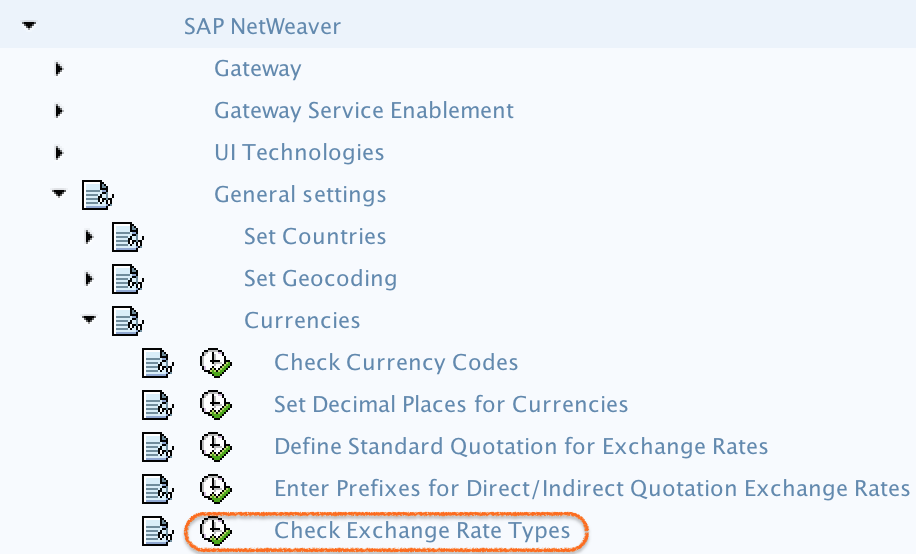
- Menu Path: – SPRO –> IMG –> SAP Netweaver –> General Settings –> Currencies –> Check Exchange Rate type
Step-by-Step Procedure to Check Exchange Rate Types with OB07
Step 1) Enter transaction code “OB07” in the SAP command field and enter.

Step 2) On change view currency translation exchange rate types overview screen, list of exchange rate types displays with details of reference currency, buying rate and selling rate. Either you can create new exchange rate types or you can use predefined rate types in SAP. To check exchange rate types, click on position button, enter exchange rate type key and check the settings. (G, B, M rate types).
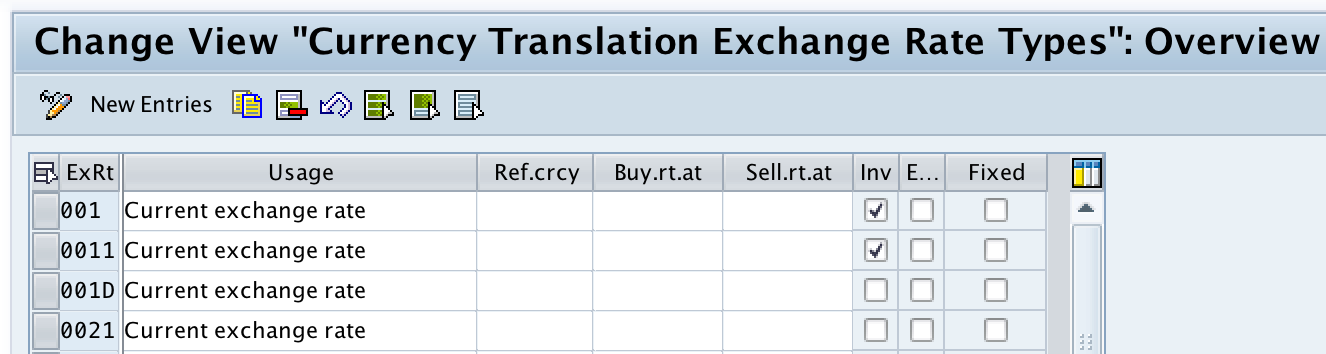
Step 3) Review the exchange rate type settings carefully. Important fields may include the exchange rate type key, description, reference currency, buying rate type, selling rate type, and other translation-related settings depending on the SAP version and customizing screen.
Step 4) If you only want to verify the delivered exchange rate types, do not create a new entry. Use the existing SAP-delivered rate types where they meet the business requirement. If the organization needs a separate rate type for a specific process, create a new exchange rate type after confirming the accounting and reporting requirement.
In our scenario, we use predefined exchange rate types – bank buying rate, bank selling rate type and average type. However we can defined new exchange rate types as per organizational requirements.
Creating a New Exchange Rate Type in SAP OB07
This is new entries of rate types screen, update all the details and click on save button to save your configured details.
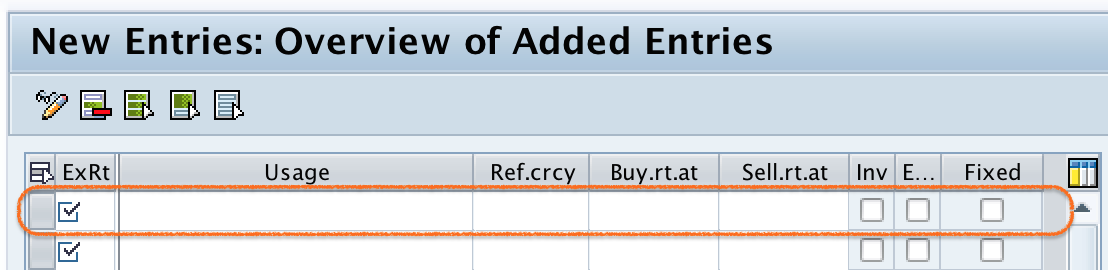
When you create a new exchange rate type, use a clear key and description so that users can understand its purpose. Avoid creating duplicate rate types unless there is a real business reason, such as a separate rate for valuation, budgeting, group reporting, or a special local requirement.
Configuration Points to Verify After Checking Exchange Rate Types
After checking exchange rate types in SAP, verify the related currency configuration so that postings and translations work correctly.
- Confirm that the required currency keys are available in the system.
- Check that translation ratios are maintained for the required currency pairs.
- Maintain the actual exchange rates in OB08 for the relevant exchange rate type.
- Check whether the exchange rate type is used in company code, valuation, or reporting configuration.
- Verify exchange difference accounts if foreign currency postings are expected.
Common Issues While Checking Exchange Rate Types in SAP
The following issues are common when users work with exchange rate types and currency translation in SAP FICO.
| Issue | Likely Reason | What to Check |
|---|---|---|
| Exchange rate type is available, but translation fails | Exchange rates may not be maintained | Check OB08 for the currency pair and valid date |
| Wrong rate is picked during posting | Incorrect exchange rate type is assigned or entered | Check document entry, company code settings, and relevant configuration |
| Currency pair cannot be translated | Missing translation ratio or missing rate | Check translation ratios and exchange rates |
| Foreign currency valuation gives unexpected result | Valuation method or exchange rate type may not match the requirement | Check valuation configuration and assigned exchange rate type |
QA Checklist for This SAP Exchange Rate Type Configuration
- OB07 opens the exchange rate type overview screen without authorization errors.
- Required exchange rate types such as M, B, and G are available or created with clear descriptions.
- OB08 has exchange rates for the required currency pairs and validity dates.
- Translation ratios are maintained before testing currency conversion.
- Foreign currency valuation and exchange difference account settings are reviewed where applicable.
FAQs on Exchange Rate Types in SAP
What is OB07 used for in SAP?
OB07 is used to check and maintain exchange rate types in SAP. Exchange rate types define the category of rate that SAP should use for currency translation, such as average rate, bank buying rate, or bank selling rate.
What is OB08 used for in SAP FICO?
OB08 is used to enter exchange rates for currency pairs. For example, if exchange rate type M is already available in OB07, OB08 is used to maintain the actual USD to INR or EUR to USD rate for that exchange rate type.
What is the relation between OB07, OB08, and currency translation ratios?
OB07 defines the exchange rate type, OB08 maintains the exchange rate values, and currency translation ratios define the ratio between two currencies. All three settings must be correct for currency translation to work properly.
Why is exchange rate type M commonly used in SAP?
Exchange rate type M represents an average rate and is commonly used for standard currency translation in SAP. However, the actual rate type used in a business process depends on the configuration and accounting requirement.
Can a company create its own exchange rate type in SAP?
Yes. A company can create a new exchange rate type in SAP if the delivered rate types do not meet its requirement. Before creating one, confirm the purpose, related valuation process, reporting impact, and exchange rate maintenance responsibility.
Successfully we have configured exchange rate types in SAP.