 TutorialKart.com
How to Assign Business Area to Consolidation Business Area in SAP
In this SAP FICO tutorial, you will learn how to assign business area to consolidation business area in SAP. This assignment links an operating business area with the consolidation business area used for consolidation reporting. After you define the business area and the consolidation business area, this configuration step tells SAP which consolidation business area should receive values from each business area.
The configuration is normally performed in Customizing through SPRO. The important field in this activity is Con.bus.area, where you enter the consolidation business area key against the relevant business area.
When This SAP Business Area to Consolidation Business Area Assignment Is Used
The assignment is used when business area information has to flow into consolidation-related reporting structures. A business area represents an internal area of operations, while a consolidation business area groups or maps those areas for consolidation purposes. In simple terms, the assignment answers this question: which consolidation business area should SAP use for this business area?
Before you start this activity, check that the business area has already been created. If the business area does not exist, first define it in SAP Customizing. In many SAP systems, transaction OB13 is used to define business areas, while the assignment to consolidation business area is maintained through the IMG path shown below.
IMG Path to Assign Business Area to Consolidation Business Area in SAP
You can assign business areas to consolidation business area in SAP through the following navigation path.
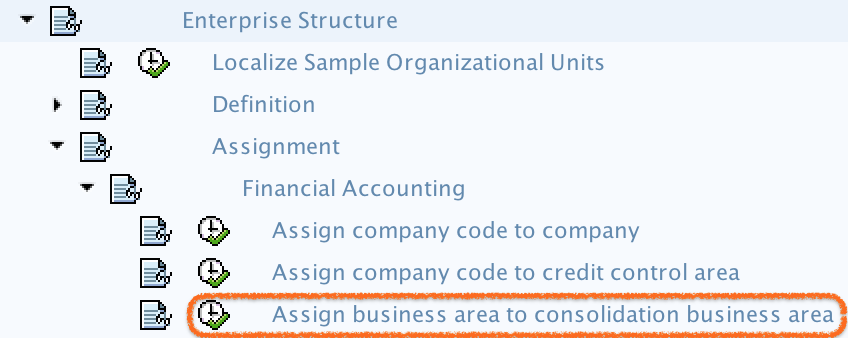
- Navigation: – SPRO – IMG – Enterprise Structure – Assignment – Financial Accounting – Assign Business area to consolidation business area.
Use this menu path when you want to maintain the consolidation business area assignment from the SAP Implementation Guide. The exact screen labels can vary slightly by SAP release, but the activity name and field purpose remain the same.
Prerequisites Before Assigning Business Area to Consolidation Business Area
- The business area key must already be defined in SAP.
- The consolidation business area key must already be available for assignment.
- You should know which business area has to be mapped to which consolidation business area.
- You need authorization to change SAP Customizing settings.
- A valid customizing request should be available if the system asks for a transport request while saving.
Step-by-Step SAP Configuration to Assign Business Area to Consolidation Business Area
Step 1) Enter t-code “SPRO” in the command field and enter to continue.

Step 2) Select “SAP Reference IMG“

Step 3) On display IMG screen, follow the menu path and choose IMG activity of assign business area to consolidation business area.
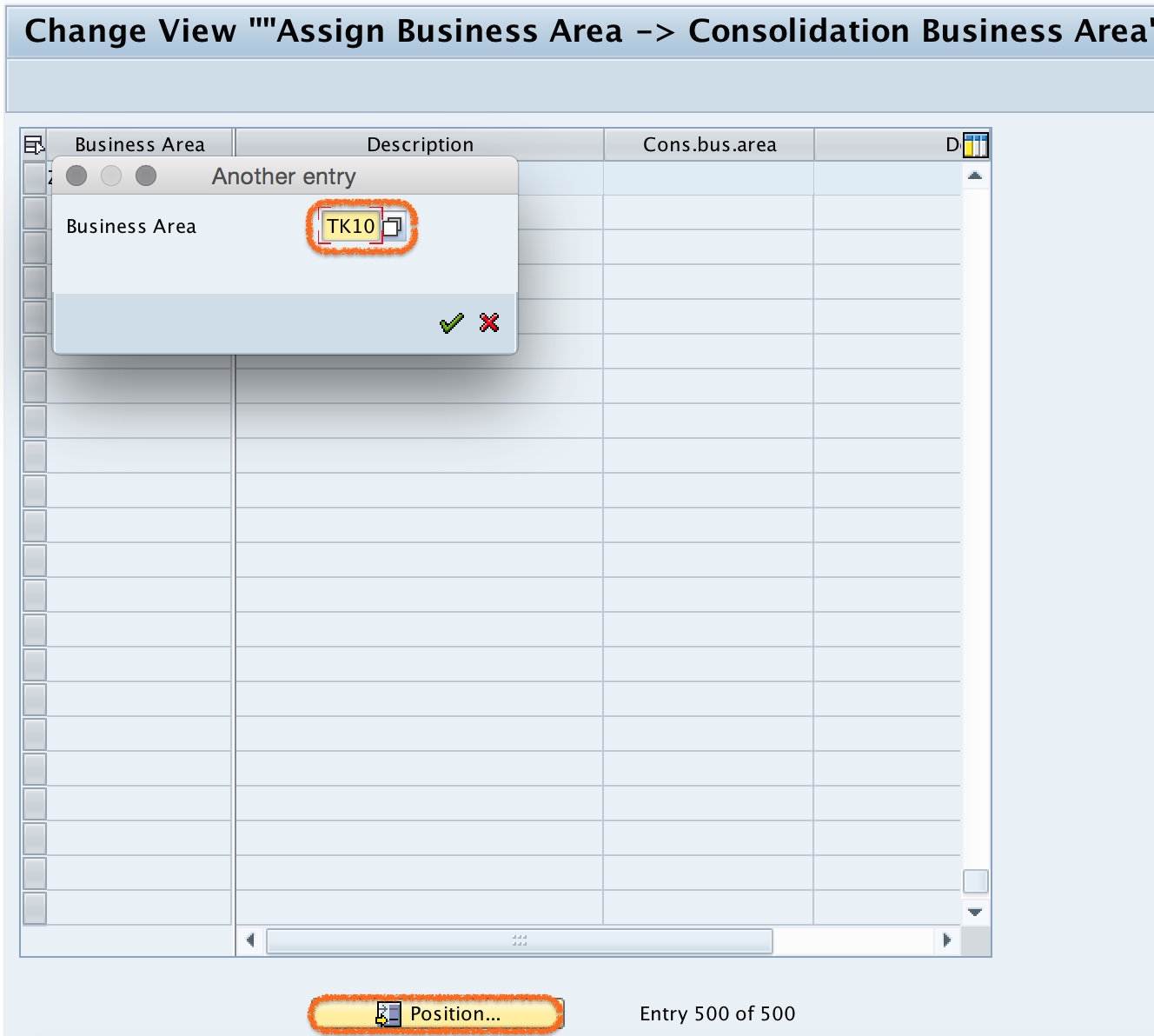
Step 4) On change view “Assign business area –> consolidation business area”, click on position button and update your business area key. Now your business area key displays in the top of the screen.
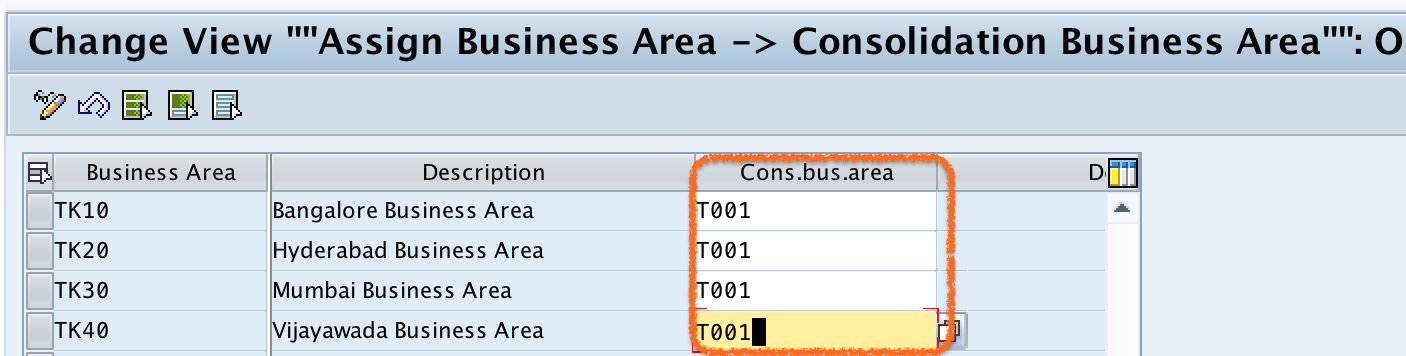
Step 5) Now assign business area to consolidation business area by updating the consolidation business area key in the con.bus.area field.
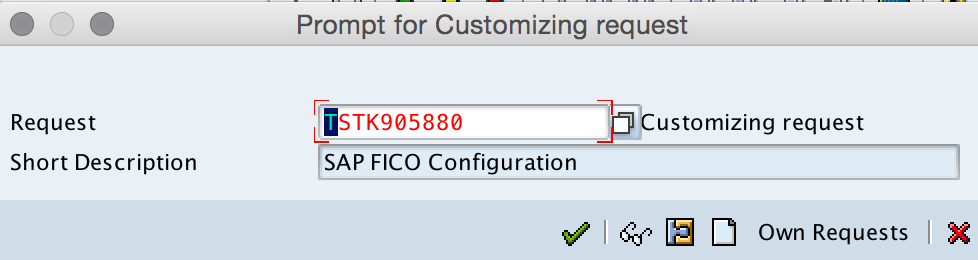
Step 6) After assignment, click on save button to save the configured details.

Now choose the customize request number and press enter to continue to save the data.
Field Details for Business Area and Con.bus.area Mapping
| Field | What to enter | Purpose in this assignment |
|---|---|---|
| Business Area | Enter or locate the existing business area key | Identifies the operating business area that needs a consolidation mapping |
| Con.bus.area | Enter the consolidation business area key | Defines the consolidation business area assigned to the selected business area |
| Customizing Request | Select a valid transport request when prompted | Saves and transports the configuration to the next SAP system |
After saving, the selected business area is mapped to the consolidation business area in SAP FICO. If the same configuration has to be used in quality or production systems, move the customizing request according to your organization’s transport process.
OB13 and Business Area Assignment Difference in SAP
OB13 is commonly used to define business areas in SAP. The activity in this tutorial is different: it does not create the business area. It assigns an existing business area to a consolidation business area. If you cannot find the required business area on the assignment screen, verify the business area definition first and then return to this assignment activity.
Common Checks After Assigning Business Area to Consolidation Business Area
- Confirm that the correct business area row was selected before entering the consolidation business area.
- Check that the consolidation business area key was entered in the Con.bus.area field, not in the business area field.
- Save the entry and confirm that SAP does not show an error or missing-entry message.
- Verify that the configuration is stored under the correct customizing request.
- Review the assignment with the functional owner before transporting it to another system.
Troubleshooting SAP Business Area to Consolidation Business Area Assignment
If SAP does not allow you to save the assignment, first check whether the consolidation business area key exists and whether you have change authorization for the IMG activity. If the business area is not visible, use the position button carefully or confirm that the business area was already defined. If SAP asks for a request, choose the correct customizing request instead of creating an unrelated one.
FAQs on Assigning Business Area to Consolidation Business Area in SAP
How to assign business area to consolidation business area in SAP?
Go to SPRO, open SAP Reference IMG, and follow Enterprise Structure – Assignment – Financial Accounting – Assign Business area to consolidation business area. Locate the business area, enter the consolidation business area in the Con.bus.area field, and save the configuration.
What is OB13 in SAP?
OB13 is a transaction commonly used to define business areas in SAP. It is useful before this assignment step because the business area must exist before it can be assigned to a consolidation business area.
What is consolidation business area in SAP?
A consolidation business area is a consolidation-related organizational assignment used to group or map business area values for consolidation reporting. In this configuration, it is entered against the business area in the Con.bus.area field.
Can one consolidation business area be assigned to multiple business areas?
Yes, depending on the reporting design, multiple business areas can be mapped to the same consolidation business area. The correct mapping should be decided based on the organization’s consolidation and reporting requirements.
Why is the business area not visible in the assignment screen?
The business area may not have been created, or you may need to use the position button to locate it. First verify the business area definition, then return to the assignment activity and search for the business area key again.
Editorial QA Checklist for This SAP FICO Configuration
- The tutorial clearly distinguishes business area creation from business area assignment.
- The IMG path includes Enterprise Structure, Assignment, Financial Accounting, and the correct assignment activity.
- The instructions mention the Con.bus.area field where the consolidation business area is entered.
- The guide explains why OB13 may be relevant before performing the assignment.
- The troubleshooting notes cover missing business areas, save errors, and customizing request selection.
Successfully we have assigned business area to consolidation business area in SAP FICO.