 TutorialKart.com
Define valuation areas in SAP FI is a configuration step used in currency valuation during period-end closing. In this SAP FI tutorial, you will learn how to create a valuation area, maintain the currency type, and assign the valuation area to an accounting principle. In the previous tutorial, we learned how to define accounting principles in SAP.
Do not confuse this SAP FI valuation area with the SAP MM valuation area used for material stock valuation at plant or company-code level. This page is about the FI configuration path under General Ledger Accounting for valuation during closing activities.
SAP FI valuation area meaning for currency valuation
In SAP Financial Accounting, a valuation area is a key that groups valuation settings for foreign currency valuation and related closing activities. The key is later linked with an accounting principle, so SAP can apply the correct valuation approach for a reporting requirement such as local accounting or another accounting principle maintained in the system.
A valuation area normally contains three practical details: the valuation key, the currency type, and a description. The currency type tells SAP which currency view is relevant for the valuation area, while the accounting principle assignment controls the reporting rule that the valuation area belongs to.
Related SAP FI currency valuation configuration
- Procedure to check exchange rates
- Define translation ratios for currency translation
- How to enter exchange rate
- Define accounts for exchange rate differences.
Before defining valuation areas in SAP FI
Before you create a valuation area, confirm the following configuration points. This avoids rework when the valuation area is used in closing, foreign currency valuation, or ledger-specific reporting.
- The required accounting principle has already been created in SAP FI.
- The company code currencies and relevant currency types are understood for the company code.
- Exchange rate types, translation ratios, and exchange rate difference accounts are maintained where required.
- You know whether the valuation area should represent local accounting, group reporting, or another accounting principle used by your organization.
Define valuation areas in SAP FI using SPRO
You can define currency valuation areas by using the following SAP IMG navigation method.
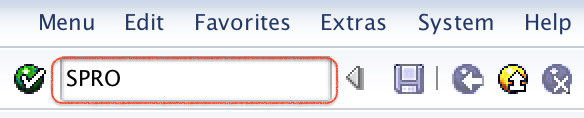
- Transaction code: – SPRO
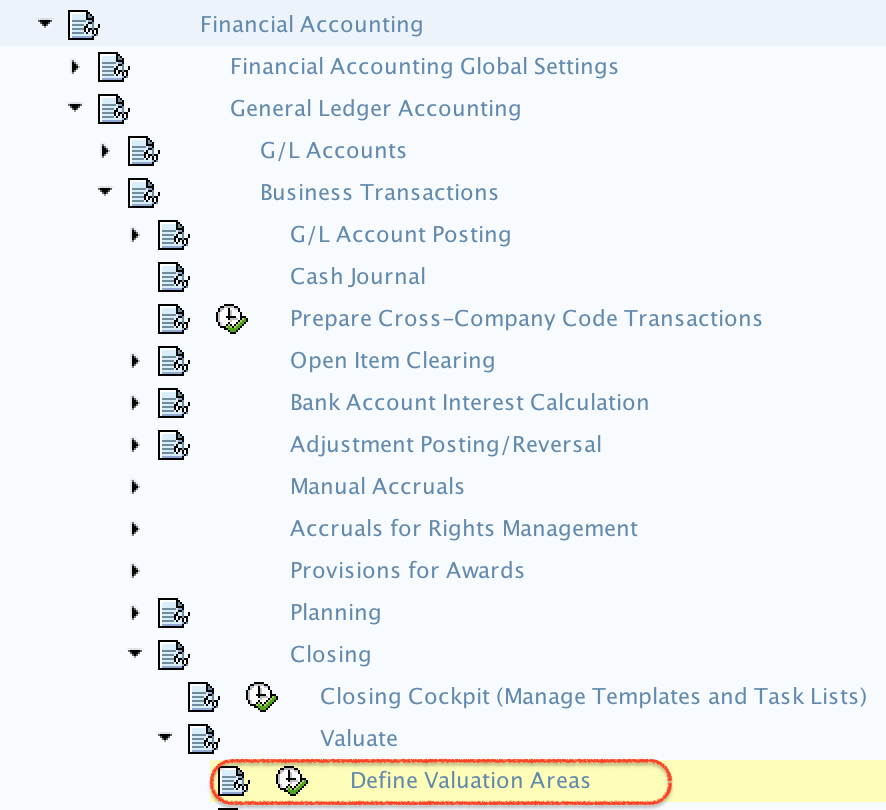
- Menu path: – IMG –> Financial Accounting –> General Ledger accounting –> Business Transactions –> Closing –> Valuate –> Define Valuation Areas.
For this tutorial, we will create the following sample SAP FI valuation area.
| Valuation | Crcy type | Long text |
| TK | Company code currency | Valuation area for TK01 company |
Step 1) Enter T-Code “SPRO” in the SAP command field and enter.
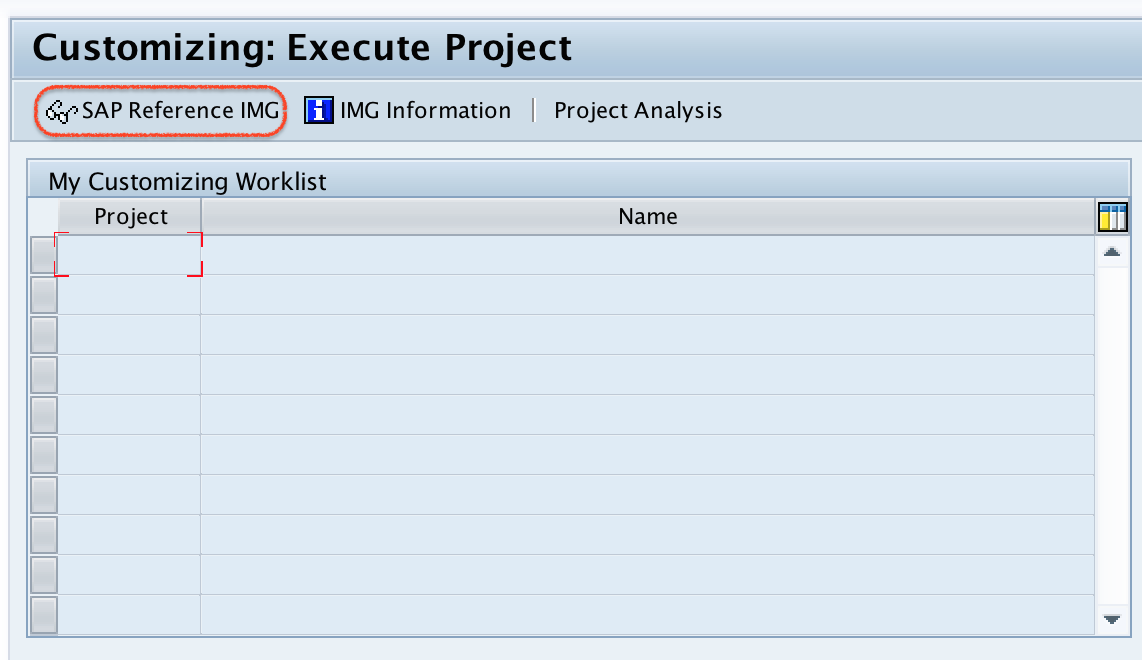
Step 2) On customizing execute project, select “SAP Reference IMG“
Step 3) On display IMG screen, follow the menu path and double click on “Define Valuation Areas”
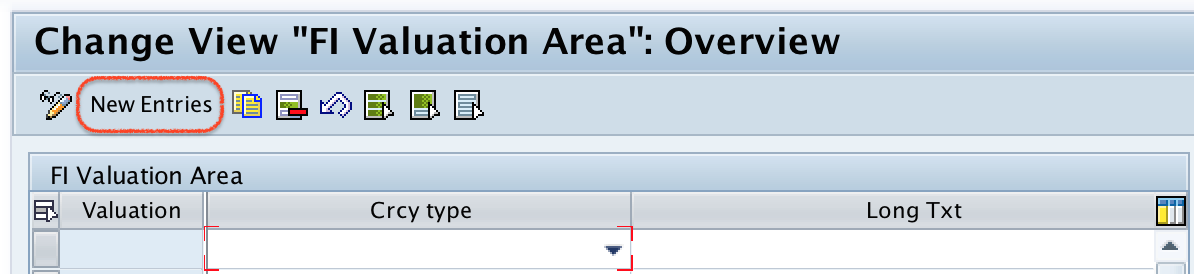
Step 4) On change view “SAP FI Valuation Area” overview screen, click on new entries button for creation of new valuation area as per an organizational requirements.
Step 5) On new entries valuation areas screen, update the following details.
- Valuation: – Enter the two-character key that identifies the valuation area in SAP FI. Use a key that is meaningful for your accounting design and transport standards.
- Crcy type: – Select the currency type from the list, choose company code currency when the valuation should be based on the company code currency view.
- Long Text: – Update the descriptive text of valuation area. The description should clearly identify the company code, currency view, or accounting principle purpose.
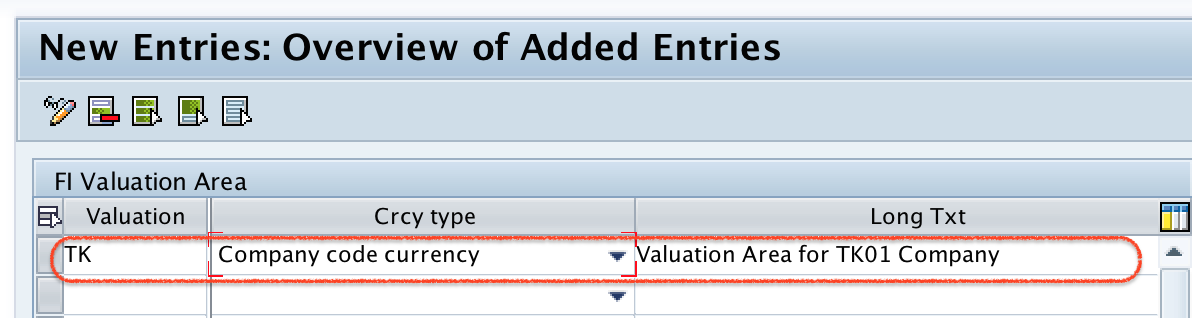
After maintaining all the required details, click on save button and save the configured valuation areas details.
Successfully we have defined valuation areas in SAP FI.
Field explanation for SAP FI valuation area entries
| Field | What it controls | Configuration note |
|---|---|---|
| Valuation | Identifies the SAP FI valuation area key. | Keep the key short and consistent with your naming convention. |
| Crcy type | Specifies the currency view used for valuation. | Company code currency is common for local valuation, but the correct value depends on the currency setup. |
| Long Text | Explains the purpose of the valuation area. | Use a clear description so users can identify the valuation area during assignment and review. |
Assign valuation areas and accounting principles in SAP FI
After the valuation area is created, the next configuration step is assignment of valuation areas and accounting principles. This assignment is important because it connects the valuation area with the accounting principle used for reporting and valuation rules.
- IMG Path: – IMG –> Financial Accounting –> General Ledger accounting –> Business Transactions –> Periodic Processing –> Valuate –> Assign Valuation areas and Accounting Principles
Step 1) Follow the menu path and double click on “Assign Valuation areas and Accounting Principles”.
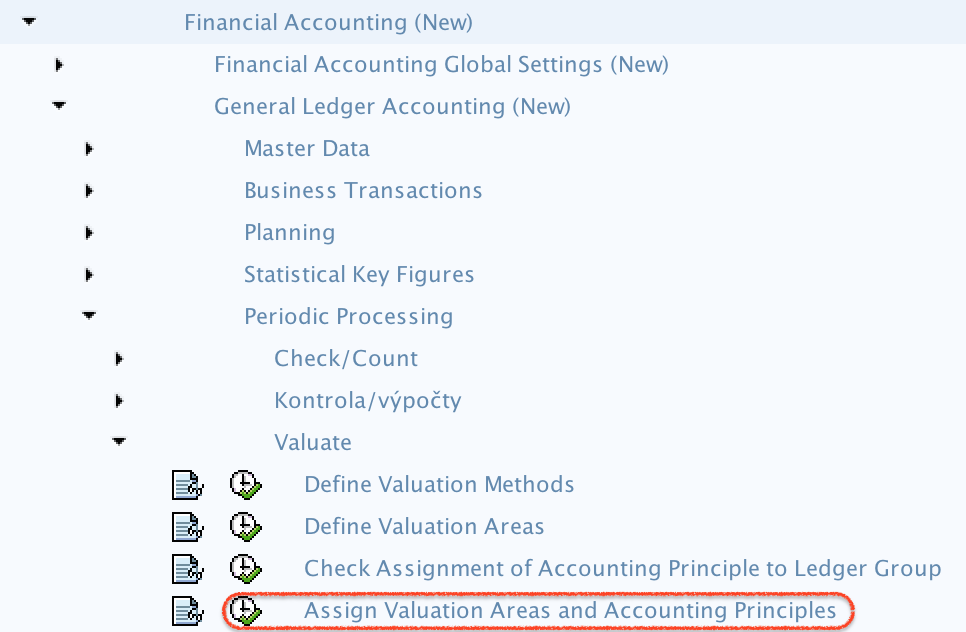
Step 2) On change view “Assignment of Valuation Area to Accounting Principles” overview screen, click on new entries button for assignment.

Step 3) On new entries screen, update the following details.
- Valuation Area: – Update the valuation area key for assignment
- Acct.Princ. : – Update the Accounting principle key for assignment.
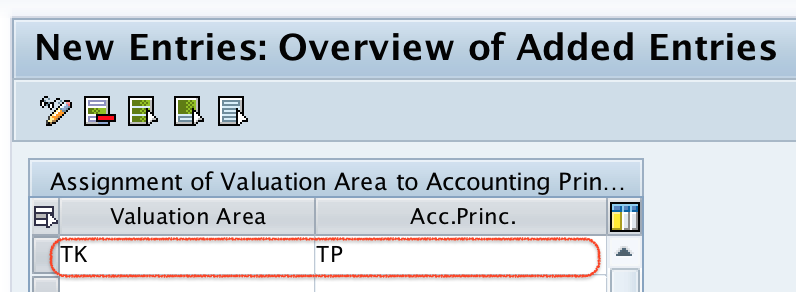
After assignment, click on save button and save in your request in SAP systems.
Common mistakes while defining valuation areas in SAP FI
- Using a vague valuation area description: A short text such as “test” or “valuation” makes the assignment difficult to review later.
- Selecting the wrong currency type: The valuation result depends on the currency view selected for the valuation area, so confirm the currency requirement before saving.
- Creating the valuation area but not assigning it: The valuation area should be assigned to the relevant accounting principle before it is used in closing configuration.
- Confusing FI valuation area with MM valuation area: SAP MM valuation area is used for material stock valuation, while this SAP FI valuation area is used in the financial closing valuation configuration.
SAP FI valuation area and valuation class difference
A valuation area and a valuation class are not the same configuration object. In this SAP FI tutorial, the valuation area is used for currency valuation and accounting-principle assignment. A valuation class is commonly used in materials management and automatic account determination to group materials for posting to the correct general ledger accounts.
When users ask about “valuation area” in SAP, the answer depends on the module and business process. In SAP MM, a valuation area can refer to the organizational level at which material stock is valuated, such as plant or company code depending on system design. In SAP FI closing configuration, the valuation area discussed here is a separate key used with currency valuation settings.
QA checklist for SAP FI valuation area configuration
- Does the valuation area key follow the client naming standard?
- Is the selected currency type correct for the company code and reporting requirement?
- Is the long text clear enough for another FI consultant to understand the purpose?
- Has the valuation area been assigned to the correct accounting principle?
- Are related exchange rate and exchange difference account settings completed before testing period-end valuation?
Useful SAP valuation area reference links
For more background on the SAP MM meaning of company codes and valuation areas, refer to SAP Learning: determining the relevance of company codes and valuation areas. For FI configuration, use the IMG paths shown above and validate the settings in your own SAP system because available options can vary by release and activated business functions.
FAQs on defining valuation areas in SAP FI
What is the valuation area in SAP FI?
In SAP FI, the valuation area in this configuration is a key used for currency valuation during closing. It is maintained with a currency type and then assigned to an accounting principle.
How do you create a valuation area in SAP FI?
Go to SPRO, open SAP Reference IMG, and follow Financial Accounting > General Ledger Accounting > Business Transactions > Closing > Valuate > Define Valuation Areas. Choose New Entries, enter the valuation area key, currency type, and long text, then save the entry.
What is the difference between valuation area and valuation class in SAP?
A valuation area is a configuration key or organizational valuation level depending on the SAP process being discussed. A valuation class is used mainly with materials and automatic account determination to decide which G/L accounts are posted for material transactions.
Why assign valuation areas to accounting principles?
The assignment links the valuation area with the accounting principle so that SAP can apply the intended reporting and valuation logic during financial closing processes.
Which currency type should be selected for a valuation area?
Select the currency type based on the reporting requirement for the valuation area. Company code currency is often used for local valuation, but the correct choice should match the company code, ledger, and accounting-principle design.