In this SAP FICO tutorial, you will learn how to enter exchange rates in SAP using transaction code OB08. Exchange rates are required when SAP posts or translates amounts from one currency to another, such as foreign currency vendor invoices, customer invoices, bank transactions, valuation, and reporting. In our previous SAP tutorial, we learned how to define translation ratios for currency translation in SAP.
How to enter exchange rates in SAP with OB08
In SAP, exchange rates can be maintained by exchange rate type, currency pair, valid-from date, and quotation method. The most commonly used transaction code for maintaining exchange rates is OB08. The same configuration can also be reached from the SAP IMG path under currencies.
Exchange rates are date-dependent. This means SAP reads the rate that is valid for the posting date, translation date, or valuation date used in the business transaction. If there is no rate for the exact date, SAP normally searches for the latest valid rate before that date, depending on the configuration and transaction context.
It is recommended to maintain exchange rates consistently for the exchange rate types used in your company code processes. If your company uses only one rate type for normal postings, maintain that rate type carefully. If your organization uses separate rate types such as average rate, buying rate, selling rate, group rate, or planning rate, maintain the rates for each required type.
OB08 transaction code and SAP IMG menu path
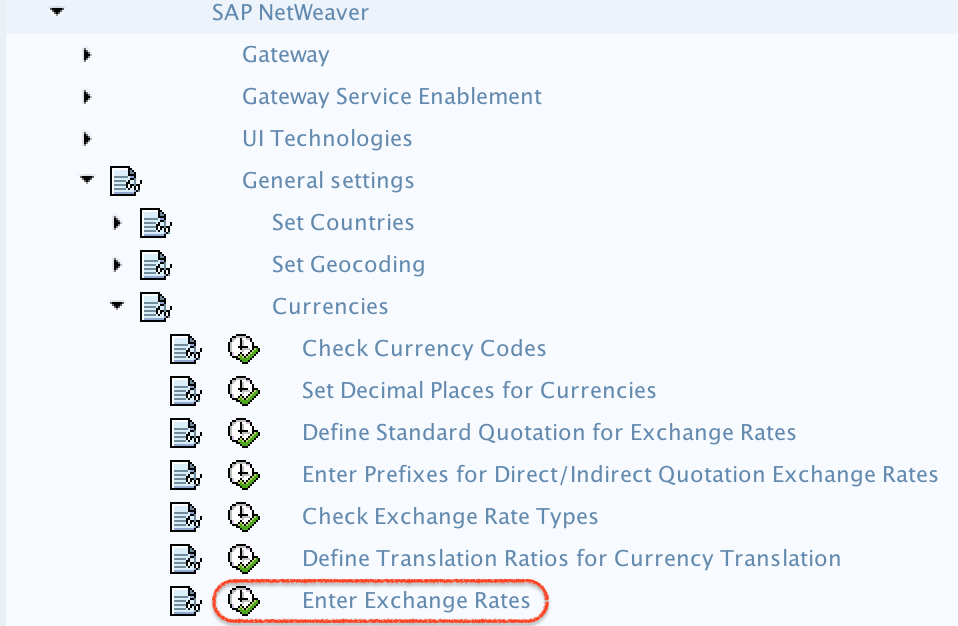
You can enter exchange rates in SAP by using one of the following navigation methods.
Path: – SPRO –> SAP Reference IMG -> SAP Netweaver –> General Settings –> Currencies –> Enter Exchange rates.
In SAP S/4HANA systems, users may also maintain or review exchange rates using available SAP Fiori apps when those apps are activated and assigned to the user role. However, in many SAP FICO configuration tutorials and on-premise systems, OB08 remains the familiar transaction code for maintaining exchange rates.
Exchange rate types used while entering rates in SAP
An exchange rate type tells SAP which rate should be used for a particular purpose. For example, normal accounting postings may use one rate type, while group reporting, planning, or bank-related transactions may use another rate type.
Exchange rate type
Common meaning
Typical use in SAP FICO
M
Average rate
Default rate type commonly used for standard foreign currency postings
B
Bank buying rate
Used where the bank buying rate is required by the business process
G
Bank selling rate or group rate, depending on configuration
Used when the company has defined a separate rate type for selling, group, or reporting needs
Custom rate type
Company-specific rate type
Used for special reporting, planning, tax, or local business requirements
The exact meaning of rate types can vary by system configuration. Before maintaining exchange rates, check the rate types configured in your SAP system and confirm which business process uses each type. You can review rate type configuration in SAP customizing before entering daily or periodic rates in OB08.
Direct quotation and indirect quotation in SAP exchange rates
In SAP, exchange rates can be maintained using direct quotation or indirect quotation. The quotation method controls how the relationship between the from-currency and to-currency is entered.
Direct quotation: Shows how much local currency is needed for one unit of foreign currency. Example: 1 USD = ₹66.
Indirect quotation: Shows how much foreign currency is represented by one unit of local currency. Example: 1 INR = USD 1/66.
Use the quotation method that matches your SAP currency translation configuration. Do not enter both direct and indirect values for the same currency pair unless your system design specifically requires it. Incorrect quotation can cause wrong document amounts, translation differences, and foreign currency valuation results.
Step-by-step OB08 procedure to maintain exchange rates in SAP
Step 1) Enter transaction codeOB08 in the SAP command field and press Enter.
Step 2) On the Change View Currency Exchange Rates: Overview screen, click New Entries to maintain a new exchange rate. You can maintain daily quotations, weekly quotations, month-end quotations, or any required valid-from date. For a specific exchange rate type, currency pair, and valid-from date, maintain one correct quotation as per your business requirement.
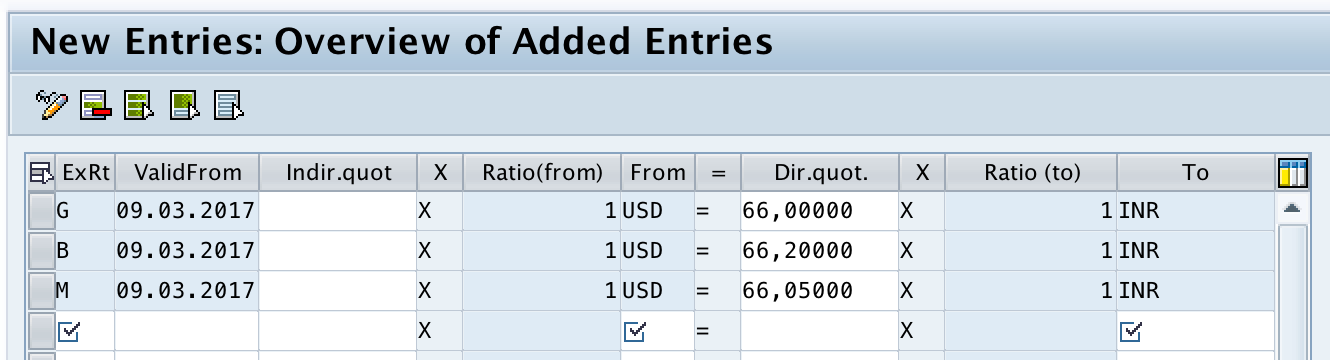
Step 3) On the exchange rates new entries screen, update the required fields for the currency conversion.
Enter the date from which the exchange rate is valid.
01.04.2026
From
Enter the currency code to be converted from.
USD
Dir. Quotation
Enter the direct quotation if your system uses direct quotation.
83.25000
Indirect Quotation
Enter the indirect quotation if your system uses indirect quotation.
Based on configured quotation method
To
Enter the target currency key.
INR
Note: Bank selling rate is usually higher than bank buying rate. If your company maintains separate buying and selling rate types, verify the correct rate type before saving the entry.
Step 4) After maintaining the exchange rate details, click the Save button. SAP saves the configured details in the currency exchange rate table for the relevant rate type, currency pair, and valid-from date.
Example of maintaining USD to INR exchange rate in SAP OB08
Assume your company code currency is INR and you need to post a vendor invoice in USD. If the posting date is 01.04.2026 and the applicable rate is 1 USD = 83.25 INR, you can maintain the rate as shown below.
Field
Value
Exchange rate type
M
Valid From
01.04.2026
From currency
USD
To currency
INR
Direct quotation
83.25000
When a foreign currency document is posted using the same rate type and translation date, SAP can use this maintained exchange rate to calculate the local currency amount. If the business process uses a different rate type, such as a bank buying rate or custom rate type, maintain the rate under that rate type as well.
How SAP selects the exchange rate during foreign currency posting
While posting foreign currency transactions, SAP commonly uses the average exchange rate type M by default. The system reads the exchange rate based on the currency pair, exchange rate type, and relevant date. If a different exchange rate type is assigned in configuration or entered in the transaction, SAP uses that rate type instead.
For standard accounting postings, SAP often reads exchange rate type M unless another rate type is specified.
For bank-related or treasury-related processes, the system may use buying or selling rate types as configured.
For foreign currency valuation, the valuation program may use the exchange rate type assigned in valuation configuration.
For reporting or consolidation, companies may use separate group or closing rate types.
If SAP cannot find a valid exchange rate, the posting or valuation process may stop with an error asking you to maintain the missing exchange rate. In that case, check the currency pair, exchange rate type, translation date, and quotation method before entering a new rate.
Checks before saving exchange rates in SAP OB08
Before saving exchange rates in OB08, review the following points to avoid incorrect currency conversion in accounting documents.
Confirm that the exchange rate type is correct for the business process.
Check whether the rate should be entered as direct quotation or indirect quotation.
Verify the from-currency and to-currency order before entering the rate.
Use the correct valid-from date, especially for month-end or daily rates.
Ensure translation ratios are already maintained for the currency pair.
Do not overwrite existing rates unless you are correcting an approved rate entry.
Keep an audit trail or approval record if your company controls exchange rate maintenance.
OB08 exchange rate maintenance issues and quick fixes
Issue in SAP
Likely reason
What to check
Exchange rate missing during posting
No rate exists for the required rate type, currency pair, or date.
Check OB08 for the exact exchange rate type and translation date.
Converted amount looks incorrect
Direct and indirect quotation may be mixed up.
Review the quotation method and currency direction.
Rate is not picked even though it exists
Different exchange rate type is used by the transaction.
Check document entry, valuation configuration, or company code settings.
Currency pair cannot be maintained correctly
Translation ratio may be missing.
Maintain translation ratios before entering the rate.
Month-end valuation difference is unexpected
Wrong closing rate or valid-from date may have been used.
Review the rate type and valuation date used by the valuation program.
FAQ on entering exchange rates in SAP
What is the T code for currency exchange rate in SAP?
The transaction code for maintaining currency exchange rates in SAP is OB08. You can enter OB08 in the SAP command field to open the currency exchange rate maintenance screen.
What is OB08 used for in SAP?
OB08 is used to maintain exchange rates for currency pairs in SAP. Rates are maintained by exchange rate type, valid-from date, from-currency, to-currency, and quotation method.
What exchange rate type does SAP use by default?
For many standard foreign currency postings, SAP uses exchange rate type M, which is commonly treated as the average rate. The actual rate type used can vary if the transaction or configuration specifies another rate type.
Can SAP maintain different exchange rates for the same currency pair?
Yes. SAP can maintain different exchange rates for the same currency pair by using different exchange rate types and valid-from dates. For example, USD to INR can have separate rates for average rate, buying rate, selling rate, or group reporting rate.
Why is SAP not picking the exchange rate maintained in OB08?
SAP may not pick the rate if the exchange rate type, currency pair, valid-from date, or quotation method does not match the transaction requirement. Check the posting date or translation date and confirm the rate type used by the transaction.
Editorial QA checklist for SAP exchange rate tutorial review
Verify that OB08 is clearly identified as the transaction code for maintaining exchange rates.
Confirm that direct quotation and indirect quotation are explained with a currency example.
Check that the OB08 field names match the SAP screen labels used in the screenshots.
Ensure the tutorial explains exchange rate type M and why different rate types may be maintained.
Confirm that the troubleshooting section covers missing rate, wrong quotation, and wrong valid-from date issues.
Successfully, we have maintained exchange rates in SAP using transaction code OB08.
 TutorialKart.com