 TutorialKart.com
How to Assign Country to Calculation Procedure in SAP Using OBBG
In this SAP FI tutorial, you will learn how to assign country to calculation procedure in SAP. In the previous tutorial, we learned how to define tax procedures in SAP. The link between a country and a tax calculation procedure is created through the country-to-calculation-procedure assignment.
This setting is important for tax on sales and purchases because SAP determines the tax calculation procedure based on the country. When users create documents for a company code, the country assignment helps SAP pick the correct tax procedure for tax code processing.
Purpose of Country to Calculation Procedure Assignment in SAP FI
The country to calculation procedure assignment tells SAP which tax procedure should be used for a specific country. For example, if the country key is IN, you can assign the relevant India tax procedure such as TAXINN, depending on your system design and business requirement.
After this assignment, tax codes for sales and purchases are created and maintained with reference to the tax procedure. If this setting is missing or incorrect, tax code maintenance and tax calculation in documents may not work as expected.
Configuration Items to Complete Before Assigning Country to Tax Procedure
Important configuration to refer:
- How to define condition types
- Maintain tax codes for sales and purchases
- Define the tax calculation procedure before assigning it to a country
- Confirm the correct country key, such as IN for India, US for United States, or GB for United Kingdom
OBBG Navigation Path for Assign Country to Calculation Procedure in SAP
You can assign country to calculation procedure by using one of the following navigation methods.
- Transaction code: – OBBG
- Path: – SPRO –> IMG –> Financial Accounting (New) –> Financial Accounting Global Settings (New) –> Tax on Sales/Purchases –> Basic settings –> Assign Country to Calculation Procedure.
The exact IMG wording can vary slightly by SAP release, but the configuration activity is the same. The transaction code OBBG is the direct way to open the assignment screen.
Step-by-Step SAP OBBG Configuration for Country IN
Step 1) Enter T-code “OBBG” in the SAP command filed and enter.

Step 2) On change view “Assign country –> calculation procedure”: overview screen, click on position button and enter the country key “IN” in the given field and press enter.
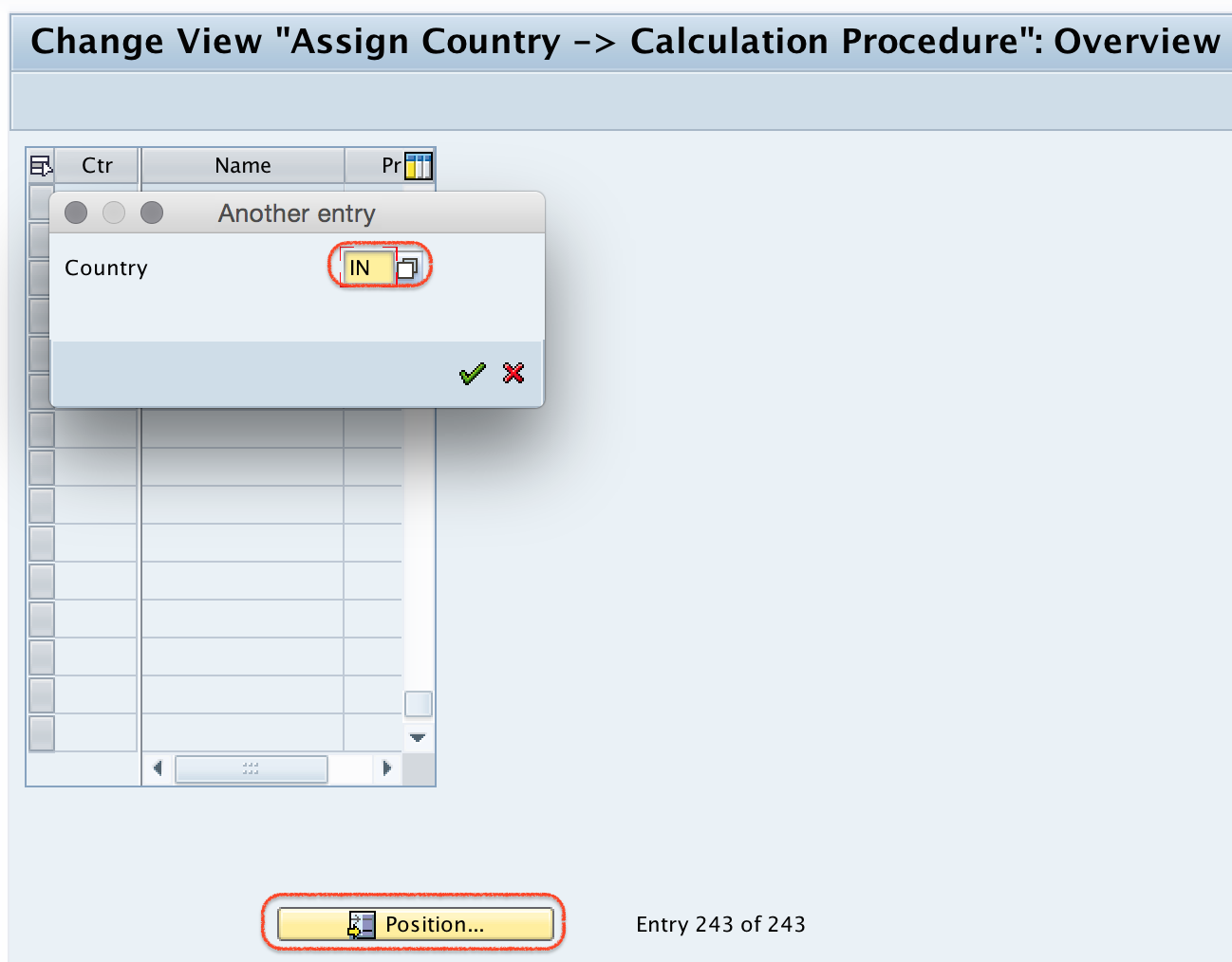
Step 3) Now country IN displays on top of the screen. Now assign your calculation procedure to IN.

In the calculation procedure field, enter the tax procedure that is already defined in your SAP system. For India, many systems use TAXINN, but you should use the procedure approved for your implementation.
Step 4) After assignment, click on save button and save in your request.
Successfully we have assigned country to calculation procedure in SAP.
Fields Used in Assign Country to Calculation Procedure Screen
| Field | What it means | Example |
|---|---|---|
| Country | Country key for which the tax calculation procedure is assigned. | IN |
| Calculation Procedure | Tax procedure that contains condition types, access sequence logic, and tax calculation rules. | TAXINN |
| Transport Request | Customizing request used to move the assignment to quality and production systems. | Workbench or customizing request as per project setup |
How SAP Uses the Country Calculation Procedure Assignment
When tax is calculated in FI, MM, or SD documents, SAP needs a tax procedure to determine the condition types and calculation sequence. The country key assigned to the company code is one of the key inputs used for this tax procedure determination.
For a simple example, if a company code belongs to India and the country key IN is assigned to TAXINN, tax codes created for India are processed with that procedure. This is why the country assignment should be completed before maintaining tax codes for sales and purchases.
Common Errors in SAP OBBG Country Assignment
- Calculation procedure not available: Define or check the tax procedure before assigning it in OBBG.
- Wrong country key selected: Use the correct SAP country key. For example, India is IN.
- Transport not saved: Save the setting in the correct customizing transport request.
- Tax code issue after assignment: Recheck tax code maintenance for sales and purchases after the country procedure assignment.
- Mismatch between company code country and tax setup: Confirm the company code country before troubleshooting document-level tax calculation.
Checklist Before Saving Country to Calculation Procedure in SAP
- The tax calculation procedure has already been defined.
- The correct country key is selected in OBBG.
- The calculation procedure is approved for that country and business process.
- Condition types and account keys are reviewed in the tax procedure.
- Tax codes for sales and purchases will be created or validated after this assignment.
- The assignment is saved in the correct transport request.
FAQ on Assign Country to Calculation Procedure in SAP
What is the transaction code to assign country to calculation procedure in SAP?
The transaction code is OBBG. You can also reach the same setting through SPRO under Tax on Sales/Purchases basic settings.
Why do we assign a country to a calculation procedure in SAP?
We assign a country to a calculation procedure so that SAP can determine the correct tax procedure for tax on sales and purchases. The procedure controls how tax condition types are processed.
Can one country have more than one tax calculation procedure in SAP OBBG?
In the OBBG country assignment, a country is assigned to the relevant calculation procedure used for that country. If different tax requirements exist, they are normally handled within the tax procedure, tax codes, condition records, or country-specific configuration design.
What should be configured before maintaining tax codes in SAP?
Before maintaining tax codes, you should define the tax procedure, assign the country to the calculation procedure, and review the required condition types and account keys.
Is OBBG used in both SAP ECC and SAP S/4HANA?
OBBG is commonly used for the country-to-calculation-procedure assignment in SAP FI tax configuration. The IMG menu text may differ by release, but the purpose of the assignment remains the same.