 TutorialKart.com
How to define functional area in SAP FICO
The following SAP tutorial explains how to define functional area in SAP Financial Accounting step by step. A functional area is used mainly for cost of sales accounting, where expenses are reported by business function such as production, administration, sales, or research and development.
Before referring this configuration steps, we recommend to read how to define company code in SAP and how to create business area in SAP.
What is functional area in SAP FICO?
In SAP, functional area is an organizational unit that sorts operating expenses based on the activity or function that caused the cost. Common examples are Production, Administration, Sales, and Research & Development.
- Functional areas help prepare financial statements using the cost of sales accounting approach.
- If the organization follows cost of sales accounting, functional areas should be created and assigned correctly in master data and business postings.
- Functional area is usually derived from master data during posting, so correct assignment is important for reporting accuracy.
- You can enter or derive functional area from master data such as G/L accounts, cost elements, cost centers, internal orders, and WBS elements.
Functional area level in SAP configuration
Functional areas are defined at client level in SAP customizing. After defining the functional area key and description, the same functional area can be used in relevant company codes and controlling objects, depending on the accounting and controlling design of the organization.
The functional area itself is only the basic definition. For real reporting, you must also make sure that the functional area is assigned or derived correctly in the master data and postings that create costs.
Functional area examples used in this SAP FICO tutorial
Scenario: In this configuration, we are going to define the following functional areas in order to meet the organizational requirements.
| Functional Area | Description | Typical business use |
| TK11 | Production | Manufacturing and production-related expenses |
| TK12 | Administration | General administration expenses |
| TK13 | Sales | Selling and distribution-related expenses |
| TK14 | Research & Development | Product research and development expenses |
Functional area vs business area in SAP
Functional area and business area are not the same in SAP. A functional area classifies expenses by business function, such as production or sales. A business area is used to separate financial reporting by internal business segment or area of responsibility.
| Point | Functional Area | Business Area |
| Main purpose | Classifies costs by function for cost of sales accounting | Supports segment-style reporting across business areas |
| Example | Production, Sales, Administration | Region, division, or internal reporting area |
| Used mainly for | Expense classification and profit and loss reporting | Internal financial statement reporting |
| Typical assignment | Derived from G/L account, cost center, order, WBS, or related objects | Derived from organizational assignment and posting logic |
SAP path and transaction codes to create functional area
You can define functional area in SAP by using the IMG navigation path or the direct transaction code.
- SAP Menu Path: – SPRO – IMG – Enterprise Structure – Definition – Financial Accounting – Define functional Area
- T – code: – OKBD, FM_FUNCTION
- Database Table: – TFKB, TFKBT.
You can also refer to SAP Help documentation for functional area configuration and cost of sales accounting concepts when validating the configuration in an implementation project.
Step 1: Open FM_FUNCTION to define functional area in SAP
Step 1) Enter transaction code “FM_FUNCTION” in the sap commend filed and enter to continue.

Step 2: Enter the SAP functional area key
Step 2) From process functional area screen, enter the four digits key that identities functional area in SAP and click on create functional area button to define the functional areas as per the organizational requirements.
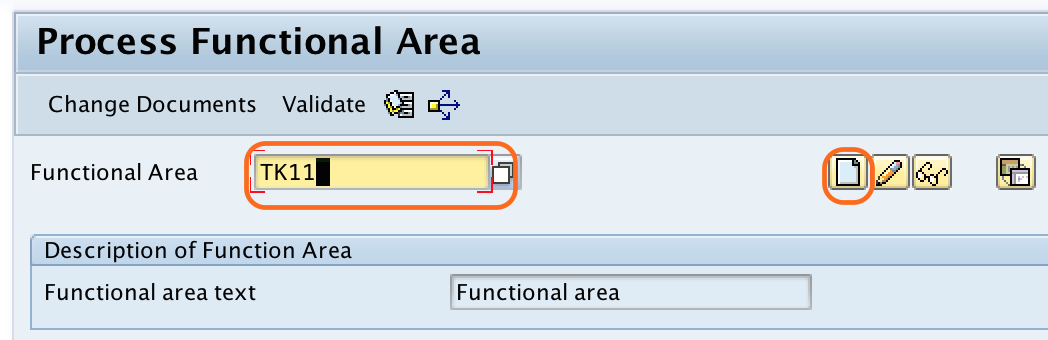
Use a short and meaningful key that follows the naming standard used in your SAP system. In this example, TK11 is used for the Production functional area.
Step 3: Maintain functional area description in SAP
Step 3) Now update description of functional area.
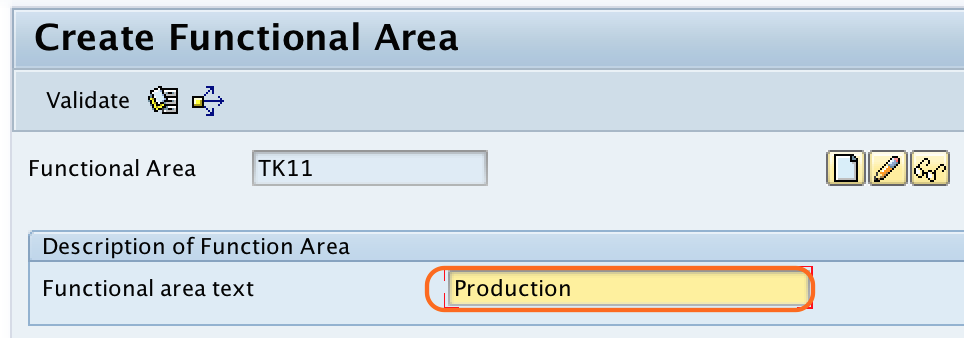
The description should clearly identify the activity represented by the functional area. Avoid vague descriptions because the same value may appear in reports, master data checks, and posting analysis.
Step 4: Save the functional area in SAP
Step 4) Click on save button and save the configured functional area details. You get a message as “Functional area TK11 has been saved.

Successfully we have created new functional area “TK11” in SAP system.
Where functional area is assigned after creation
Creating the functional area key is only the first part of the setup. The next important task is to make sure that functional area is available during postings. Depending on your SAP design, the value may be maintained or derived from the following objects.
- G/L account: Useful when the account itself clearly belongs to one functional area.
- Cost center: Useful when expenses posted to a cost center should flow to a specific function.
- Internal order: Useful for project-like or temporary cost tracking.
- WBS element: Useful when project costs need functional classification.
- Cost element or controlling object: Used in controlling-related derivation depending on the system version and configuration.
Checks after defining functional area in SAP FICO
After saving a functional area, verify the configuration with a small posting or with existing master data. This helps confirm whether the functional area is derived as expected.
- Check whether the functional area key and description are saved correctly.
- Verify that the functional area is assigned in relevant master data, such as G/L account, cost center, order, or WBS element.
- Post a test transaction in a non-production client and check whether the correct functional area appears.
- Review reporting output if cost of sales accounting is active.
- Confirm the naming standard before transporting the configuration to quality or production systems.
Common issues when SAP functional area is not derived
If the functional area does not appear in a posting, the issue is usually not with the basic functional area definition. Most issues are caused by missing assignment or incorrect derivation logic.
| Issue | What to check |
| Functional area is blank in posting | Check assignment in G/L account, cost center, order, WBS element, or derivation rules. |
| Wrong functional area appears | Review which master data object has priority in your configuration. |
| Functional area not available for reporting | Confirm cost of sales accounting settings and reporting configuration. |
| New functional area not visible to users | Check transport movement, authorization, and whether the user is working in the correct client. |
Editorial QA checklist for SAP functional area tutorial
- Confirm that the tutorial explains the SAP functional area meaning before showing configuration steps.
- Verify that the IMG path and transaction codes OKBD and FM_FUNCTION are presented clearly.
- Check that functional area and business area are not described as the same object.
- Confirm that the tutorial explains where functional area assignment or derivation is usually maintained after creation.
- Review screenshots and step text to ensure the example functional area TK11 is consistent.
FAQs on functional area in SAP FICO
How to define functional area in SAP?
You can define functional area in SAP through the IMG path under Enterprise Structure or by using transaction code FM_FUNCTION. Enter the functional area key, maintain the description, and save the entry.
At which level do you define functional area in SAP?
Functional areas are defined at client level in SAP customizing. After definition, they can be assigned or derived in relevant master data and postings based on the organization’s accounting design.
What is the use of functional area in SAP FICO?
Functional area is used to classify expenses by business function, such as production, sales, administration, or research and development. It is mainly used for cost of sales accounting and related financial reporting.
What is the difference between business area and functional area in SAP?
A functional area classifies expenses by activity or function. A business area supports internal financial reporting by business segment or area of responsibility. They serve different reporting purposes.
Where is functional area maintained after creating it?
Depending on the SAP design, functional area can be maintained or derived from G/L accounts, cost centers, cost elements, internal orders, WBS elements, and other controlling objects.