 TutorialKart.com
In this SAP FICO tutorial, you will learn how to define a posting period variant in SAP using transaction code OBBO. A posting period variant is used to control which accounting periods are open or closed for financial postings. In the previous SAP tutorial, we created fiscal year variant T3 and assigned it to company code TK01. The next step is to create a posting period variant so that postings can be controlled for the required fiscal periods.
What is Posting Period Variant in SAP FICO?
Posting period variant (PPV) is a four-character configuration key that controls the opening and closing of posting periods for FI transactions in SAP. It does not create the fiscal calendar. The fiscal year variant defines the fiscal year structure, number of periods, and special periods; the posting period variant decides which of those periods are currently allowed for posting.
When a user posts an accounting document, SAP checks the posting date in the document header and determines the relevant fiscal period. The system then checks the posting period variant assigned to the company code. If the period is not open for the required account type and account interval, the document cannot be posted.
In SAP S/4HANA, the same business concept is also handled through the SAP Learning lesson on posting period variants and the Manage Posting Periods app, depending on the system and role design. In classic SAP GUI configuration, OBBO is used to define the variant, OBBP is used to assign it to company codes, and OB52 is used to maintain the open and closed posting periods.
Why Posting Period Variant is Required for Open and Close Posting Periods
Scenario
During fiscal year 2016, company TK01 has declared profitability to management and the public up to the first quarter, that is, up to 30th June 2016. After declaration of profitability, the reported profit figures should not be changed by backdated postings.
If periods from April 2016 to March 2017 are open, a user may post a transaction with an April posting date. That backdated entry can change the profitability figures that were already declared for the first quarter. To prevent this, the SAP consultant closes the posting periods from 1st April 2016 to 30th June 2016 and keeps the posting periods from 1st July 2016 to 31st March 2017 open.
- To open posting periods from July 2016 to March 2017 in an April-to-March fiscal year, we represent the open period range in SAP as period 4, 2016 to period 12, 2016.
- Users can post entries only within the allowed period range. This is the practical meaning of open and closed posting periods.
- A posting period variant enables period control for multiple company codes at the same time or individually by company code in SAP.
Posting Period Variant, Fiscal Year Variant, and Company Code Relationship
The posting period variant works together with the fiscal year variant and company code assignment. These three settings should not be confused during SAP FICO configuration.
| SAP FICO setting | Purpose in posting period control | Common transaction code |
|---|---|---|
| Fiscal year variant | Defines the fiscal year structure, normal periods, and special periods. | OB29 |
| Posting period variant | Defines the variant key used to control open and closed periods. | OBBO |
| Assign posting period variant to company code | Links the company code to the posting period variant. | OBBP |
| Open and close posting periods | Maintains the actual period ranges allowed for posting by account type. | OB52 |
Defining the posting period variant in OBBO only creates the variant key and description. To make the setting effective, the variant must be assigned to the company code, and open period intervals must be maintained for that variant.
Account Types Checked by Posting Period Variant in SAP
Posting period control can be maintained differently by account type. The account type decides whether the open period check applies to all accounts, customers, vendors, assets, materials, or general ledger accounts.
| Account type | Meaning in posting period variant | Typical use |
|---|---|---|
| + | Valid for all account types | Basic open period entry required for posting control. |
| A | Asset accounts | Used for asset accounting postings. |
| D | Customer accounts | Used for accounts receivable postings. |
| K | Vendor or supplier accounts | Used for accounts payable postings. |
| M | Material accounts | Used for materials management related postings. |
| S | G/L accounts | Used for general ledger account postings. |
| V | Contract accounts | Used where contract accounting is active. |
In many SAP FI implementations, the account type + is maintained first because it is valid for all account types. More specific entries can then be maintained for account types such as S, D, K, A, and M when the business wants tighter control during month-end or year-end close.
How to Define Variants for Open Posting Periods in SAP
You can define a posting period variant in SAP by using one of the following navigation methods.
- Transaction code: – OBBO
- Menu Path: – SPRO > IMG > Financial Accounting > Financial Accounting Global Settings > Document > Posting periods > Define variants for open posting periods.
Step 1) Enter transaction code “OBBO” in the SAP command field and press Enter.

Step 2) On the change view “Posting Periods: Define Variants” overview screen, click the New Entries button to create a new variant for open posting periods in SAP.

Step 3) On the new entries screen, update the following details.
- Variant: Enter the four-character key that identifies the posting period variant in SAP. Use a naming convention that can be understood by the finance and SAP support teams, such as the company code or a group-level variant key.
- Name: Enter a clear description for the variant, for example, “Posting period variant for TK01”.
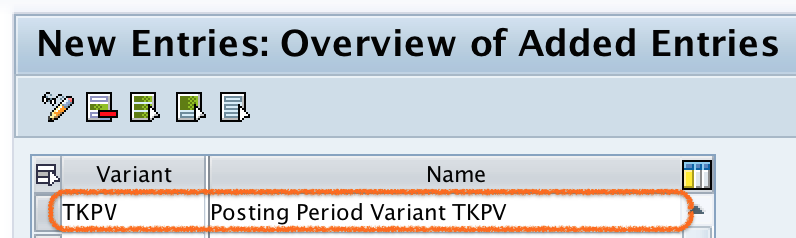
Step 4) After updating the variant key and name, click the Save button and save the configured variant details.
Successfully, we have defined the posting period variant in SAP FICO.
What to Do After Creating Posting Period Variant in OBBO
After the posting period variant is created, complete the remaining period-control configuration. Creating the variant alone does not open or close any accounting period.
- Assign the posting period variant to the company code: Use the company code assignment step so that SAP knows which period variant applies to postings in that company code.
- Maintain open and closed periods: Use transaction code OB52 to define the allowed period range for account types such as +, S, D, K, A, and M.
- Test with a posting date inside the open range: Post a sample accounting document with a valid posting date and confirm that the system allows the posting.
- Test with a posting date outside the open range: Use a closed posting date and confirm that SAP blocks the posting with a period-related error message.
Normal Periods and Special Periods in Posting Period Variant
Normal posting periods are usually used for regular monthly postings. In many fiscal year variants, these are periods 1 to 12. Special periods are optional year-end periods, commonly 13 to 16, used for audit adjustments or closing entries. The exact availability of special periods depends on the fiscal year variant configuration.
For example, a business may keep the current normal period open for all users and open a special period only for selected year-end users through authorization control. This prevents regular users from posting adjustment entries while still allowing the finance close team to complete year-end activities.
Common Posting Period Variant Configuration Mistakes
- Creating the variant but not assigning it to the company code: OBBO only defines the variant. Assignment to the company code is a separate configuration step.
- Opening the wrong fiscal year: Always check the fiscal year variant before maintaining periods, especially when the company follows a non-calendar fiscal year.
- Leaving earlier periods open after reporting is complete: This can allow backdated postings and may change already reviewed financial figures.
- Missing the account type + entry: If the generic account type is not maintained correctly, postings may fail even when specific account type entries exist.
- Using one shared variant without business agreement: If multiple company codes use the same posting period variant, changing periods for one company code can affect all company codes assigned to that variant.
Posting Period Variant Configuration Checklist in SAP FICO
- Confirm the fiscal year variant assigned to the company code before deciding the period numbers.
- Use OBBO to create a clear four-character posting period variant key and description.
- Assign the posting period variant to the correct company code before testing postings.
- Maintain open periods in OB52 for the correct account types and account ranges.
- Check whether special periods are required for year-end adjustments.
- Test both allowed and blocked posting dates before moving the configuration to production.
Posting Period Variant FAQs
What is a posting period variant in SAP FICO?
A posting period variant in SAP FICO is a configuration key used to control which fiscal periods are open or closed for accounting postings. It is assigned to one or more company codes and maintained with period ranges for different account types.
Which transaction code is used to define a posting period variant in SAP?
Transaction code OBBO is used to define a posting period variant. After defining the variant, the consultant assigns it to the company code and maintains open posting periods separately.
What is the difference between OBBO and OB52 in posting period control?
OBBO is used to create the posting period variant key and description. OB52 is used to maintain the actual open and closed posting period intervals for that variant.
Can one posting period variant be assigned to multiple company codes?
Yes, one posting period variant can be assigned to multiple company codes. This is useful when the same period-control policy applies to all those company codes. If each company code needs independent opening and closing of periods, separate variants should be used.
Why does SAP block posting even when the posting date looks correct?
SAP can block posting when the posting period is not open for the company code, account type, account interval, or fiscal year derived from the posting date. The posting period variant, fiscal year variant, and OB52 entries should be checked together.