 TutorialKart.com
Maintain Financial Management Area in SAP using transaction code OF01
This tutorial explains how to maintain a Financial Management Area in SAP FI step by step. An FM area is required when you use Funds Management or related public sector budgeting functions, because it defines the organizational unit in which funds, budget values, and commitment values are managed.
In this example, we create the following FM areas in SAP. The values are sample configuration values and should be adjusted according to your project design, currency, and company code assignment requirements.
| FM Area | FM area text | FM area Currency |
| FM01 | TKART FM Area -In | INR |
| FM02 | TKART FM Area -SGD | SGD |
| FM03 | TKART FM Area -US | USD |
SAP configuration items to check before creating an FM Area
Before you create a Financial Management Area in SAP, check the enterprise structure and finance settings that will later be assigned to the FM area. In most implementations, the FM area is created first and then assigned to the relevant company code or company codes.
Important configurations to refer
What is Financial Management Area in SAP?
A Financial Management Area in SAP, also called an FM area, is an organizational unit used in Funds Management. It helps organize budgeting, availability control, commitment tracking, and fund-related reporting for one or more company codes.
You can assign one or more company codes to a single FM area in SAP when those company codes are managed under the same funds management structure. The currency entered for the FM area is important because budget values and funds management totals are maintained with reference to that currency.
The FM area should not be confused with the functional area. A functional area is used for cost-of-sales accounting and reporting by function, while the FM area is used for funds management and budget control.
Navigation path and SAP table for FM Area maintenance
You can maintain FM area in SAP by using the IMG navigation path or the direct transaction code.
- Navigation: – SPRO – IMG – Enterprise Structure – Definition – Financial Accounting – Maintain FM Area
- Transaction Code: – OF01
- Database table: –FM01, FM01T.
The main table for Financial Management Areas is FM01. Texts for FM areas are stored in FM01T. These tables are useful when you want to verify whether an FM area exists or when you need to check the FM area description in different languages.
Step 1: Open transaction code OF01 to maintain FM Area in SAP
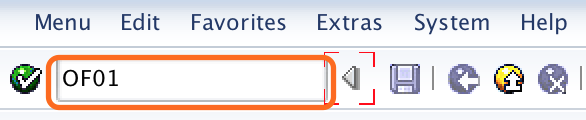
Enter transaction code “OF01” in the SAP command field and enter to continue.
Step 2: Choose new entries in the Create FM Areas overview screen
On change view “Create FM Areas” Overview screen, click on entries button to create new financial management area in SAP as per the organizational requirements.

Step 3: Enter FM Area key, description, and currency in SAP
On new entries:Overview of added entries screen, update the following details.
- FM Area: – Give the four alphanumeric key that identifies the Financial Management Area in SAP.
- FM Area Text: – Update the descriptive text of Fm area.
- FM area currency: – Update the currency key under which currency financial management areas are to be maintained.
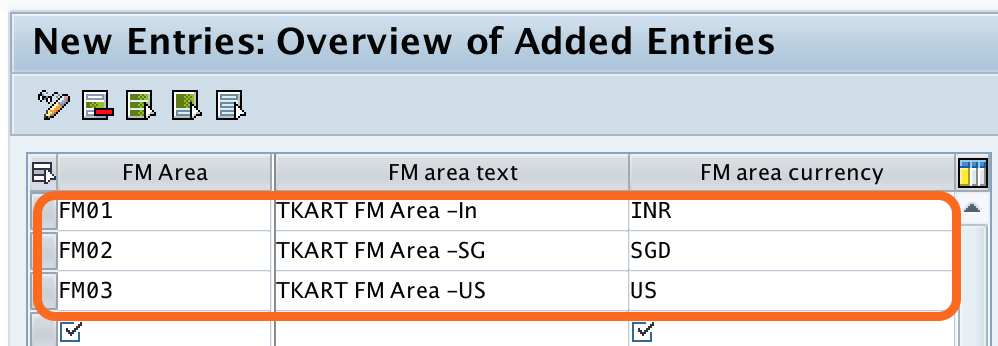
After updating all the details, click on save button and save the configured details.

Step 4: Save the SAP FM Area configuration in a customizing request
Now you are prompted for customise request number to save the FM area in SAP, choose request number and save the details.
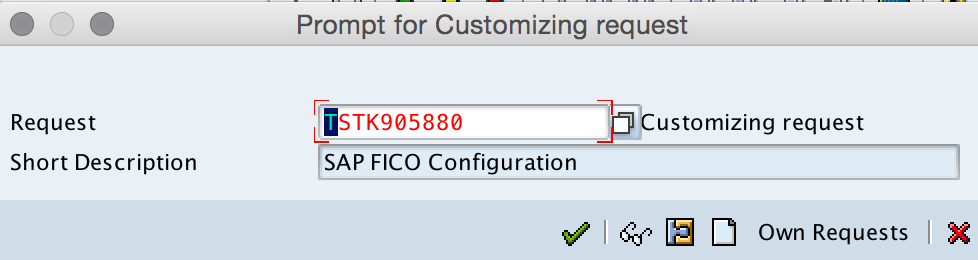
Successfully we have maintained Financial management area in SAP.
Field explanation for Financial Management Area creation in SAP
| Field | Purpose in FM Area configuration | Configuration note |
| FM Area | Unique four-character key for the Financial Management Area. | Use a code that follows your project naming convention. |
| FM Area Text | Description that helps users identify the FM area. | Use a clear description such as country, company group, or budget unit. |
| Currency | Currency in which funds management values are maintained. | Confirm the currency before saving because it affects funds management reporting and budget values. |
After creating an FM Area: next SAP Funds Management settings
Creating the FM area only defines the organizational unit. In a complete SAP Funds Management setup, you normally continue with assignment and control settings. The exact sequence depends on whether classic Funds Management or other public sector management functions are active in your system.
- Assign company code to the Financial Management Area.
- Check whether the FM area currency matches the reporting requirement.
- Maintain funds centers, commitment items, funds, and funded programs if they are used in the project.
- Configure budget profile, availability control, and derivation rules according to the business process.
- Transport the customizing request to the required quality and production clients after testing.
Common mistakes while maintaining Financial Management Area in SAP
- Using an unclear FM area key: Avoid random keys that do not match the project naming standard.
- Selecting the wrong FM area currency: Confirm the currency before saving the configuration.
- Creating duplicate FM areas: Check existing entries in OF01 before creating a new one.
- Confusing FM area with controlling area: A controlling area is used in CO, while an FM area is used in Funds Management.
- Skipping company code assignment: The FM area must be assigned properly before it can be used in normal business processing.
QA checklist for this SAP FM Area tutorial
- Confirm that the transaction code OF01 is shown as the direct transaction for maintaining the FM area.
- Verify that the IMG path mentions Enterprise Structure, Definition, Financial Accounting, and Maintain FM Area.
- Check that FM01 and FM01T are listed as the relevant database tables for FM area and FM area text.
- Ensure that the example FM area keys, descriptions, and currencies are sample values and not presented as mandatory SAP values.
- Confirm that the tutorial distinguishes Financial Management Area from functional area and controlling area.
FAQs on Maintain Financial Management Area in SAP
What is the transaction code to create FM Area in SAP?
The transaction code to create or maintain a Financial Management Area in SAP is OF01. You can also reach the same configuration through SPRO and the SAP Reference IMG path.
Which SAP table stores Financial Management Areas?
The Financial Management Area is stored in table FM01. The related text table is FM01T, which stores language-dependent descriptions for FM areas.
Can one FM Area be assigned to multiple company codes?
Yes, one FM area can be assigned to one or more company codes when those company codes are managed under the same funds management structure. This assignment should follow the finance and budgeting design of the implementation.
Is FM Area the same as controlling area in SAP?
No. The controlling area is used in SAP Controlling for cost accounting, while the FM area is used in Funds Management for budget and funds control. They are different organizational units and are configured for different purposes.
What should be checked before saving an FM Area currency?
Before saving the FM area currency, confirm the currency required for budget values, funds management reporting, and company code assignment. Changing the design later can affect reporting and configuration consistency.