 TutorialKart.com
How to Define Accounts for Cash Discount Taken in SAP Using OBXV
In this SAP FICO tutorial, you will learn how to define accounts for cash discount taken in SAP step by step using transaction code OBXV. This setting assigns the G/L account that SAP uses when a vendor cash discount is taken during outgoing payment clearing.
Cash discount taken normally applies to accounts payable transactions. When the vendor invoice is paid within the discount period defined in the payment terms, SAP can post the discount amount to the configured cash discount received account while clearing the open item.
Purpose of Defining Cash Discount Taken Accounts in SAP FI
Through this SAP configuration, you define the G/L account numbers for your cash discount received accounts. The SAP system posts the cash discount amount to this G/L account when you are clearing the open items. Discounts are adjusted against purchases when cash discounts are to be shown under other income or a separate discount received account, depending on the accounting policy used by the company.
The OBXV assignment is maintained with reference to the chart of accounts. Therefore, the correct chart of accounts must be selected before you assign the G/L account for cash discount taken.
Prerequisites Before Assigning G/L Accounts for Cash Discount Taken
Before you maintain OBXV, complete the basic FI setup and make sure the discount account is available for posting.
Assign chart of accounts to company code
Create G/L accounts for cash discounts using transaction code FS00
| G/L Account | Account Group | Description |
| 300101 | Other Income | Cash discount received |
Also verify that payment terms are configured for cash discount, the vendor invoice is eligible for the discount, and the selected G/L account is not blocked for posting. If taxes are affected by cash discounts in your country configuration, validate the tax treatment with your FI lead before moving the setting to production.
OBXV Configuration Path for Cash Discount Taken Account Determination
| SAP R/3 Role Menu | Define accounts for cash discount taken |
| Transaction Code | OBXV |
| IMG Menu Path | SPRO > SAP Reference IMG > Financial Accounting (New) > Accounts Receivable and Accounts Payable > Business transactions > Outgoing payments > Outgoing payment global settings > Define accounts for cash discount taken |
Step 1: Open OBXV and Enter the Chart of Accounts
Step 1 : – Enter SAP T-code “OBXV” in the commend field and press enter to continue.

A window opens for entering the chart of accounts key, update the chart of account (COA) and press enter.
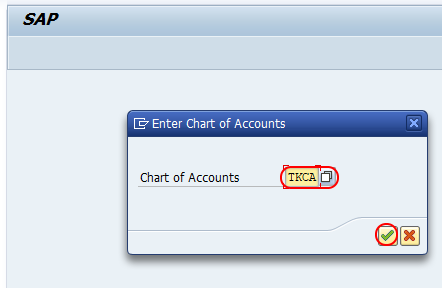
Select the same chart of accounts that is assigned to the company code for which the cash discount taken posting will be used. If the wrong chart of accounts is selected, SAP may not find the expected account during vendor payment clearing.
Step 2: Choose the Account Key for Cash Discount Taken in OBXV
Step 2 : – On configuration accounting maintain: accounting posts -rules, click on accounts key for assignment of G/L accounts for cash discounts.
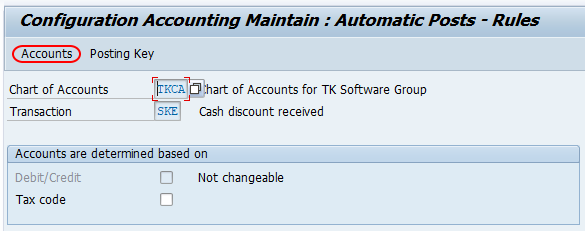
This screen controls the automatic account assignment rule for the cash discount taken transaction. Keep the account determination simple unless your organization has a documented requirement to split discount accounts by additional criteria.
Step 3: Assign the Cash Discount Received G/L Account
Step 3: – Under Account assignment option, update the cash discount received G/L in the field account as shown below image.
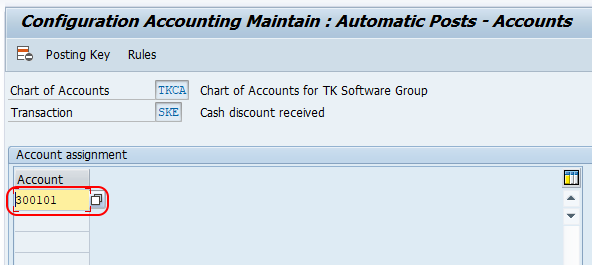
After assignment of general ledger cash discount received accounts, click on save button and save the configured details.
Successfully we have defined accounts for cash discounts taken in SAP Financial Accounting.
How SAP Posts a Vendor Cash Discount Taken During Payment
The account maintained in OBXV is used when SAP posts the discount portion during open item clearing. A simple vendor payment with cash discount can be understood as follows.
| Line item | Debit | Credit |
| Vendor account | Invoice amount | |
| Bank or outgoing payment account | Net paid amount | |
| Cash discount received account | Cash discount taken amount |
For example, if a vendor invoice of 10,000 is paid within a 2% discount period, the payment may clear the vendor for 10,000, credit the bank for 9,800, and credit the cash discount received account for 200. The exact posting can vary when tax adjustment, document splitting, withholding tax, or country-specific settings are active.
Related SAP Transactions for Cash Discount Taken Configuration
| Transaction | Use in cash discount setup |
| OBXV | Define accounts for cash discount taken. |
| FS00 | Create or maintain the cash discount received G/L account. |
| OB13 | Define or review the chart of accounts used for account determination. |
| OBB8 | Maintain payment terms, including cash discount percentage and discount days. |
| F-53 | Post an outgoing vendor payment and test whether the cash discount is calculated and posted correctly. |
OBXV does not create the discount condition by itself. The discount is driven by payment terms and open item clearing. OBXV only tells SAP which G/L account should receive the cash discount taken posting.
Common OBXV Errors When Cash Discount Taken Is Not Posted
- Wrong chart of accounts selected: Maintain the account in the chart of accounts assigned to the company code.
- Payment terms do not allow discount: Check the discount percentage and discount days in the payment terms.
- Invoice paid after the discount period: SAP will not take the discount if the payment date is outside the allowed discount window unless manually adjusted.
- G/L account blocked or not extended: Confirm the cash discount received account is created, extended, and open for posting.
- Tax or tolerance settings influence the result: Review tax adjustment and payment difference settings if the posted amount is not as expected.
Editorial QA Checklist for Cash Discount Taken Account Setup
- Confirm that the tutorial uses OBXV only for cash discount taken, not cash discount granted.
- Confirm that the example G/L account belongs to the same chart of accounts entered in OBXV.
- Test one vendor invoice with discount payment terms and clear it through outgoing payment processing.
- Verify the accounting entry for vendor, bank, and cash discount received account after clearing.
- Check whether local tax rules require cash discount to adjust tax base or tax amount.
Official SAP References for Payment Terms and Cash Discounts
For deeper configuration context, refer to SAP documentation on cash discount settings in SAP ERP and SAP Learning material on configuring payment terms and cash discounts in SAP S/4HANA.
FAQs on Defining Accounts for Cash Discount Taken in SAP
How do you configure cash discount taken accounts in SAP?
Use transaction OBXV or the SPRO path for outgoing payment global settings. Enter the relevant chart of accounts, choose the account key for cash discount taken, assign the cash discount received G/L account, and save the configuration.
How is a cash discount taken accounted for in SAP FI?
During vendor payment clearing, SAP clears the full vendor liability, posts the net payment to the bank or outgoing payment account, and posts the discount portion to the cash discount received G/L account configured in OBXV.
What is OB13 in SAP and why is it relevant to OBXV?
OB13 is used to define or review a chart of accounts. OBXV is maintained by chart of accounts, so the cash discount taken account must be assigned under the correct chart of accounts.
What is SAP transaction F-53 used for in cash discount testing?
F-53 is used to post an outgoing vendor payment. After maintaining OBXV and payment terms, you can use an outgoing payment transaction such as F-53 to test whether the vendor cash discount is calculated and posted to the expected G/L account.
Why is the cash discount taken not posted to the expected G/L account?
Common reasons include an incorrect chart of accounts in OBXV, missing or expired discount terms, a blocked G/L account, tax settings, or payment difference settings that change the clearing result.