 TutorialKart.com
How to Assign Posting Period Variant to Company Code in SAP
In this SAP FICO tutorial, you will learn how to assign variants to company code in SAP Financial Accounting step by step. In the previous tutorial, we learned how to define variants for open posting periods. After a posting period variant is created, it must be assigned to a company code so that SAP can check which posting periods are open for that company code.
The link between company code and posting period variant is established through this assignment. Without this assignment, the posting period variant remains only a configuration key and cannot control postings for the company code.
Why Assigning Posting Period Variant to Company Code is Required
A posting period variant controls open and closed posting periods. When a user enters an accounting document, SAP checks the company code, posting date, fiscal year, account type, and the posting period variant assigned to the company code. If the posting period is not open in the assigned variant, the system blocks the posting.
This assignment is important because the same SAP client can have many company codes. Some company codes may follow the same period-close calendar, while others may need separate period control. By assigning the correct posting period variant, SAP allows each company code to follow the required month-end and year-end posting rules.
Posting Period Variant Assignment Example for Company Code TK01
For this tutorial, company code TK01 uses posting period variant TKPV. After the assignment is saved, all FI postings for TK01 are checked against the open and closed periods maintained for variant TKPV.
| CoCd | Company Name | City | Variant |
| TK01 | TK Software Limited | Bangalore | TKPV |
Important SAP FI Configurations Before Assigning Variant to Company Code
Before assigning a posting period variant to a company code, check that the basic FI enterprise structure and period-control settings are ready. The following configuration topics are commonly completed before or along with this step.
How to create chart of accounts in SAP
How to define fiscal year in SAP
Define retained earnings account in SAP
OBBP Menu Path to Assign Posting Period Variant to Company Code
You can assign posting period variant to company code in SAP by using one of the following navigation methods.
- Transaction code: – OBBP
- Menu Path: – SPRO > IMG > Financial Accounting > Financial Accounting Global Settings > Document > Posting periods > Assign variants to company code.
In SAP S/4HANA systems, the business activity is the same: the company code must be linked to the required posting period variant before open posting periods can be applied correctly. The exact screen or app available to a user can differ based on system version, authorizations, and whether configuration is performed in SAP GUI or SAP Fiori.

Step-by-Step Procedure to Assign Posting Period Variant in OBBP
Step 1) Enter SAP transaction code “OBBP” in the command field and press Enter to continue.
Step 2) On the change view “Assign Comp.Code –> Posting Period Variants”: Overview screen, click the Position button and enter your company code in the given field. The selected company code displays on the top of the screen.
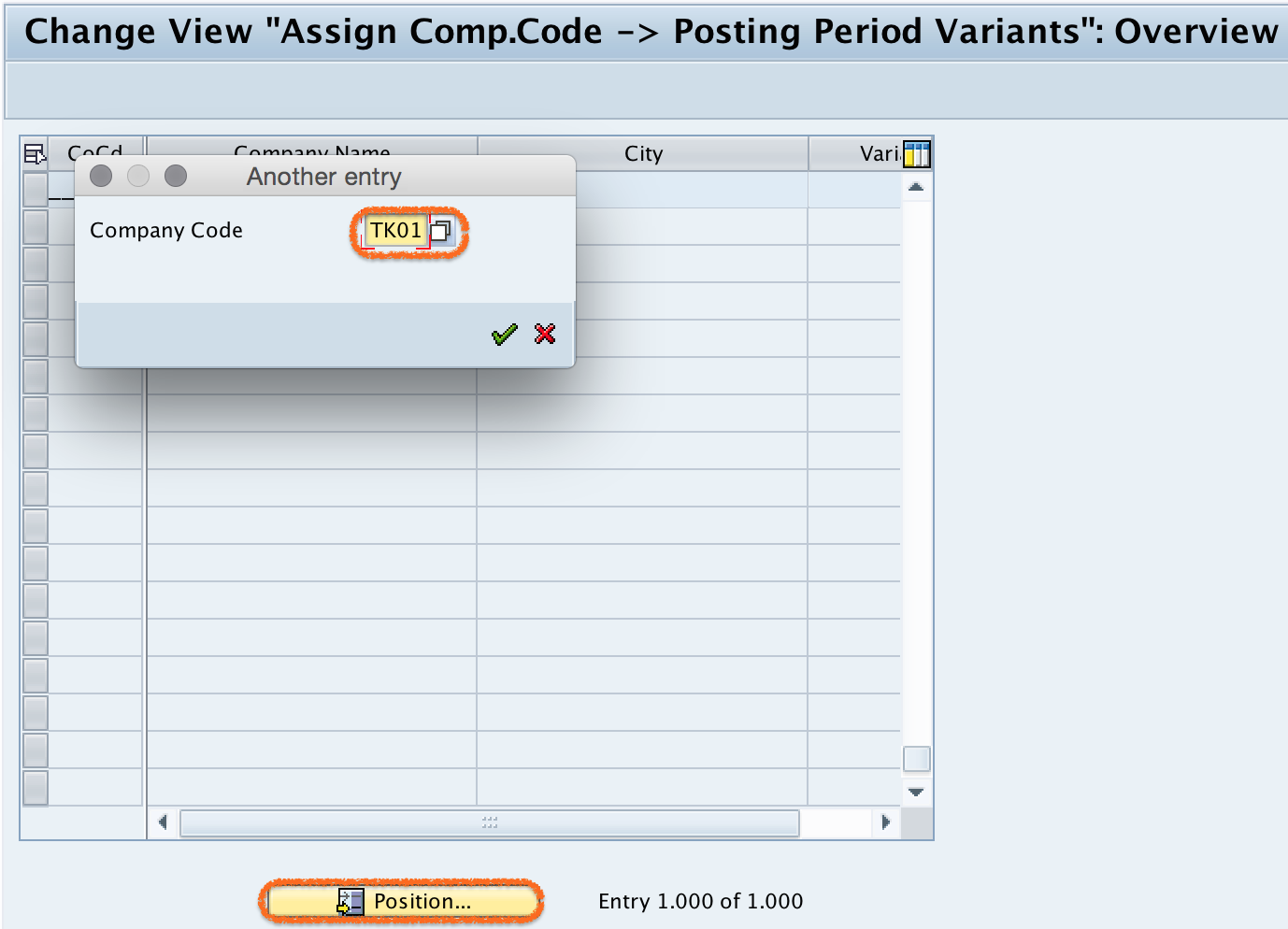
Step 3) Enter the posting period variant key in the Variant field. In this example, company code TK01 is assigned to variant TKPV.

Step 4) After updating the required details, click the Save button to save the configured posting period variant assignment.

Successfully, we have assigned posting period variants to company code in SAP.
Difference Between OBBP, OBBO, OB52, Fiscal Year Variant, and Field Status Variant
Searches for assigning variants to company code often mix different SAP FI variants. The following comparison helps separate the posting period variant assignment from other commonly used SAP FI configuration steps.
| SAP configuration | Purpose | Common transaction code |
|---|---|---|
| Define posting period variant | Creates the variant key used for period control. | OBBO |
| Assign posting period variant to company code | Links the company code with the posting period variant. | OBBP |
| Open and close posting periods | Maintains the allowed period ranges for postings by account type. | OB52 |
| Assign fiscal year variant to company code | Defines the fiscal calendar used by the company code. | OB37 |
| Assign field status variant to company code | Controls field status behavior for G/L account postings. | OBC5 |
OBBP does not open or close periods by itself. It only tells SAP which posting period variant is applicable to a company code. The actual open periods are maintained separately in OB52.
What to Check After Assigning Posting Period Variant to Company Code
After saving the assignment, the next configuration step is to maintain open posting periods for the assigned variant. For example, if company code TK01 is assigned to TKPV, open and closed period ranges must be maintained for TKPV in OB52.
- Check whether the correct posting period variant is assigned to the company code in OBBP.
- Check whether the fiscal year variant assigned to the company code has the expected fiscal period structure.
- Maintain open posting periods for the assigned variant in OB52.
- Test one posting date that falls inside the open period range.
- Test one posting date that falls outside the open period range to confirm that SAP blocks the posting.
Using One Posting Period Variant for Multiple Company Codes
One posting period variant can be assigned to more than one company code. This is useful when multiple company codes follow the same period closing calendar. For example, a group may use one posting period variant for all company codes that close periods on the same dates.
If different company codes need separate posting period control, use separate posting period variants. When several company codes share one variant, changing open periods for that variant can affect all company codes assigned to it. This should be checked carefully during month-end and year-end close.
Common Errors While Assigning Variants to Company Code in SAP
- Wrong variant key entered: The company code may be linked to a variant that is not maintained in OB52.
- Posting period variant not defined first: The variant should be created in OBBO before it is assigned in OBBP.
- Open periods not maintained after assignment: The assignment alone will not allow postings unless the required periods are open in OB52.
- Confusion with fiscal year variant: The fiscal year variant defines the fiscal calendar, while the posting period variant controls open and closed posting periods.
- Shared variant changed without review: If several company codes use the same posting period variant, a period change can affect more than one company code.
Editorial QA Checklist for Posting Period Variant Assignment Tutorial
- Confirm that the article clearly states that OBBP assigns a posting period variant to a company code.
- Confirm that OBBO, OBBP, and OB52 are explained as separate configuration steps.
- Confirm that the example company code TK01 and variant TKPV are used consistently.
- Confirm that the tutorial does not imply that OBBP opens or closes posting periods directly.
- Confirm that the reader is guided to check OB52 after completing the company code assignment.
Assign Posting Period Variant to Company Code FAQs
How do you assign a posting period variant to company code in SAP?
Use transaction code OBBP, find the required company code, enter the posting period variant in the Variant field, and save the assignment. The variant should already be defined in OBBO before assignment.
What is the use of OBBP in SAP FI?
OBBP is used to assign a posting period variant to a company code. This assignment tells SAP which posting period control settings apply to postings made in that company code.
Does OBBP open and close posting periods in SAP?
No. OBBP only assigns the posting period variant to the company code. Open and closed posting periods are maintained in OB52 for the assigned posting period variant.
Can one posting period variant be assigned to multiple company codes?
Yes, one posting period variant can be assigned to multiple company codes when those company codes follow the same posting period control rules. Use separate variants if each company code needs independent period control.
What should be checked if SAP blocks posting after variant assignment?
Check whether the correct variant is assigned in OBBP, whether the required period is open in OB52, whether the fiscal year variant derives the expected period, and whether the account type used in the posting is covered by the open period entry.