 TutorialKart.com
In this SAP Fico tutorials, you will learn how to define tolerance groups for employees in SAP using transaction code OBA4. In our previous SAP training tutorial, we learned how to define tolerance groups for G/L accounts in SAP.
What are tolerance groups for employees in SAP FI?
Tolerance groups for employees in SAP FI define the posting limits and permitted differences for users who post accounting documents. These limits control how much a user can post in one document, how much can be posted to an open item account, the maximum cash discount allowed, and the payment differences that may be accepted during clearing.
This configuration is useful when different finance users need different authorization limits. For example, a junior accountant may be allowed to post only small accounting documents, while a senior accountant or finance manager may be allowed to post documents with higher values.
Posting controls maintained in SAP employee tolerance groups
Tolerance groups for employees in SAP determine the upper limits for postings as per the following controls.
- Amount per document
- Amount per open item account
- Cash discount
- Payment differences
Why employee tolerance groups are used in SAP FI postings
Scenario: – If an organization has many SAP users, it is not practical to maintain separate posting behavior manually for every user. In order to overcome this issue, SAP allows tolerance groups to be defined and assigned to users based on business requirements. The SAP system checks the tolerance limits while users post or clear financial accounting documents.
If a user tries to post a document or accept a payment difference beyond the assigned tolerance limit, the SAP system does not allow the transaction to continue unless the configuration or authorization is corrected.
Example of SAP FI tolerance limits for employee groups
For example, an organization can create different tolerance groups for different finance roles. The values below are sample limits used only to understand the concept.
| Group-A | Group B | Group C | |
| Amt per document | 1,00,000 | 10,00,000 | 1,00,00,000 |
| Amt per open item account | 1,00,000 | 10,00,000 | 1,00,00,000 |
| Cash discount | 0 | 5% | 10% |
| Payment difference | 0 | 0 | 0 |
In this example, users assigned to Group C can post documents with higher values than users assigned to Group A. Similarly, the allowed cash discount percentage is different for each group.
SAP OBA4 transaction code and IMG path for employee tolerance groups
SAP Implementation steps
- Transaction code: – OBA4
- Menu Path: – SPRO >> IMG >> Financial Accounting (New) >> Financial Accounting Global Settings (New) >> Document >> Tolerance groups >> Define tolerance groups for employees.
How to define tolerance groups for employees in SAP using OBA4
Step 1) Enter T-Code “OBA4” in the SAP command field and enter to continue.

Step 2) On change view “FI Tolerance Groups For Users” screen, click on new entries button to create tolerance groups for employees.

Step 3) On new entries screen, update the following details.
- Group: – For practice purpose, let use same tolerance group for all company codes, so it is recommended to use blank tolerance group.
- Company code: – Update the company code “TK01”
- Amount per document: – Enter maximum amount allowed per document
- Amount per open item account: – Enter maximum amount per line items.
- Cash discount per line item: – Update the maximum cash discount allowed
- Permitted payment differences: – Keep this field as blank
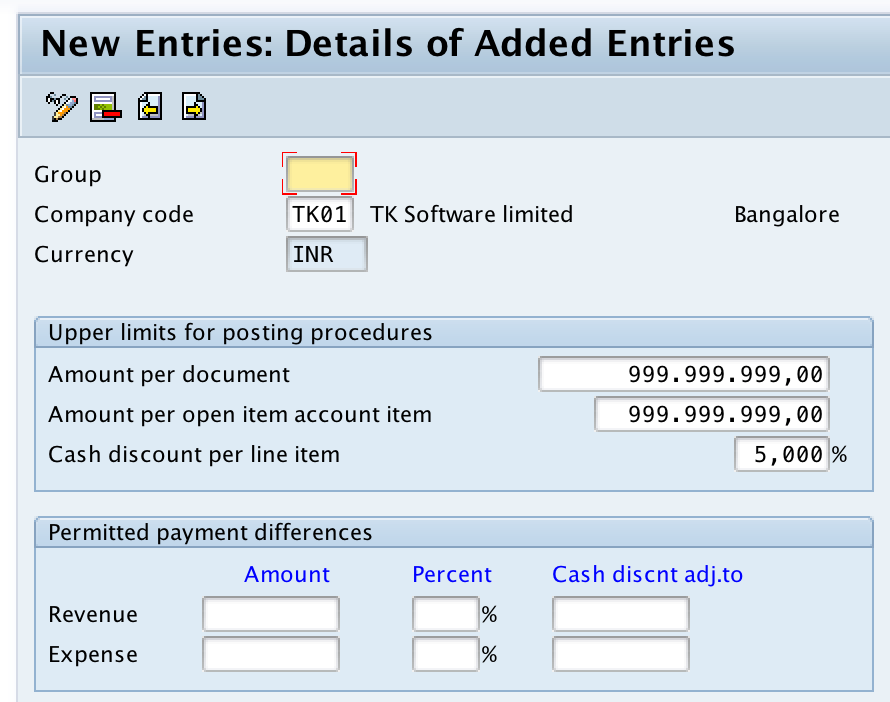
After updating all the required details, click on save button and save the configured tolerance groups details.
Field explanation for SAP employee tolerance group configuration
| Field in OBA4 | Meaning in SAP FI posting control | Configuration note |
|---|---|---|
| Group | Identifies the tolerance group that can be assigned to users. | A blank group is commonly used as the default tolerance group for users who are not assigned to a named group. |
| Company Code | Specifies the company code for which the tolerance group applies. | Maintain the relevant company code such as TK01 in this example. |
| Amount per Document | Maximum total document amount the employee can post. | Use lower limits for operational users and higher limits for senior finance users, based on internal policy. |
| Amount per Open Item Account | Maximum amount allowed for an open item account line during posting. | This helps control large customer, vendor, or G/L open item postings. |
| Cash Discount per Line Item | Maximum cash discount percentage the employee can allow. | Set this carefully because it affects discount handling during payment and clearing. |
| Permitted Payment Differences | Controls allowed overpayment, underpayment, and related differences. | Maintain only the differences that are acceptable under the company accounting policy. |
Blank tolerance group versus named tolerance group in SAP OBA4
In SAP FI, you can maintain a blank tolerance group or create named tolerance groups. A blank tolerance group works as the default group for a company code. Named tolerance groups are used when different sets of users need different posting limits.
For training or simple configuration practice, a blank tolerance group is often sufficient. In real projects, companies usually define named groups based on finance roles, approval limits, or posting responsibility.
Assigning SAP tolerance groups to employees after OBA4 setup
Defining the tolerance group in OBA4 creates the posting limit configuration. To make the tolerance group effective for users, the group must be assigned to the relevant employee or user master data according to the SAP system setup used in the organization.
If a user is not assigned to a named tolerance group, SAP generally checks the blank tolerance group maintained for the company code. Therefore, it is important to maintain the blank group correctly even when named groups are also used.
Common mistakes while defining SAP employee tolerance groups
- Creating named tolerance groups but not assigning them to the intended users.
- Leaving the blank tolerance group incomplete for a company code where users need default posting limits.
- Entering high posting limits without matching the company approval policy.
- Confusing employee tolerance groups in OBA4 with G/L account tolerance groups.
- Maintaining payment difference limits without checking the clearing and write-off process.
QA checklist for SAP OBA4 employee tolerance group setup
- Check whether the company code is correct in the OBA4 entry.
- Verify whether a blank tolerance group is required as the default for the company code.
- Confirm that amount per document and amount per open item account match the user role.
- Review cash discount and payment difference limits with the finance process owner.
- Test a sample posting below and above the tolerance limit to confirm that SAP validates the configuration correctly.
FAQs on tolerance groups for employees in SAP
How to define tolerance group for employees in SAP?
To define tolerance group for employees in SAP, use transaction code OBA4 or follow the IMG path Financial Accounting (New) > Financial Accounting Global Settings (New) > Document > Tolerance Groups > Define Tolerance Groups for Employees. Then create a new entry, enter the company code, maintain posting limits, and save the configuration.
What is the tolerance for employees in SAP?
The tolerance for employees in SAP is the set of posting limits assigned to users for accounting transactions. It controls maximum document amount, maximum open item amount, allowed cash discount, and permitted payment differences.
What is the Tcode for tolerance group for users in SAP?
The transaction code for defining tolerance group for users or employees in SAP FI is OBA4.
What is the difference between employee tolerance group and G/L account tolerance group?
Employee tolerance groups control what a user is allowed to post or accept during posting and clearing. G/L account tolerance groups control tolerances related to G/L accounts. Both are part of SAP FI tolerance configuration, but they are maintained for different purposes.
Can one SAP tolerance group be used for multiple employees?
Yes. One tolerance group can be assigned to multiple employees or users when they need the same posting limits. This is one of the main reasons for using tolerance groups instead of maintaining separate limits for every user.
Successfully we have maintained tolerance groups for employees in SAP.