 TutorialKart.com
How to Define Currencies of the Leading Ledger in SAP
This SAP FICO tutorial explains how to define currencies for the leading ledger at company-code level. The configuration determines which additional local currencies SAP records, how values are translated, which exchange-rate type is used, and which source currency and translation date apply.
The screenshots in this tutorial show the SAP ERP New General Ledger activity for maintaining additional local currencies. SAP S/4HANA uses ledger-specific currency-type settings and the Universal Journal, so field names and the IMG path can differ by release. Confirm the procedure against the configuration options available in your system.
SAP IMG Path for Leading-Ledger Currency Settings
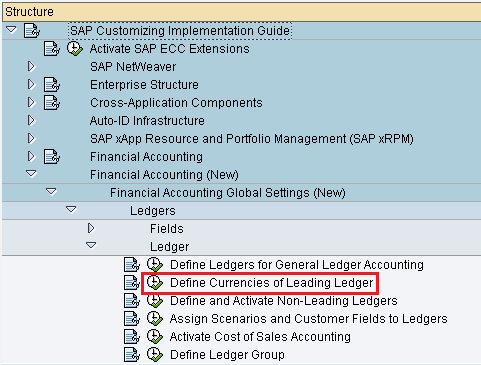
Path: SPRO > IMG > Financial Accounting (New) > Financial Accounting Global Settings (New) > Ledgers > Ledger > Define Currencies of Leading Ledger.
In systems where direct transaction access is authorized, this SAP ERP configuration is commonly associated with transaction OB22. Using SPRO remains useful because it shows the activity in its wider General Ledger configuration context.
What the Leading-Ledger Currency Configuration Controls
A company code normally has a primary local currency defined in its organizational settings. The leading-ledger currency activity is used to maintain additional local currency views, commonly referred to as the second and third local currencies in SAP ERP.
- Currency type: Identifies the business meaning of the currency view, such as company-code, group, or another configured currency type.
- Valuation: Determines the valuation view associated with the currency, where applicable.
- Exchange-rate type: Specifies which exchange-rate category SAP uses during translation.
- Source currency: Defines the currency from which the additional currency amount is translated.
- Translation-date type: Determines which date SAP uses to select the applicable exchange rate.
These settings affect how accounting documents are updated and reported in parallel currencies. They should therefore be agreed with the finance, consolidation, tax, and reporting teams before productive postings begin.
Prerequisites for Defining Leading-Ledger Currencies
- The company code must already be defined with its primary local currency.
- The leading ledger and relevant company-code assignments must be available.
- Required currency types must be permitted by the installed SAP release.
- Exchange-rate types and exchange rates must be maintained for the intended currency pairs.
- The fiscal-year and posting-period design must be consistent with the ledger setup.
- The source-currency and translation-date rules must be documented.
- A customizing transport request should be available for recording the change.
Steps to Define Currencies of the Leading Ledger in SAP
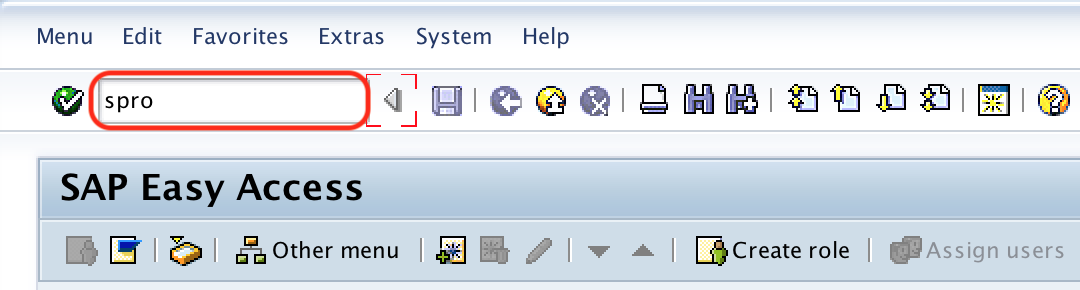
Step 1: Enter SAP transaction code “SPRO” in the SAP command field and enter to continue.
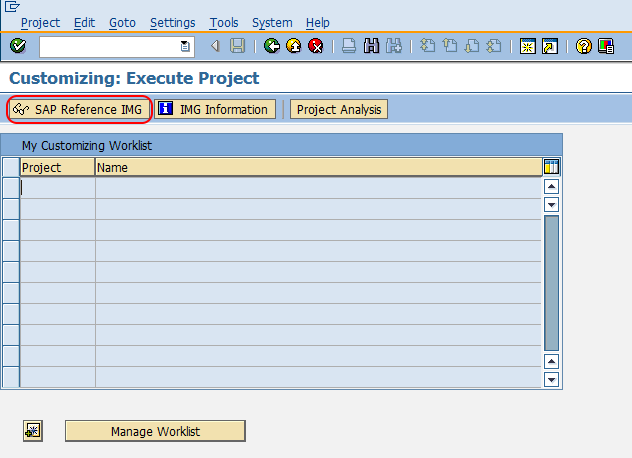
Step 2: Choose “SAP Reference IMG“
Step 3: Follow the navigation path: SAP Customizing Implementation Guide > Financial Accounting (New) > Financial Accounting Global Settings (New) > Ledgers > Ledger and choose img activity define currencies of leading ledger.
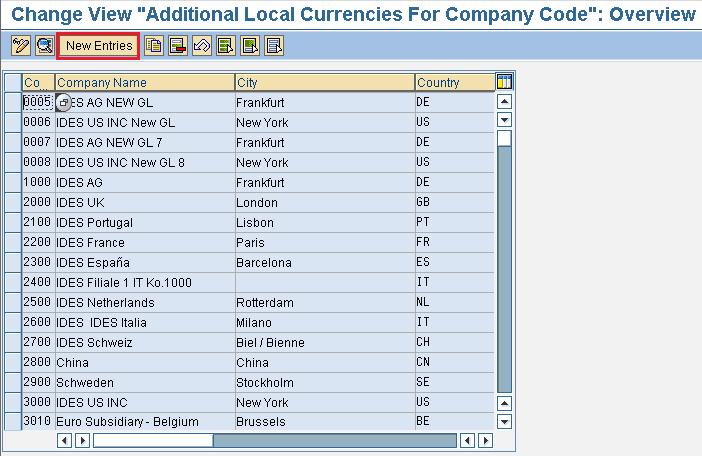
Step 4: On change view “Additional local currencies for company code”: overview screen, click on new entries button to create new currencies for leading ledger in SAP.
Step 5: On new entries additional local currencies for company code screen, enter the company code “TK01” in the company code field and press enter to continue.
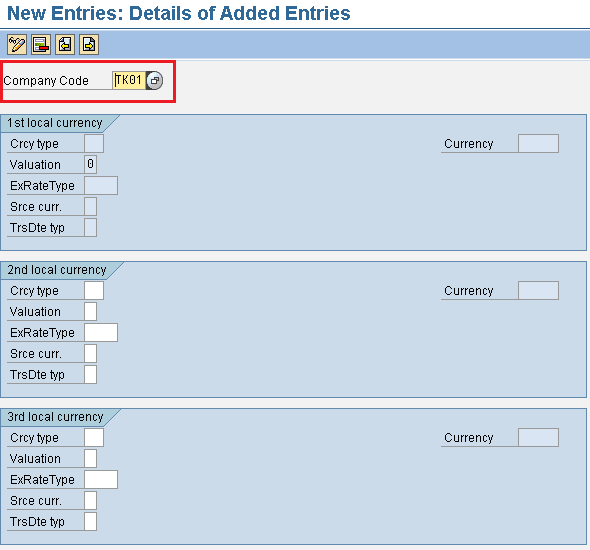
Step 6: Maintain the required settings for the second local currency and, when needed, the third local currency.
- Crcy type: Enter the currency type that identifies the purpose of the additional currency.
- Valuation: Select the applicable valuation view from the available entries.
- ExRate Type: Enter the exchange-rate type SAP should use for currency translation.
- Srce Curr: Select the source currency from which SAP derives the additional currency amount.
- TrsDte Type: Select the translation-date type that determines which date is used to find the exchange rate.
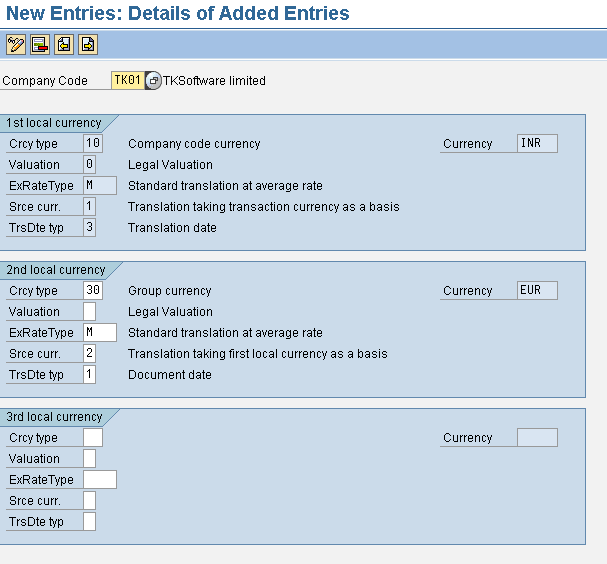
Step 7: Review the company code, currency types, valuation indicators, exchange-rate types, source currencies, and translation-date rules. Choose the save icon and assign the configuration to the appropriate customizing transport request.
Meaning of the Main Currency Fields in OB22
Currency Type for the Second and Third Local Currencies
The currency type describes why SAP stores a parallel amount. The exact types available depend on the SAP release and configuration. Examples can include a company-code currency, group currency, hard currency, index-based currency, or another permitted ledger currency type.
Do not select a currency type only because it is technically available. It should correspond to a defined legal, consolidation, tax, management, or reporting requirement.
Source Currency for SAP Currency Translation
The source-currency field tells SAP which existing document currency amount should be used as the basis for translation. Depending on the design, the additional local currency can be translated from the transaction currency or from another local currency.
Choosing a different source currency can produce different translated values because of exchange-rate timing and rounding. The decision should remain consistent across company codes that are expected to report comparable results.
Exchange-Rate Type and Translation-Date Type
The exchange-rate type identifies the rate category used for translation. The translation-date type determines the date on which SAP looks up that rate. Together, these fields control the rate applied when the accounting document is posted.
Before testing postings, verify that the required exchange rates have been maintained for the applicable dates and currency pairs. Missing rates can prevent document posting or cause translation errors.
Company-Code Currency, Functional Currency, and Reporting Currency in SAP
The terms local, functional, and reporting currency are related but should not be treated as automatically identical:
- Company-code currency: The primary local currency assigned to the company code in SAP.
- Functional currency: An accounting concept representing the currency of the primary economic environment in which an entity operates. Its treatment in SAP depends on the system release and accounting design.
- Group currency: A currency used to support consolidated or group-level reporting.
- Reporting currency: A broader business term for a currency in which financial information is presented. It may correspond to a configured SAP currency type but is not itself a universal SAP field definition.
A company code can have the same currency for more than one business purpose, but the currency types still retain different meanings. The configuration should reflect the intended accounting view rather than only the currency key.
SAP S/4HANA Ledger and Currency-Type Differences
In SAP S/4HANA, currency settings are integrated more closely with the ledger and company-code configuration. The Universal Journal stores multiple currency amounts in a common line-item structure, and newer releases can support additional ledger currency types beyond the traditional SAP ERP second and third local currencies.
For an SAP S/4HANA implementation, review the activity for defining settings for ledgers and currency types for the installed release. Do not assume that an OB22 setup from SAP ERP can be copied directly into S/4HANA without considering migration, ledger assignments, Asset Accounting, Controlling, consolidation, and reporting dependencies.
Validation After Configuring Leading-Ledger Currencies
- Confirm that the correct company code is maintained.
- Verify that the second and third currency types do not conflict with existing ledger settings.
- Check that each currency type has the intended currency key for the company code.
- Confirm that the source-currency rule matches the approved finance design.
- Verify that the required exchange-rate type exists and has valid rates.
- Check that the translation-date type produces the intended exchange-rate date.
- Post test documents in foreign and local currencies.
- Compare document, local, group, and other parallel currency amounts.
- Test reversals, clearing, foreign-currency valuation, and period-end reports.
- Confirm that the configuration is included in the correct transport request.
Common Errors in Leading-Ledger Currency Configuration
- Currency type selected without a reporting requirement: Every parallel currency should have a documented purpose.
- Incorrect source currency: Translating from the wrong source can create unexpected values and rounding differences.
- Missing exchange rates: SAP cannot translate amounts when the required rate is unavailable for the selected date.
- Inconsistent company-code settings: Company codes used in the same reporting structure should follow a coordinated currency design.
- Changing settings after postings exist: Currency configuration changes can affect historical comparability and integrated components.
- Confusing currency key with currency type: A currency key such as USD identifies the currency, while a currency type identifies its accounting purpose.
- Applying SAP ERP instructions directly to S/4HANA: The ledger and currency framework differs between releases.
Frequently Asked Questions About Leading-Ledger Currencies in SAP
What is the transaction code for defining leading-ledger currencies in SAP?
In SAP ERP New General Ledger, transaction OB22 is commonly used to maintain additional local currencies for company codes. The same activity can be accessed through SPRO. SAP S/4HANA systems may provide different ledger and currency-type configuration activities.
What is the difference between a currency type and a currency key in SAP?
A currency key identifies the actual currency, such as USD, EUR, or INR. A currency type identifies the role of that amount in SAP, such as company-code currency or group currency.
Can the leading ledger store more than one currency?
Yes. SAP can record accounting documents in multiple currency views. SAP ERP traditionally supports the company-code currency together with additional second and third local currencies. SAP S/4HANA can support a broader ledger-specific currency framework, depending on the release.
Is functional currency always the same as company-code currency?
No. The company-code currency is a specific SAP organizational setting. Functional currency is an accounting determination based on the entity’s primary economic environment. They may be the same, but this should be confirmed from the accounting policy and SAP design.
Can leading-ledger currency settings be changed after postings exist?
Such changes require careful assessment because currency settings affect document values, reporting, valuation, integrated accounting components, and historical data. Test the change in a non-production system and follow the SAP-supported procedure for the installed release.
Editorial QA Checklist for SAP Leading-Ledger Currencies
- Confirm that the IMG path and OB22 reference match the SAP ERP release shown in the screenshots.
- Verify that currency type and currency key are explained as separate concepts.
- Check that source currency, exchange-rate type, and translation-date type are described accurately.
- Confirm that the tutorial distinguishes SAP ERP second and third local currencies from SAP S/4HANA ledger currency types.
- Verify that functional currency is not presented as automatically identical to company-code currency.
- Ensure that post-configuration testing includes foreign-currency documents and parallel-currency reports.
- Confirm that warnings about changing currency settings after productive postings are retained.
- Verify that all existing images and links remain unchanged.
After the settings are saved, test representative accounting documents and confirm that SAP updates each configured currency with the expected exchange rate, source amount, and translation date.