 TutorialKart.com
How to Define Segment in SAP FICO?
In this SAP FICO tutorial, you will learn how to create segment in SAP step by step using transaction code S_AL0_19000003. A segment is used for segment reporting in financial accounting, especially when an organization needs financial statements by business division, product line, geography, or another externally reportable unit.
Before creating a segment in SAP, decide the reporting structure clearly. The segment key should be short, meaningful, and consistent with the way the company wants to analyze balance sheet and profit and loss information.
Important configurations to refer
- Define company code in SAP
- Define business area in SAP
- Define functional area in SAP
- Define financial management area in SAP
What is Segment in SAP FICO?
Segment is a division of an organization for which you can generate financial statements for the purpose of external reporting.
In SAP FI, a segment commonly represents a reportable part of the enterprise, such as a business line, product group, service line, or geographical unit. Segment information is used in financial reporting so that management and external stakeholders can view accounting figures for each reportable segment.
- US GAAP and IAS set out different requirements regarding to segment reporting.
- US GAAP requires the complete balance sheet at segment level of reporting.
- IAS requires for segment reporting primary and secondary segmentation. It is divided into two types of segments.
The types of segments are:
Business segment: – A business segment is a sub activity of an organization that relates to the manufacture of a product or provision of service and that has risks and revenues that differ from those in other business segments.
Geographical segment: – A geographical segments is a sub activity of an organization that relates to the manufacture of a product or provision of service within a specific field of business.
SAP Segment Creation Path, Transaction Code and Tables
- Path: – SPRO – SAP IMG – Enterprise Structure – Definition – Financial Accounting – Define segment.
- Transaction code: S_AL0_19000003
- Database Table: – FAGL_SEGM, FAGL_SEGMT.
You can also reach the same configuration activity from the SAP Customizing Implementation Guide. The transaction code is useful when you want to open the segment maintenance activity directly.
Example Segment Structure for SAP FICO Reporting
The following sample segment keys show how an organization can define separate reportable areas in SAP FICO. Use names that match your enterprise reporting policy rather than copying these sample values directly into a production system.
| Segment | Description |
| TCORP | TK Corporation Segment |
| TCMNT | TK Cement Segment |
| TSTEL | TK Steel Segment |
| TTEXT | TK Textiles Segment |
Steps to Create Segment in SAP FICO
Step 1) Enter SAP transaction code “S_AL0_19000003” in the sap command field and enter to continue.

Step 2) On change view “segment for segments reporting”: overview screen, click on “new entries” button to create new segments in SAP as per company requirements.

Step 3) On new entries segment screen, update the following details.
- Segment: – Update key that identifies the segment in SAP
- Description: – Update the descriptive text of segment.
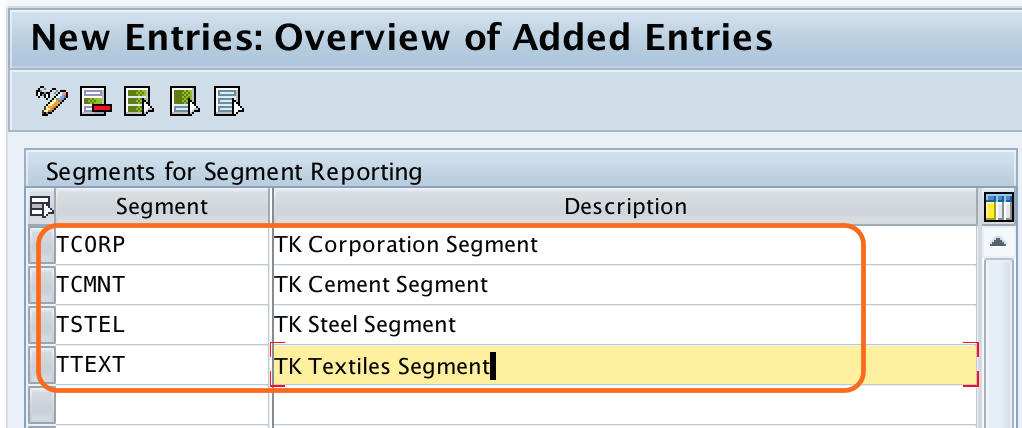
After updating all the details, click on save button to save the configured segments in SAP.

Now choose request number and save the details.
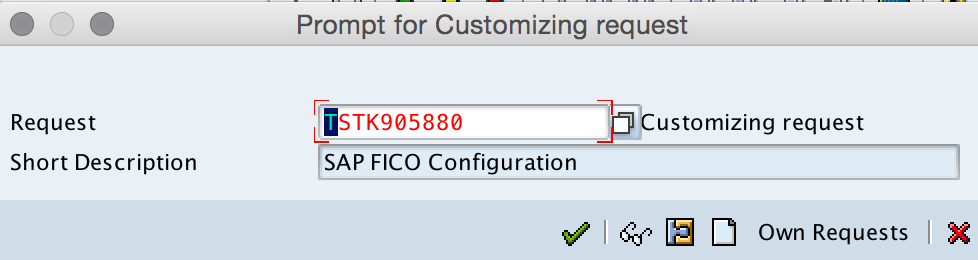
Successfully we have created segment in SAP.
Segment Field Values Used While Creating a New SAP Segment
When you create a new segment in SAP FICO, the key fields are simple, but they must be planned carefully. The segment key is stored and used in financial postings and reporting, so it should not be renamed casually after postings begin.
| Field | Purpose in SAP segment configuration | Example |
| Segment | Unique key that identifies the reportable segment. | TCORP |
| Description | Business description displayed in segment reporting and maintenance screens. | TK Corporation Segment |
| Customizing request | Transport request used to move the configuration to the next SAP system. | DEVK900123 |
How Segment is Used in SAP FICO Postings
Creating a segment only defines the segment master data. For the segment to appear in accounting documents, SAP must be able to derive or populate the segment during postings. In many implementations, segment derivation is linked with profit centers, because profit centers often represent the operating structure used for internal and external reporting.
For example, a company may assign one segment to a group of profit centers used by its cement division and another segment to profit centers used by its steel division. When transactions are posted to those profit centers, the segment value can flow into financial accounting documents according to the configured derivation logic.
Difference Between Segment, Business Area and Profit Center in SAP FICO
Segment, business area, and profit center are sometimes confused because all three can be used for reporting. They are not the same configuration object.
| SAP object | Main use | Typical reporting purpose |
| Segment | External segment reporting. | Financial statements by reportable segment. |
| Business Area | Cross-company-code internal reporting area. | Business line or area-level reporting. |
| Profit Center | Management accounting responsibility area. | Profitability and responsibility reporting. |
In practice, the organization should decide whether the segment structure follows product lines, geographical areas, service lines, or another reporting basis. The decision should be aligned with accounting and reporting requirements before configuration is transported.
Common Mistakes While Creating Segment in SAP FICO
- Creating too many segments without a clear external reporting requirement.
- Using segment keys that do not follow a consistent naming convention.
- Assuming that segment creation alone will automatically populate segment values in all accounting documents.
- Not checking the relationship between segment, profit center, business area, and company code design.
- Transporting segment configuration without confirming the values with the finance reporting team.
SAP Segment Configuration QA Checklist
- Confirm that every segment key represents a real reportable segment required by finance.
- Check that each segment description is clear enough for reporting users.
- Verify that the segment naming convention is consistent across all entries.
- Review how segment values will be derived in accounting postings.
- Test sample postings and reports in the quality system before moving the configuration to production.
SAP Segment Configuration FAQs
How to create the segment in SAP?
To create a segment in SAP, use transaction code S_AL0_19000003 or follow the IMG path SPRO – SAP Reference IMG – Enterprise Structure – Definition – Financial Accounting – Define Segment. Choose New Entries, enter the segment key and description, and save the entry in a customizing request.
What is segment in SAP FICO with example?
A segment in SAP FICO is a reportable part of an organization used for segment-level financial reporting. For example, a company may create segments such as TCMNT for Cement, TSTEL for Steel, and TTEXT for Textiles when these divisions are reported separately.
Is creating a segment enough for segment reporting in SAP?
No. Creating a segment defines the segment master record, but segment values must also be populated in accounting documents. Many implementations use profit center assignment or derivation logic so that segment values flow correctly into financial postings and reports.
Which SAP tables store segment master data?
Segment master data is stored in tables such as FAGL_SEGM and segment text information is stored in FAGL_SEGMT. These tables can be useful when checking configured segment keys and descriptions.
Can one SAP company code have multiple segments?
Yes. A company code can have postings that belong to different segments when the organization needs reporting by multiple divisions, product lines, services, or geographical areas. The exact design depends on the enterprise structure and reporting requirements.