 TutorialKart.com
How to Define and Activate Non-Leading Ledgers in SAP
In this SAP tutorials, you will learn how to define and activate non leading ledgers in SAP FICO step by step. The procedure assigns a non-leading ledger to one or more company codes so that parallel accounting requirements can be handled separately from the leading ledger.
Leading Ledger and Non-Leading Ledger in SAP
The leading ledger is the primary ledger used for the main accounting principle and is normally assigned to all company codes. A non-leading ledger is an additional standard ledger that can support a different accounting principle, fiscal year variant, or reporting requirement where the SAP configuration permits it.
- Leading ledger: Primary ledger for the main accounting view.
- Non-leading ledger: Additional full ledger used for parallel accounting.
- Company code activation: Determines where the non-leading ledger is available for postings and reporting.
- Ledger-specific settings: Must be reviewed together with accounting principles, currencies, fiscal year variants, and posting-period controls.
Before creating a new ledger, confirm the required accounting principle, affected company codes, currency settings, fiscal year requirements, and integration impact. Ledger design is a cross-functional decision because it can affect General Ledger Accounting and related components.
SAP IMG Path for Non-Leading Ledger Activation
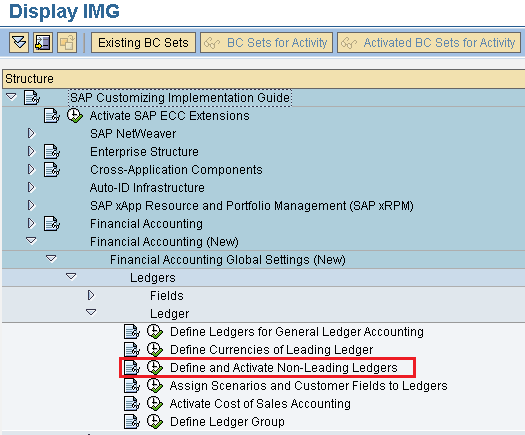
Path: SPRO > IMG > Financial Accounting(New) > Financial Accounting Global Settings (New) > Ledgers > Ledger > Define and activate non leading ledgers.
The exact IMG wording can differ by SAP release. In SAP S/4HANA systems, use the corresponding General Ledger Accounting configuration activity available in your release and verify the ledger settings before transport.
Configuration Steps to Activate a Non-Leading Ledger
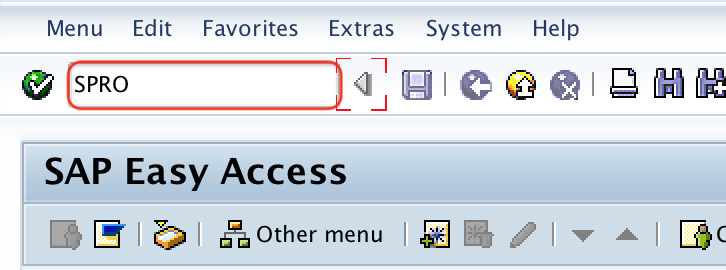
Step 1: Enter t-code “SPRO” in the SAP command field and press enter to continue.
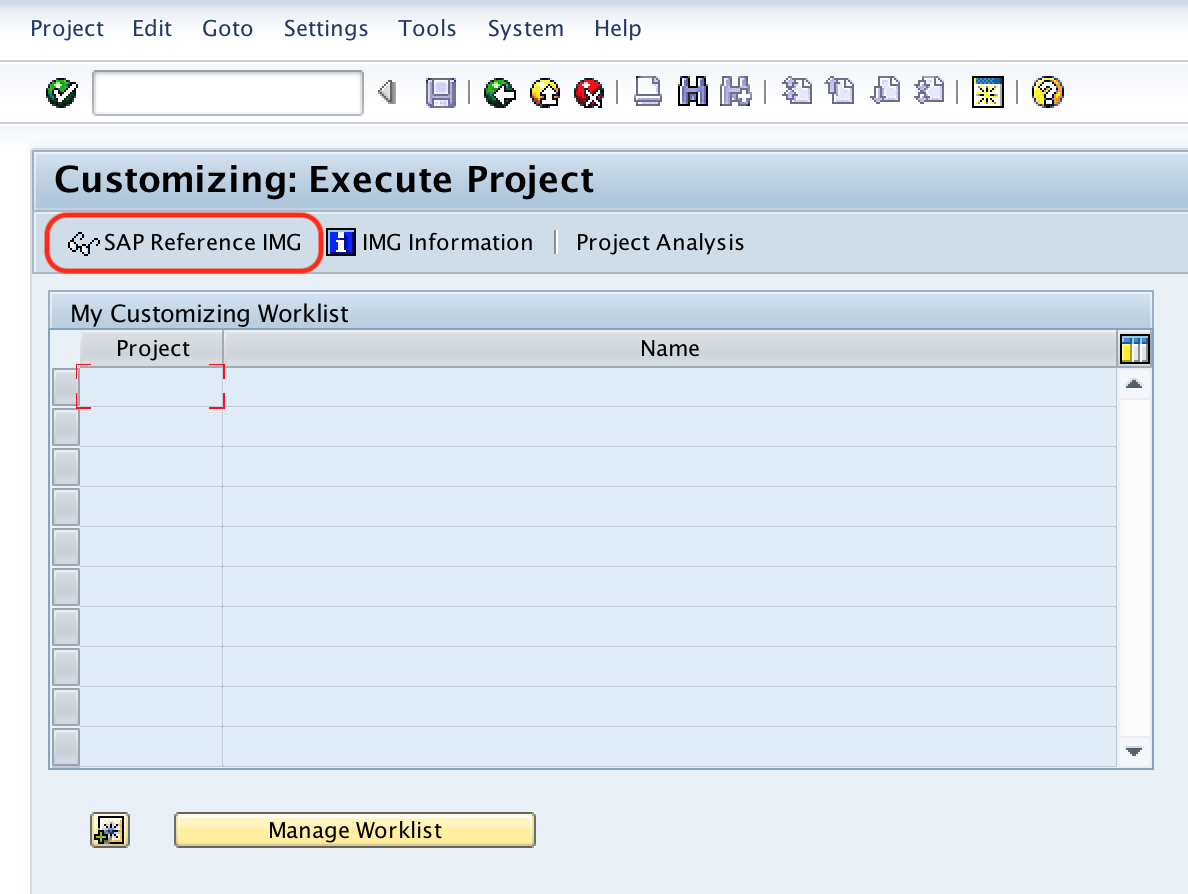
Step 2: Choose “SAP Reference IMG“
Step 3: Follow the navigation path Financial Accounting(New) > Financial Accounting Global Settings (New) > Ledgers > Ledger and choose IMG activity “Define and Activate Non Leading Ledgers”.
Step 4: On determine work area entry screen, enter the ledger key “A1” in the given field work area and press enter to continue.
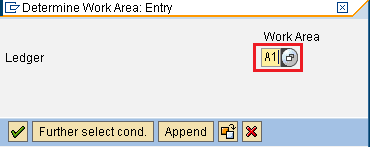
The ledger key shown here is an example. Use the ledger identifier approved in your project design and confirm that it has already been defined with the required ledger settings.
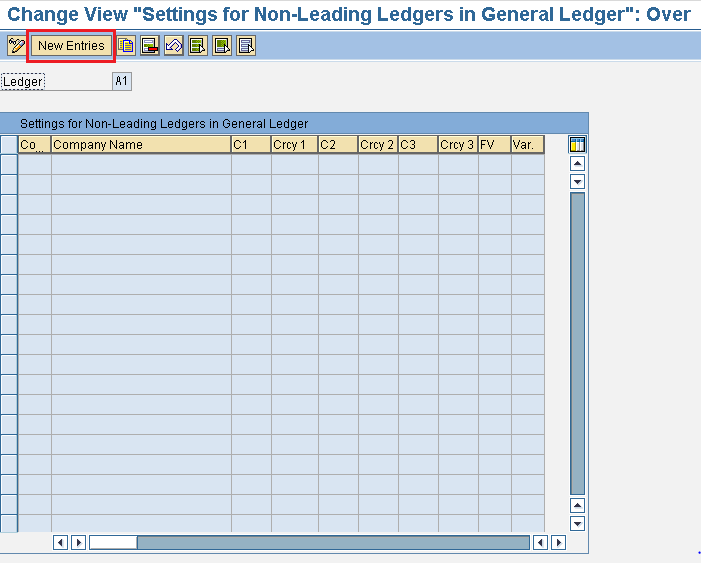
Step 5: On change view “Settings for Non-leading ledgers in general ledger” overview screen, click on “new entries” button.
Step 6: On new entries overview screen, update the company code “TK01” in the field cocd and press enter to continue.
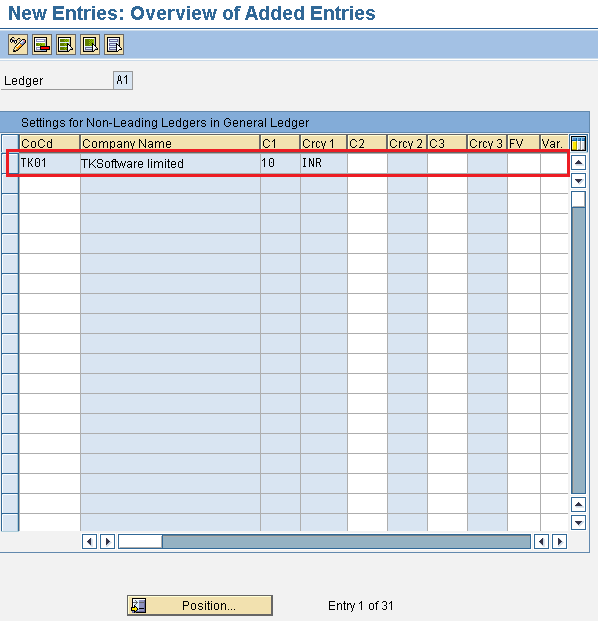
After updating all the required details, choose save icon and save the configured details.
Similarly update the details for ledger A2.
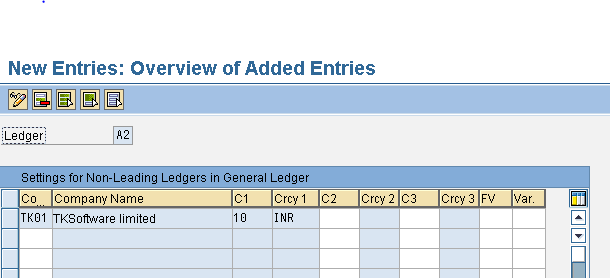
Choose save icon and save the configured details.
Checks After Activating the Non-Leading Ledger
- Confirm that the correct non-leading ledger is assigned to the intended company code.
- Review the ledger’s accounting principle, currency types, and fiscal year settings.
- Check whether posting periods and document types support the required ledger-specific postings.
- Verify integration with Asset Accounting, controlling processes, material valuation, and other relevant components for the system release.
- Test representative postings and compare ledger-specific reports before moving the configuration to production.
- Save the configuration in the correct transport request and document the business reason for the ledger.
Non-Leading Ledger and Extension Ledger Difference
A non-leading ledger is a standard full ledger that stores its own journal entries and can be used for a separate accounting view. An extension ledger is designed to build on an underlying ledger and generally stores only adjustment or delta postings. Because an extension ledger depends on another ledger, it is not a direct replacement for every non-leading-ledger scenario.
Choose between them based on the reporting objective, posting volume, integration requirements, and SAP release. Use a non-leading ledger when a complete parallel accounting view is required. Consider an extension ledger when the requirement is mainly an additional adjustment or management-reporting layer over an existing ledger.
Common Non-Leading Ledger Configuration Errors
- Using an unapproved ledger key: Ledger IDs should follow the project’s naming and governance rules.
- Assigning the wrong company code: Confirm the organizational scope before saving.
- Ignoring fiscal year differences: A different fiscal year variant requires careful validation of posting and reporting behavior.
- Skipping integration testing: Ledger changes can affect processes outside General Ledger Accounting.
- Confusing non-leading and extension ledgers: These ledger types serve different technical and reporting purposes.
Frequently Asked Questions About Non-Leading Ledgers in SAP
What is a non-leading ledger in SAP?
A non-leading ledger is an additional standard ledger used to maintain a separate accounting or reporting view alongside the leading ledger. It is commonly used for parallel accounting requirements.
How do you create and activate a non-leading ledger in SAP?
Define the ledger with the required settings, open the IMG activity for defining and activating non-leading ledgers, select the ledger, assign the applicable company code, and save the configuration. The exact activity names depend on the SAP release.
Can one non-leading ledger be assigned to multiple company codes?
Yes, a non-leading ledger can be activated for multiple company codes when the organizational and accounting design requires it. Each assignment should be checked for compatible fiscal year, currency, and integration settings.
What is the difference between a non-leading ledger and an extension ledger?
A non-leading ledger is a full ledger with its own postings, while an extension ledger builds on an underlying ledger and typically stores only delta postings. The correct choice depends on whether a complete parallel accounting view or an adjustment layer is required.
Editorial QA Checklist for SAP Non-Leading Ledger Configuration
- Verify that the IMG path matches the SAP release used by the reader.
- Confirm that example ledger keys A1 and A2 are clearly identified as project-specific examples.
- Check that the company code assignment is shown without implying that TK01 is a universal value.
- Ensure the difference between non-leading and extension ledgers is technically clear.
- Confirm that post-configuration testing covers ledger-specific postings, reports, currencies, and integrated components.
Successfully we have defined and activated non leading ledgers in SAP systems.