 TutorialKart.com
In this SAP tutorial, you will learn how to check and enter company code global parameters in SAP using transaction code OBY6. Company code global parameters are important in SAP FI because they bring together several company code level settings, such as chart of accounts, fiscal year variant, field status variant, posting period variant, credit control area, and other processing controls.
Company code global parameters in SAP FI
Company code global parameters control how a company code behaves in the SAP system. These parameters influence how the system processes financial accounting transactions for a company code.
In SAP FI, global parameters are mainly grouped into the following areas.
- Accounting organization
- Processing parameters
The accounting organization section contains assignments such as chart of accounts, fiscal year variant, company, and credit control area. The processing parameters section contains settings that influence postings, document entry, value date proposal, negative postings, and related controls.
OBY6 transaction code for company code global data
Implementation Process
- Transaction Code: – OBY6
- Path: – SPRO –> IMG –> Financial Accounting (New) –> Financial Accounting Global Settings (New) –> Global parameters for company code –> Enter Global Parameters.
Use OBY6 when you want to display, check, or maintain global parameters for an existing company code. Some values shown in OBY6 are copied from earlier configuration steps, while other checkboxes and additional data fields can be maintained from this screen.
How to check and enter company code global parameters in SAP
Step 1) Enter T Code “OBY6” in the SAP command field and enter.

Step 2) On change view “Company Code Global Data”: overview screen, click on position button and enter your company code “TK01” in the given entry field.
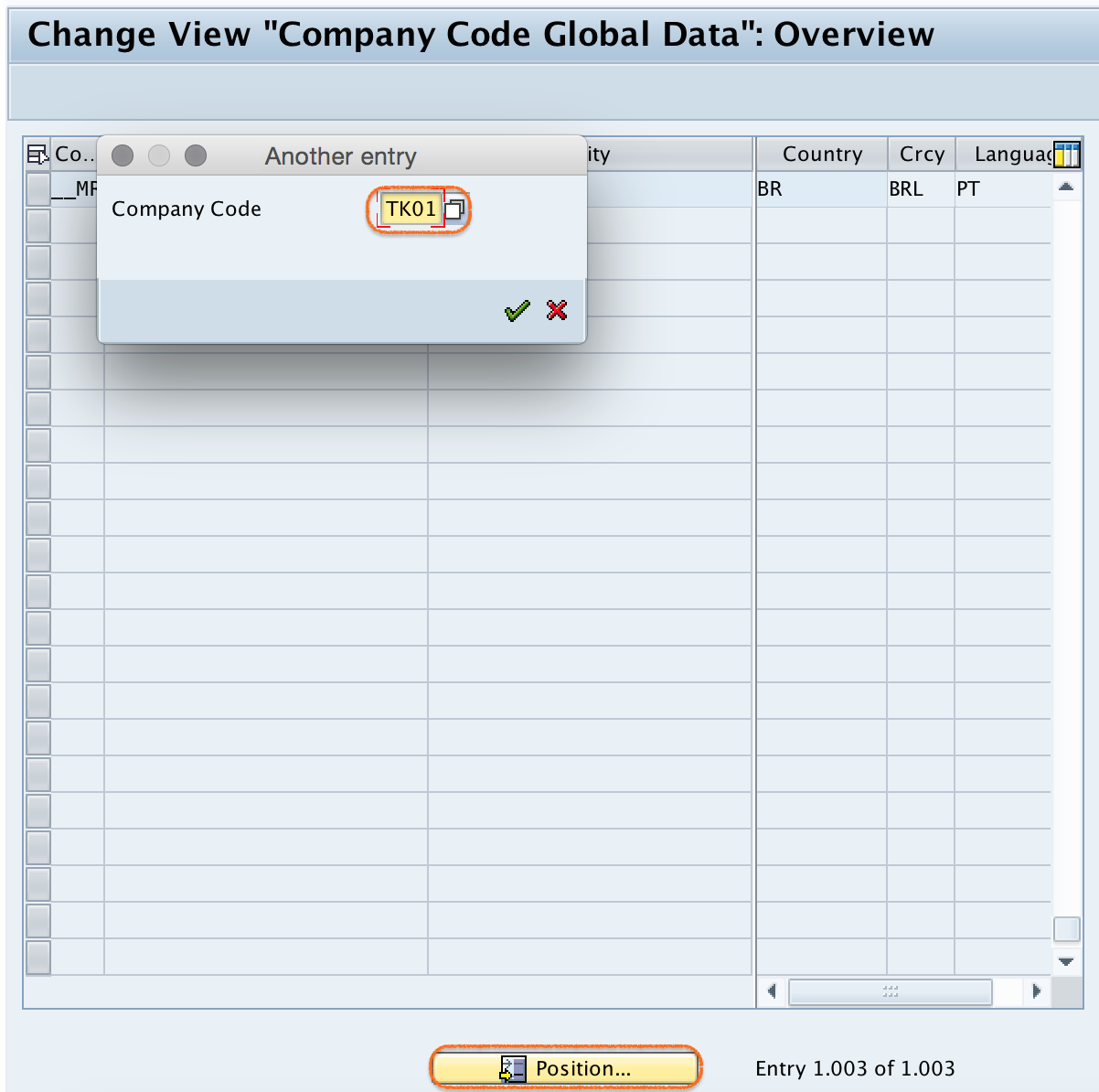
Step 3) Now double click on your company code “TK01” to check company code global parameters in SAP.

Step 4) Update the following details.
- Some of the fields are updated automatically as we already configured and assigned. For e.g. Chart of accounts, Company, FM area, Credit control area, Fiscal year variant, etc.
- Choose business area financial statements check box.
- Select the propose fiscal year check box
- Select define default value data check box
- Select negative postings permitted check box.
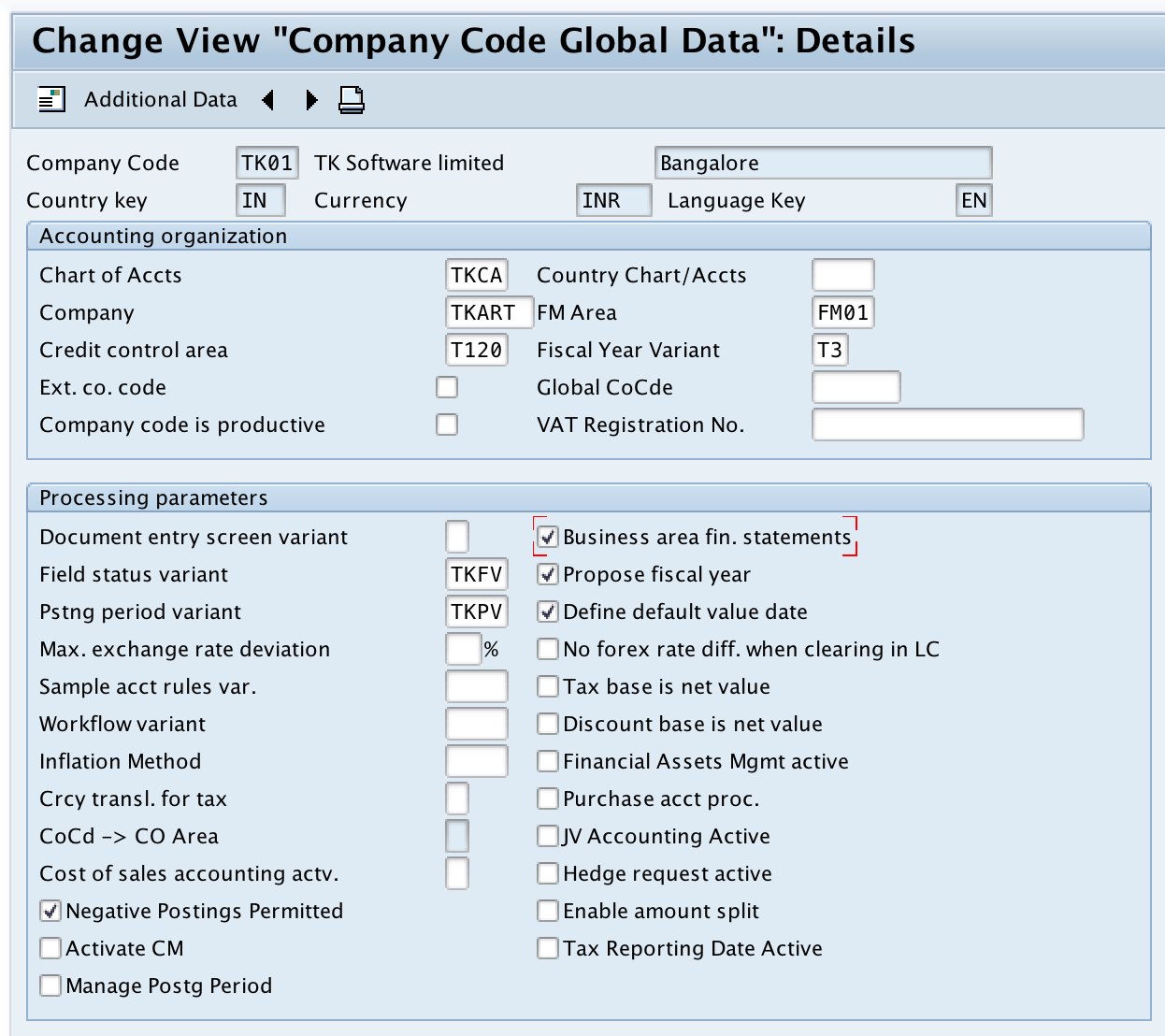
After maintaining all the required details, click on additional data.

Step 5) On maintenance of additional data for company code TK01, update the following details.
- TDS No – Update the Tax deduction source number for filing TDS returns.
- PAN No – Update permanent account number for filing income tax returns.
- GIR No – Update general identification number.
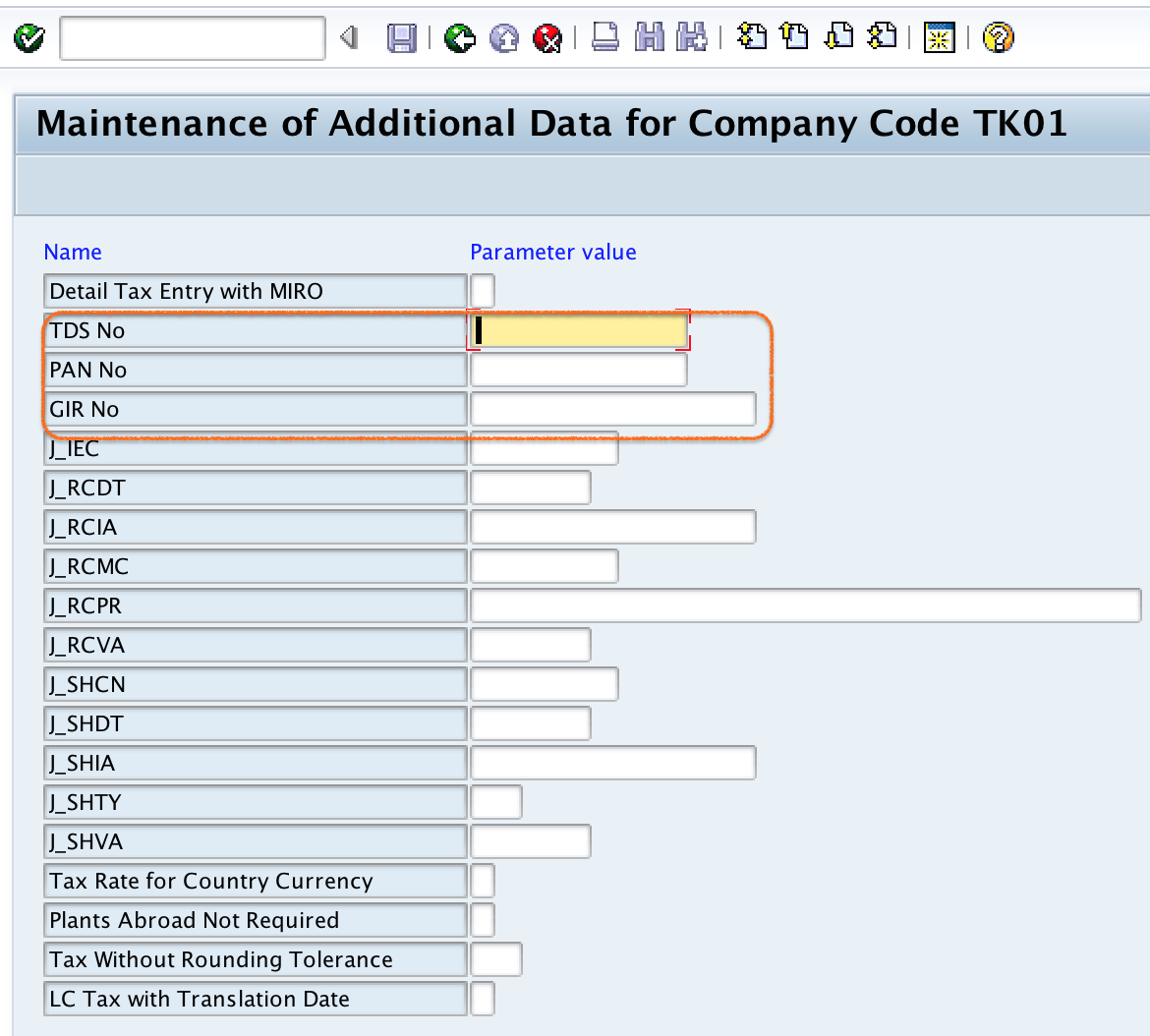
After entering all the required details, click on go back button.
Step 6) Click on save button and select customizing request number, than save the configured global parameters details.

Successfully we have updated company code global parameters in SAP.
Important fields in SAP company code global parameters
| Field in company code global data | Purpose in SAP FI | Configuration note |
|---|---|---|
| Chart of accounts | Determines the list of G/L accounts available for the company code. | This value normally comes from company code assignment configuration. |
| Company | Links the company code to the group company or legal company structure. | Check this when consolidation or group reporting is used. |
| Fiscal year variant | Defines the fiscal year structure and posting periods. | Use OB37 when the requirement is to assign or check fiscal year variant assignment. |
| Field status variant | Controls field status behavior for G/L account postings. | It should match the field status requirements used in the company code. |
| Posting period variant | Controls which posting periods are open or closed. | It is used along with posting period maintenance. |
| Credit control area | Connects the company code to credit management control. | Check this assignment when customer credit processes are used. |
| Business area financial statements | Allows business area financial statement processing. | Select only when business area reporting is required. |
| Negative postings permitted | Allows reversal postings to reduce figures on the same side instead of posting on the opposite side. | Use this according to accounting and reporting policy. |
Why select propose fiscal year in OBY6?
The propose fiscal year setting helps the SAP system suggest the fiscal year during document entry. This is useful when document number ranges are maintained by fiscal year and the user is posting documents across year-end or at the beginning of a new fiscal year.
We have given number range interval for the fiscal year 2016 as shown below.
| Number Range | FY | From.No | To.No | Current.No |
| 01 | 2016 | 1 | 10000 | 4000 |
If the number range interval is not maintained for the fiscal year 2017, and the user posts an entry with document date 1st April 2017, the system may not be able to pick the correct fiscal year based number range.
If propose fiscal year is not selected and the user posts an entry dated 1.4.2017, the system can show an error such as “no number range interval is maintained for fiscal year 2017” when the relevant interval is missing.
Why select default value date in company code global parameters?
By choosing this option, SAP proposes today’s date as the value date during document entry. The user can change the proposed date if a different value date is required for the transaction.
Why select negative postings permitted for a company code?
If negative postings are permitted, reversal entries can reduce the amount on the same side of the account instead of posting the reversal value on the opposite side. This affects how balances and transaction figures appear in reporting, so the setting should be used according to the company’s accounting policy.
Difference between OBY6 and OB37 in SAP FI
OBY6 is used to check and maintain company code global parameters. OB37 is used to assign a fiscal year variant to a company code. Since fiscal year variant is also visible in company code global data, many learners confuse these two transactions.
| Transaction code | Used for | Typical use |
|---|---|---|
| OBY6 | Enter or check company code global parameters | Review global company code settings such as chart of accounts, fiscal year variant, posting controls, and additional data. |
| OB37 | Assign company code to fiscal year variant | Maintain the fiscal year variant assignment for a company code. |
Common checks before saving company code global data in SAP
- Check that the selected company code is the correct one before changing any parameter.
- Verify the chart of accounts, fiscal year variant, field status variant, and posting period variant assignments.
- Confirm whether business area financial statements are required for the company code.
- Use negative postings only when the accounting policy allows this behavior.
- Enter PAN, TDS, and GIR details carefully when they are relevant for statutory reporting.
QA checklist for SAP OBY6 company code global parameters
- Confirm that the tutorial uses OBY6 for global parameters and does not confuse it with OB37 fiscal year variant assignment.
- Check that all existing screenshots match the described SAP screens and step sequence.
- Review whether the company code example TK01 is clearly presented as a sample training company code.
- Ensure the explanation of propose fiscal year, default value date, and negative postings is practical and not overstated.
- Verify that all linked SAP FI prerequisite topics, such as company code, company, chart of accounts, fiscal year, and credit control area, support the configuration flow.
FAQs on company code global parameters in SAP
How to see company code global data in SAP?
To see company code global data in SAP, use transaction code OBY6. Enter OBY6 in the SAP command field, choose the required company code from the overview screen, and open the details to check the global parameters.
What are global parameters in SAP?
Global parameters in SAP are company code level settings that control accounting organization and processing behavior. They include assignments and controls such as chart of accounts, fiscal year variant, field status variant, posting period variant, credit control area, value date proposal, and negative posting settings.
How to check the company code details in SAP FI?
You can check company code details in SAP FI using OBY6 for company code global data. For basic company code definition, use the company code configuration screen, and for related assignments, check the relevant SAP FI configuration transactions.
What is OB37 in SAP?
OB37 is the transaction code used to assign a fiscal year variant to a company code. It is different from OBY6, which is used to check and maintain company code global parameters.
Can company code global parameters be changed after postings are made?
Some company code global parameters may have a major impact after postings are already made. Before changing settings such as fiscal year variant, posting controls, or negative posting behavior, review the impact with the SAP FI consultant and accounting process owner.