 TutorialKart.com
In this SAP tutorial, you will learn how to define a foreign currency valuation method in SAP using transaction code OB59. A foreign currency valuation method controls how SAP calculates unrealized exchange differences for foreign currency balances and open items during period-end closing. In our previous tutorial, we learned how to define account for exchange rate differences in SAP.
Before maintaining the valuation method, make sure the basic currency settings are already configured. These settings help SAP determine which exchange rate should be used and where the valuation difference should be posted.
- How to check exchange rates
- Define translation ratios for currency translation
- How to maintain exchange rate
What is a Foreign Currency Valuation Method in SAP?
A foreign currency valuation method is a configuration key that tells SAP how to value foreign currency transactions at closing. It is used when balances or open items are recorded in a foreign currency and need to be translated again using the exchange rate valid for the valuation key date.
The method does not work alone. It is part of the overall foreign currency valuation setup, which includes exchange rate types, exchange rates, posting accounts for exchange differences, valuation areas if used, and the valuation run. In SAP ERP and SAP S/4HANA Finance, this configuration is commonly used for period-end closing activities for G/L accounts, customer open items, vendor open items, and foreign currency balance sheet accounts.
Where OB59 Fits in SAP Foreign Currency Valuation
Transaction code OB59 is used to define the valuation method. The valuation method stores rules such as the valuation procedure, document type, exchange rate type, and minimum difference. Later, the valuation program or valuation app uses this method to calculate the valuation difference and create accounting entries according to the configured posting rules.
For example, if an invoice is posted in USD but the company code currency is INR, the value in local currency can change because the USD to INR rate changes by period end. The foreign currency valuation process compares the original local currency value with the revalued local currency amount and posts the difference as an unrealized exchange gain or loss.
Navigation Path to Define Foreign Currency Valuation Method in SAP
You can define valuation methods by using one of the following navigation methods.
- Transaction code: – OB59
- Menu path: – SPRO –> IMG –> Financial Accounting –> General Ledger accounting –> Business Transactions –> Closing –> Valuate –> Foreign Currency Valuation –> Define valuation methods.
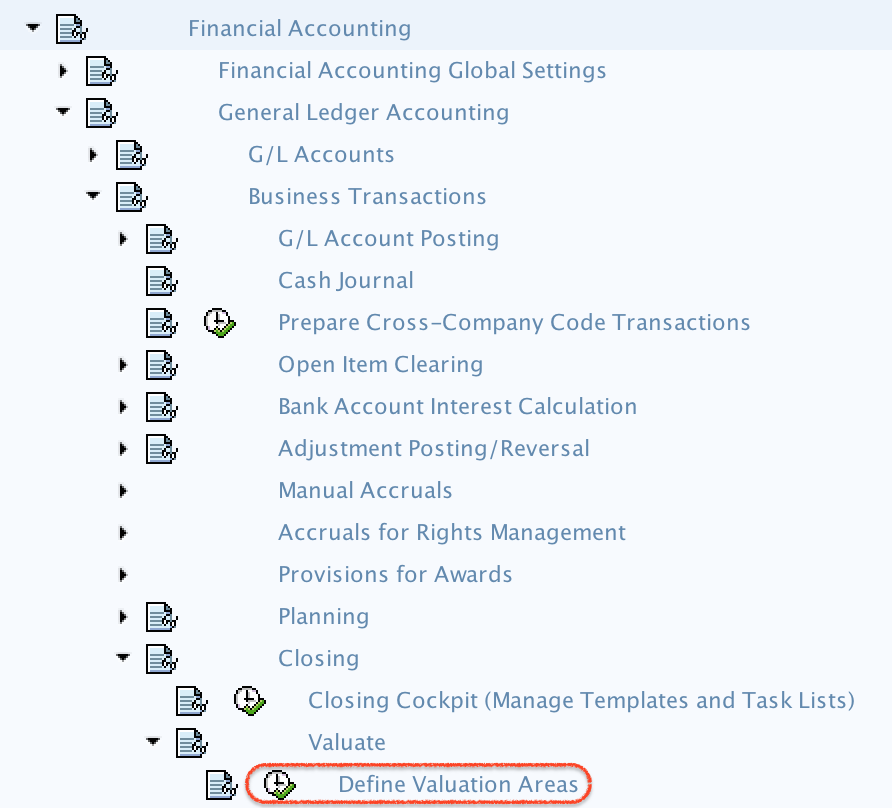
Step 1: Open OB59 to Maintain SAP Valuation Methods
Enter SAP T Code “OB59” in the SAP command field and press Enter.

The system displays the overview screen for valuation methods. From this screen, you can create a new foreign currency valuation method or review existing methods that are already available in the client.
Step 2: Choose New Entries for the Foreign Currency Valuation Method
On the change view valuation methods overview screen, click the New Entries button to maintain a new foreign currency valuation method in SAP as per organizational requirements.
If your organization already has a valuation method, you can also copy it and adjust the copied method. This is useful when the accounting treatment is similar but a different exchange rate type, document type, or minimum difference is required.
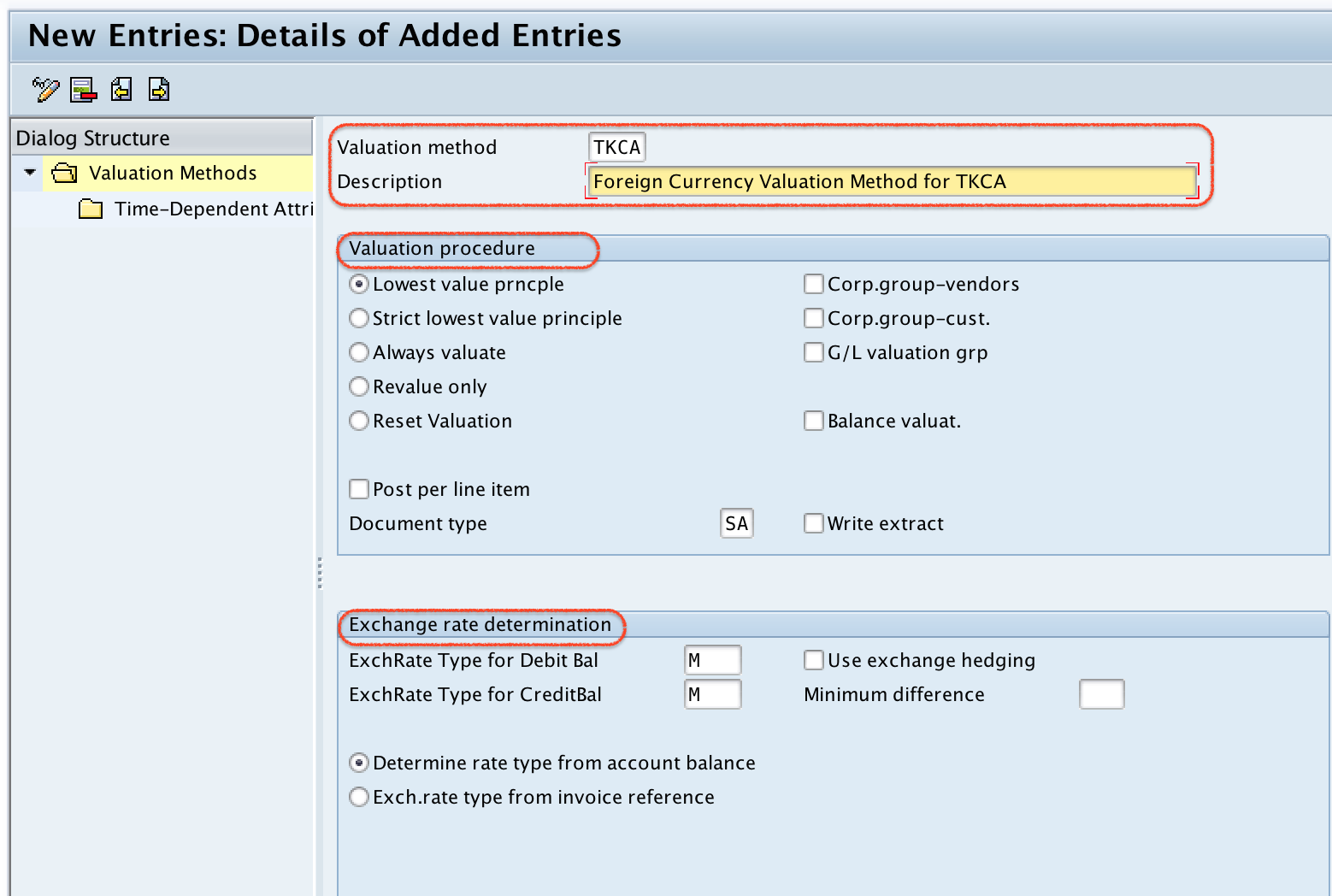
Step 3: Enter OB59 Fields for Valuation Method, Procedure, and Exchange Rate Type
On the valuation methods new entries screen, update the following details.
- Valuation method: Enter the four-character key that identifies the foreign currency valuation method in SAP. Use a meaningful key that can be recognized during closing configuration and valuation runs.
- Description: Update the descriptive text of the valuation method. The description should explain the purpose of the method, such as monthly closing valuation or local GAAP valuation.
- Valuation procedure: Choose the appropriate valuation procedure as per the accounting requirement.
- Lowest Value Principle: By choosing this option, SAP follows the lowest value principle during valuation. This is commonly used where expected losses are recognized but unrealized gains are restricted according to the accounting rule.
- Revalue Only: By choosing this option, SAP revalues the item or balance without applying the lowest value principle restriction. The result depends on whether the valuation creates an exchange gain or exchange loss.
- Document Type: Update the document type to be used for valuation postings. For example, SA can be used for a general G/L account document if that matches your posting design.
- Exchange Rate Determination: Update the exchange rate type for debit balance and credit balance. The exchange rate type decides which maintained rate SAP uses during valuation.
- Minimum difference: If you set a minimum difference amount, the system does not post valuation differences up to the given minimum amount.
- Select the exchange rate source to be considered, such as account balance valuation or invoice reference-based valuation, depending on the business requirement.
Important OB59 Settings to Review Before Saving the Valuation Method
Before saving the valuation method, review the settings carefully because they directly influence period-end valuation postings. The same foreign currency document can produce different valuation results when a different exchange rate type or valuation procedure is used.
| OB59 field | What it controls | Configuration note |
|---|---|---|
| Valuation Method | Identifies the rule set used for foreign currency valuation. | Use a clear key and description so closing users can select the correct method. |
| Valuation Procedure | Controls whether SAP applies the lowest value principle or revaluation logic. | Choose this based on the accounting policy followed by the company code. |
| Document Type | Controls the document type used for valuation accounting entries. | Confirm that the document type allows the required account types and posting setup. |
| Exchange Rate Type | Controls which exchange rate is used during valuation. | Maintain the required rates before executing valuation. |
| Minimum Difference | Prevents very small valuation differences from being posted. | Use this only if your business process allows a threshold. |
How the Foreign Currency Valuation Method Works During Closing
During closing, SAP reads the open items or balances selected for foreign currency valuation. It then determines the exchange rate based on the valuation key date and the exchange rate type maintained in the valuation method. The system compares the original local currency value with the revalued local currency value and calculates the valuation difference.
The accounting entry is posted only when the relevant posting accounts for exchange rate differences are maintained. If the account determination is missing or the exchange rate is not maintained, the valuation run can stop with an error. Therefore, OB59 should be reviewed together with exchange rate maintenance and exchange difference account configuration.
Example of Foreign Currency Valuation Difference in SAP
Assume a company code currency is INR and a vendor invoice is posted for USD 1,000. At the time of invoice posting, the exchange rate is 1 USD = 82 INR. The local currency value is INR 82,000. At month end, the exchange rate changes to 1 USD = 83 INR. During foreign currency valuation, SAP can revalue the open item to INR 83,000 and calculate an unrealized exchange difference of INR 1,000.
Whether this difference is posted, and how it is treated, depends on the valuation method, valuation procedure, minimum difference, and account determination settings. The valuation method therefore acts as a key control in the foreign currency valuation process.
Step 4: Save the Foreign Currency Valuation Method in SAP
After updating all the required details, click the Save button and save the configured valuation method details. If the system prompts for a customizing request, select or create the appropriate transport request as per your project procedure.
You have successfully defined the foreign currency valuation method in SAP. The next step in a complete configuration flow is to ensure that exchange rates, posting accounts for exchange rate differences, and valuation run settings are also maintained correctly.
Common Errors While Maintaining Foreign Currency Valuation Method in SAP
- Exchange rate type is selected but exchange rates are not maintained: The valuation run cannot calculate correct valuation amounts without valid exchange rates for the valuation key date.
- Document type does not match the posting requirement: The selected document type should support the required posting process for valuation entries.
- Minimum difference is set too high: A high threshold can prevent legitimate valuation differences from being posted.
- Valuation procedure does not match accounting policy: Confirm whether the business requires lowest value principle, revaluation, or another accepted approach.
- Exchange difference accounts are missing: The valuation method calculation and account determination must work together for successful posting.
QA Checklist for This SAP OB59 Configuration
- Confirm that the valuation method key and description clearly identify the business use.
- Check whether the selected valuation procedure matches the required accounting treatment.
- Verify that debit and credit exchange rate types are correct and maintained with valid rates.
- Review whether the document type is suitable for foreign currency valuation postings.
- Confirm that exchange difference accounts are configured before executing the valuation run.
- Test the method with one foreign currency open item or balance before moving the configuration to production.
FAQs on Foreign Currency Valuation Method in SAP
What is foreign currency valuation in SAP?
Foreign currency valuation in SAP is a period-end process that revalues foreign currency open items and balances using the exchange rate valid on the valuation key date. The process calculates unrealized exchange gains or losses and posts them according to the configured rules.
Which transaction code is used to define a foreign currency valuation method in SAP?
Transaction code OB59 is used to define a foreign currency valuation method in SAP. You can also access the same configuration through SPRO under General Ledger Accounting closing settings.
Does OB59 execute the foreign currency valuation run?
No. OB59 only defines the valuation method. The actual valuation run is performed separately using the relevant SAP foreign currency valuation transaction or app, depending on the SAP release and system design.
Why is exchange rate type important in the SAP valuation method?
The exchange rate type tells SAP which rate to use for valuation. If the exchange rate type is incorrect or the rate is not maintained for the valuation key date, the valuation result can be wrong or the run can produce errors.
What is the purpose of minimum difference in OB59?
Minimum difference is used to avoid posting small valuation differences. If the calculated difference is below the configured threshold, SAP does not post the valuation difference for that item or balance.