 TutorialKart.com
In this SAP tutorial, you will learn what a field status group is, what a field status variant is, how both are used in SAP FICO document entry, and how to define field status variants in SAP using transaction code OBC4.
Field status configuration helps SAP decide whether a posting field should be hidden, optional, or mandatory when a user enters an accounting document. This is important because different G/L accounts require different information during posting.
What is Field Status Group in SAP
During document entry, a field status group controls which fields are required for entry, which fields are optional, and which fields are suppressed. Field status groups are maintained under a field status variant, and the field status variant is assigned to company codes in SAP.
In practical terms, the field status group is assigned in the G/L account master record. When a user enters that G/L account during posting, SAP reads the field status group and displays the relevant fields on the posting screen.
Field Status Variant and Field Status Group Difference in SAP FICO
The difference between field status variant and field status group is simple. A field status variant is a container assigned to a company code. A field status group is maintained inside the variant and is assigned to G/L accounts.
| Point | Field Status Variant | Field Status Group |
|---|---|---|
| Purpose | Groups multiple field status groups together. | Controls required, optional, and suppressed fields for postings. |
| Assignment | Assigned to company code. | Assigned to G/L account master record. |
| Configuration level | Higher-level configuration object. | Detailed field control object inside the variant. |
| Example | 0001 or TKFV field status variant. | G001 General, or another field status group. |
For example, company code TK01 can be assigned field status variant TKFV. Inside TKFV, different field status groups can be maintained for different G/L accounts such as sales, salaries, bank, expenses, assets, and liabilities.
Why Field Status Groups are Needed During SAP Posting
Scenario
At the time of posting on the SAP screen, we get 70 fields approximately like quantity, Text, Cost Center, profit center, value, date, etc.
For any postings we will have a debit entries and credit entries, so we will have 75 debit fields and 75 credit fields. It is not easy to update all the 150 fields and post a document. In order to overcome this issue, SAP has provided the option to make the fields as required, optional and suppress.
The field status group keeps the posting screen relevant for the account being used. It helps the user enter the required accounting information without showing unnecessary fields for every transaction.
Required, Optional, and Suppressed Fields in SAP Field Status Group
Example : – Quantity
Suppress: – If you choose quantity as suppress, at the time of posting this quantity field will not visible on the screen.
Required: – If you choose quantity as required, at the time of posting quantity field will appear on the screen and you have to give value in the quantity field. Required means mandatory, so without quantity value you can not go to next screen.
Optional: – If you selected quantity as optional, at the time of posting the quantity field appears on the screen and it is your choice to update value or not. Without giving value you can go to next screen.
The field selection is not common for all accounts, it varies from account to account. For example for sales account quantity is required and for salaries account quantity is not required.
Example of Field Status Group Control for Sales and Salary Accounts
Assume that a company posts to two different G/L accounts: a sales account and a salaries account. For the sales account, quantity may be useful for reporting and reconciliation. For the salaries account, quantity may not be relevant.
- For the sales G/L account, the quantity field can be marked as required or optional depending on the business rule.
- For the salaries G/L account, the quantity field can be suppressed because salary posting does not normally need quantity.
- For expense accounts, cost center may be required so that expenses are captured against the correct department.
- For balance sheet accounts, some cost object fields may be suppressed if they are not relevant.
This is why field status groups are assigned at the G/L account level. The posting screen changes based on the account selected by the user.
Important Rules of Field Status Variant in SAP FICO
- We need to assign field status group at the time of general ledger master record creation.
- In field status group, we need to specify which field is required, optional and suppress.
- At the time of postings, the users gives G/L account number. The fields appears on the screen based on field status groups assigned to G/L.
- The field status variant must be assigned to the company code before its field status groups can control posting fields for that company code.
- If a field is marked as required, the user must enter a value before the posting can continue.
- If a field is suppressed, it will not be available for entry on the posting screen.
How to Define Field Status Variants in SAP using OBC4
In system, SAP has already provided pre configured field status groups. As per organizational requirements, we can copy and change the name of variant.
- Transaction code: – OBC4
- Navigation: – SPRO –> Reference IMG –> Financial Accounting (New) –> Financial Accounting Global Settings (New) –> Ledgers –> Fields –> Define field status variants.
Step 1) Enter transaction code “OBC4” in the SAP command field and enter to continue.

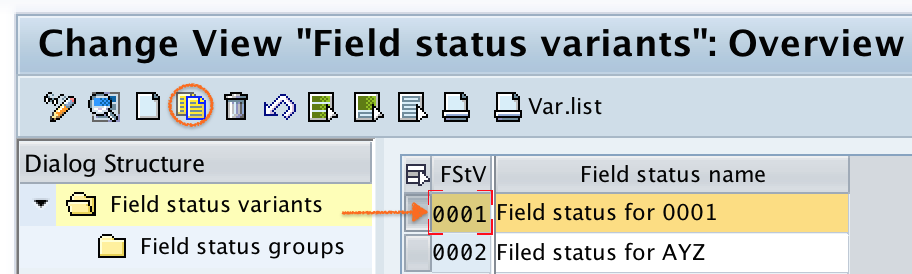
Step 2) On change view “field status variants” overview screen, select the FSTV 0001 and than select the copy as button.
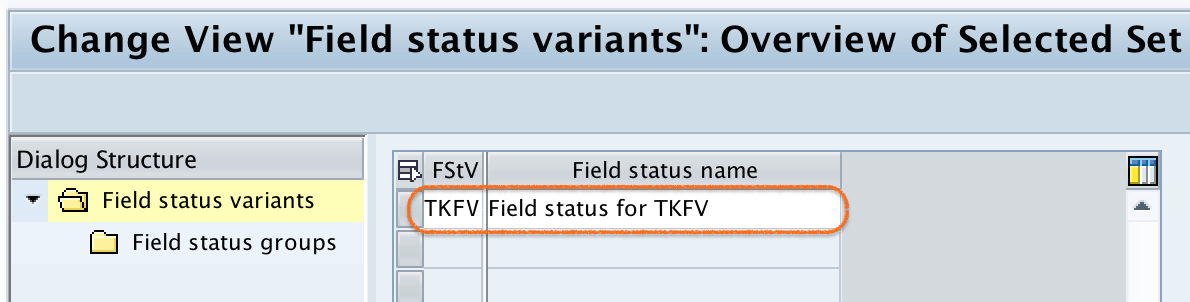
Step 3) Now change the variant name to TKFV and name to Field status for TKFV. Press enter to continue
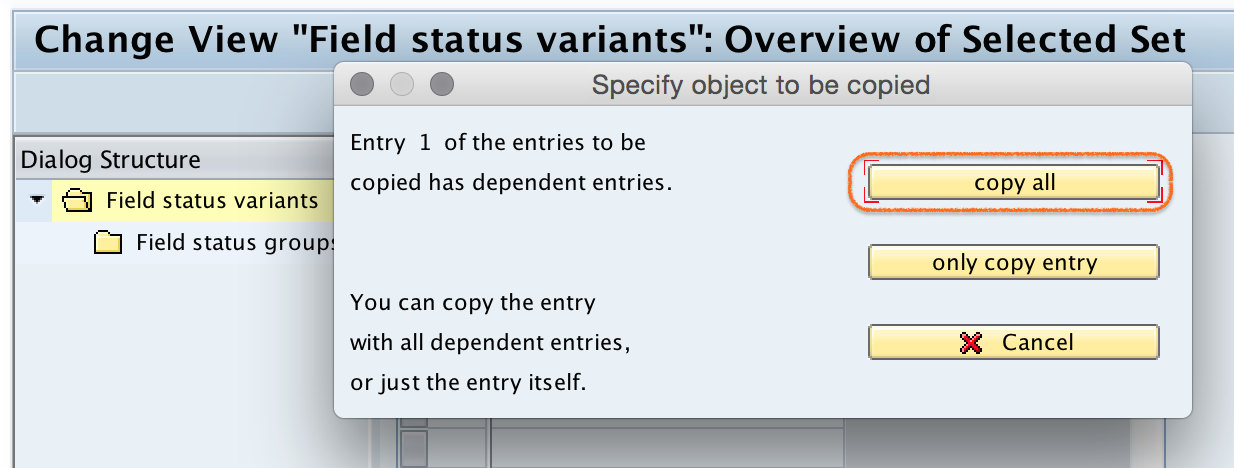
Step 4) Now the system asks you to copy all or only copy entry, select copy all option.
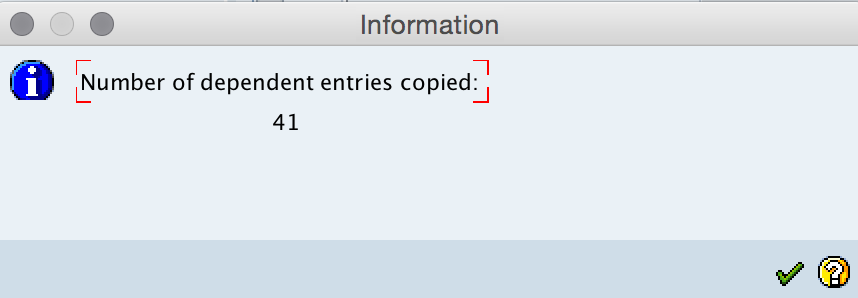
Step 5) We get a message number of dependent entries copied: 41, press enter to continue.
Step 6) Click on save button and than select the request number, save the configured field status variants details.

Successfully we have defined field status variants in SAP.
How to Edit Field Status Groups in SAP
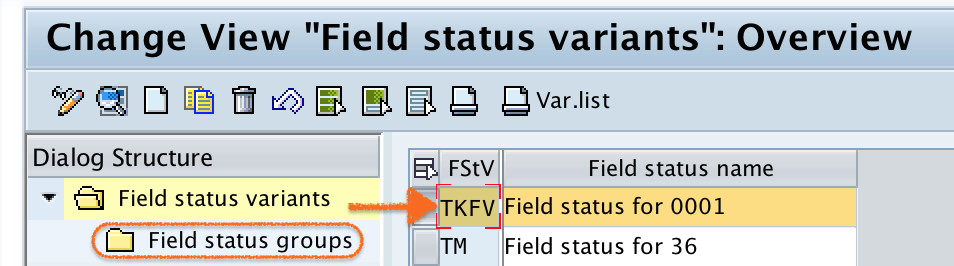
Go back to main screen, select field status variant and double click on “Field status groups”.
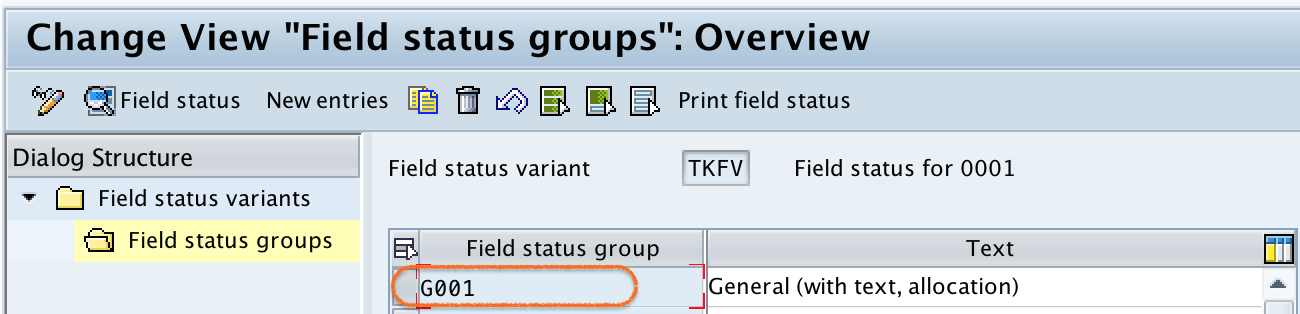
Double click on field status group “G001” i.e. General (with text allocation).
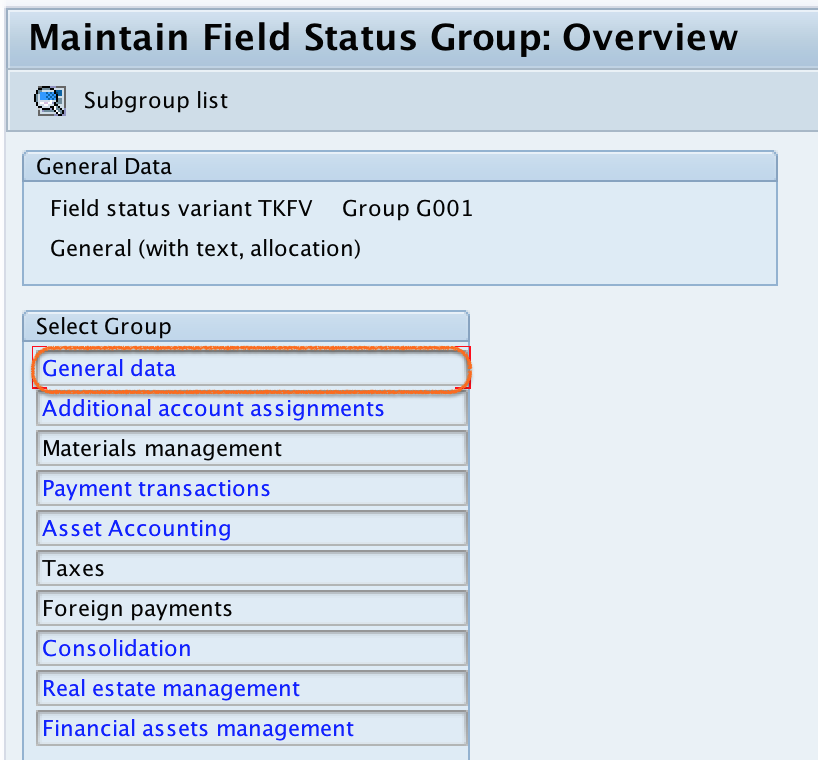
Double click on general data.
Now select required, optional and suppress field as per requirements.
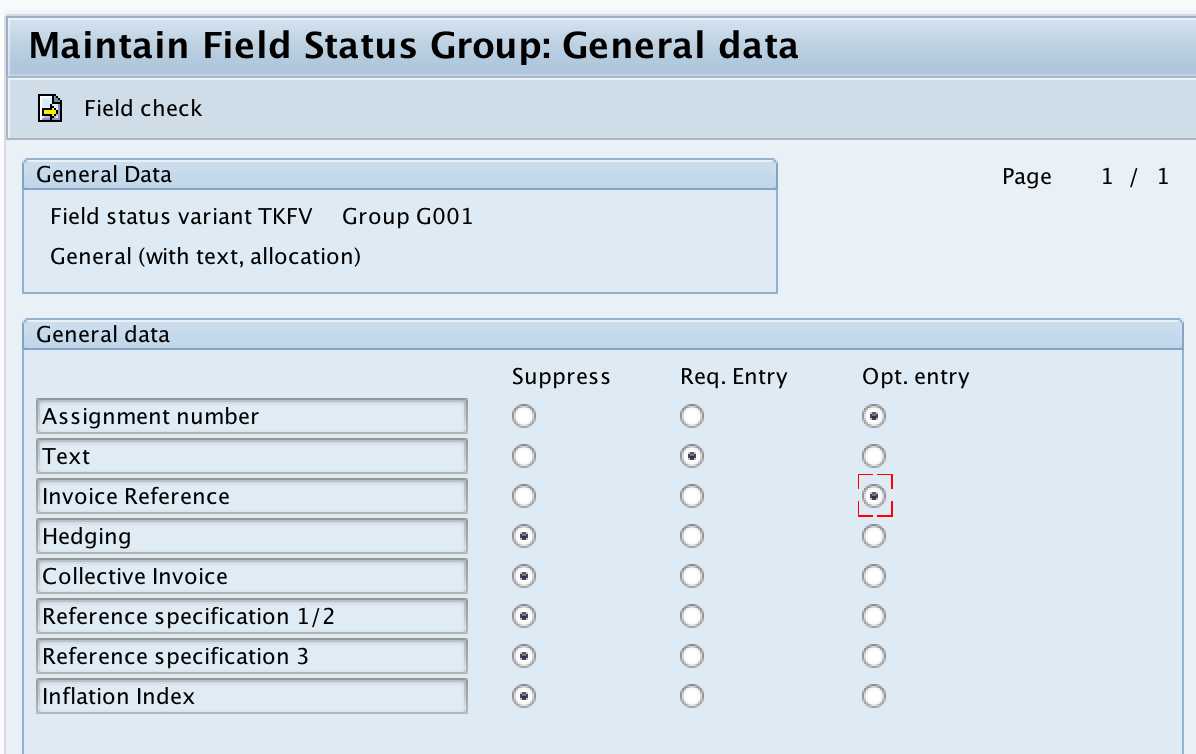
Click on save button and save the configured details. Similarly edit the remaining groups as per requirements.
Where Field Status Group is Assigned in SAP G/L Master
After maintaining field status groups in the field status variant, the required field status group must be assigned to the G/L account master record. This assignment is normally maintained in the company code segment of the G/L account.
During accounting document entry, the user enters a G/L account. SAP then checks the field status group assigned to that G/L account and applies the configured field status rules to the posting screen.
Field Status Variant Configuration Checks in SAP FICO
- Check whether the correct field status variant is assigned to the company code.
- Check whether the correct field status group is assigned in the G/L account master.
- Check whether the field is set as required, optional, or suppressed in the correct field group.
- Check related account assignment rules if fields such as cost center, profit center, or business area do not behave as expected.
- Test the posting with a sample document before moving the configuration to production use.
Common Mistakes in SAP Field Status Group Configuration
- Changing a field status group without checking which G/L accounts already use it.
- Marking too many fields as required, which makes document entry difficult for users.
- Suppressing a field that is needed for reporting or account assignment.
- Forgetting to assign the field status variant to the company code.
- Testing only one account, even though different G/L accounts may use different field status groups.
FAQ on Field Status Group and Field Status Variant in SAP
What is field status group in SAP?
A field status group in SAP controls whether posting fields are required, optional, or suppressed during document entry. It is assigned to a G/L account master record.
What is field status variant in SAP?
A field status variant is a configuration object that contains field status groups. The field status variant is assigned to a company code, and its field status groups are then used by G/L accounts in that company code.
What is the difference between field status variant and field status group in SAP?
The field status variant is assigned to the company code and contains multiple field status groups. The field status group is assigned to the G/L account and controls the field behavior during posting.
What is the transaction code to define field status variants in SAP?
The transaction code to define field status variants in SAP is OBC4. You can also reach the same configuration through SPRO under Financial Accounting Global Settings.
Why is a field not appearing during SAP document posting?
If a field is not appearing during posting, it may be suppressed in the field status group assigned to the G/L account. Check the field status group settings and also verify the company code field status variant assignment.
Editorial QA Checklist for SAP Field Status Variant Tutorial
- Does the tutorial clearly explain that the field status variant is assigned to the company code?
- Does the tutorial clearly explain that the field status group is assigned to the G/L account master record?
- Are required, optional, and suppressed field statuses explained with a posting example?
- Are the OBC4 configuration steps complete and easy to follow?
- Does the tutorial warn users to test changes before applying them widely?
In this tutorial, we have defined field status variants in SAP and reviewed how field status groups control posting fields in SAP FICO. Correct field status configuration helps keep accounting document entry accurate, relevant, and easier for users to complete.